- Startup cost
- A phone and $6 a month
- Average paid per job
- $154 (Collabstr, 2025)
- Audience needed
- None
- Income type
- Per video, plus usage add-ons
- UGC jobs grew from 15% to 35% of campaigns on Collabstr in 2025, and creators were paid $154 on average against a listed $1801.
- Marketplace guides price paid ad usage at 20% to 50% on top of the base fee and perpetual rights at 50% to 150%6718.
- TikTok reports a 142% higher engagement rate for Spark Ads than for non-Spark ads, and Meta reports 19% lower cost per acquisition with partnership ads89.
- One 30-second concept becomes 18 files (three hooks, two lengths, three shapes) and uses about 30 of the 300 AI minutes in the $6 Starter plan when it includes an AI voiceover.
What a UGC creator sells, and who pays for it
UGC means user-generated content. In this business it is a commissioned video that looks as if a customer filmed it: a person, a product, a phone and a reason to buy. The brand pays for the file and the right to use it. Your follower count does not matter: the brand supplies the audience.
UGC jobs passed TikTok posts in 2025.
Source: Collabstr Influencer Marketing Report 20261
Brands buy these videos because creator-style ads perform in paid social. TikTok reports that Spark Ads, which run from a real account’s post, get a 30% higher completion rate, a 142% higher engagement rate and a 43% higher conversion rate than non-Spark ads (help page updated March 2026, no test period given)8. Meta’s December 2025 press release, as reported by Marketing Dive, says adding partnership ads to a campaign brings 19% lower cost per acquisition and 13% higher click-through rates on average9. Both are the platforms’ own figures. Goldman Sachs Research estimated in 2023 that the creator economy could grow from $250 billion to $480 billion by 202710.
What UGC creators charge: published rates
Published numbers disagree. What a marketplace measured as paid is the lowest; price lists and guides are higher.
| Source | What it measures | Figure |
|---|---|---|
| Collabstr report 2026 | Average listed price of a UGC package, 2025 | $1801 |
| Collabstr report 2026 | Average amount paid, 2025 | $1541 |
| Collabstr report 2026 | Average UGC campaign, 2025 | $197, down from $2091 |
| Influencer Marketing Hub survey 2026 | What marketers say a UGC creator costs | About 80% under $5002 |
| Billo, October 2026 | Brand’s starting price per video | From $993 |
| Insense, 2026 | Starting price per UGC video | From $1004 |
| Trend, 2026 | 20 to 60 credits at $9.16 for two videos | About $92 to $275 a video5 |
| Billo guide, June 2026 | Typical quote for one short video | $150 to $3006 |
- Listed price
- Amount paid
A UGC job needs no audience and is paid within $40 of an Instagram post.
Source: Collabstr Influencer Marketing Report 20261
Add-ons: usage rights, whitelisting, raw footage, hooks
The base fee pays for filming and editing; add-ons pay for what the brand does with the file. Billo sells extra hooks, extra crops and raw footage as separate items and includes two revisions3; Insense allows up to three revisions4. Billo and Trend include usage rights for the brand35, so say clearly what your own base price covers.
These are marketplace guides, not surveys, and they disagree: whitelisting is about 30% a month in one and 50% to 100% in another. Pick one rule and keep to it.
An example rate card
| Item | Example price | Basis |
|---|---|---|
| One video up to 30 seconds: one hook, 9:16, captions, two revisions, use on the brand’s own accounts | $160 | Between $154 paid and $180 listed1 |
| Extra hook (new first three seconds) | $30 each | Example |
| 15-second cuts | $40 | Example |
| 4:5 and 1:1 versions | $20 | Example |
| Paid ad usage, 90 days | +30% ($48) | 20% to 50%6718 |
| Ads from your handle | +30% a month ($48) | About 30% a month, or 50% to 100%618 |
| Raw footage | +30% ($48) | 30% to 50%6 |
| Perpetual rights | +100% ($160) | 50% to 150%718 |
What you need and what it costs
- A phone and a window. Film vertically in daylight with the product in your hands.
- A computer. The CutLuma editor runs in desktop Chrome, Edge, Brave and Firefox.
- CutLuma Starter, $6 a month. Client files cannot carry a watermark, one delivery needs more than the three projects of the Free plan, and Starter includes 300 AI minutes. See pricing.
Example: six jobs a month at the $154 Collabstr average is $9241, or $918 after the plan. At three and a half hours a job (an assumption) that is 21 hours and about $44 an hour before tax.
AI time is a small cost. Auto captions use about one AI minute per minute of speech, and AI voiceover about 60 AI minutes per 1,000 characters for English voices, so the 400-character sample script below takes about 24. One delivery with a voiceover stays near 30 minutes.
The anatomy of a UGC ad script
Most briefs follow five parts. The sample is for an invented product, a leak-proof travel mug with no real brand behind it: 80 words, about 30 seconds.
| Part | Seconds | Job | Sample line |
|---|---|---|---|
| Hook | 0 to 3 | Stops the scroll | I’ve ruined two laptop bags with coffee. Never again. |
| Problem | 3 to 7 | Names the pain | Every travel mug I owned leaked the moment it tipped over. |
| Demo | 7 to 17 | Shows it working, close up | This is the [Brand] mug. Lid on, twist until it clicks, and now it’s upside down over my keyboard. Nothing. It opens with one hand. |
| Proof | 17 to 26 | Your real experience, with a detail | It has been in my bag on the bus for two weeks. The bag is dry, and my coffee is still hot at eleven. |
| Call to action | 26 to 30 | One next step | If your bag smells of old coffee, the link is below. |
Brands test hooks more than anything else, so write three per concept and film each as a separate take: a problem hook (the table line), a result hook (“Two weeks on the bus and not one drop in my bag”) and a picture hook (the mug upside down over a laptop). The 15-second cut keeps the hook, a short demo and the call to action.
The CutLuma workflow: from brief to recorded takes
This walkthrough is a real delivery: one concept, three hooks, two lengths (30 and 15 seconds) and three shapes (9:16, 4:5, 1:1). That is 3 × 2 × 3 = 18 MP4 files.
- Collect the selling pointsOn a paid plan, paste the product page into Product link to video ad. It drafts a hook, three benefits and a call to action and builds a 15-second vertical ad from the photos. Rewrite the points in your own words. Some shops block it; then use the brief.
- Open the teleprompterPaste the script into the teleprompter (free account). Set speed and text size; both can change while you record. The text sits at the top of the camera preview, next to the lens, and is not recorded.
- Set the camera lookThe teleprompter is part of the webcam recorder. Under its preview, Camera looks fix the picture before recording: auto lighting, warmth and skin smoothing, in eight presets.
- Record the body, then each hookAfter the three-second countdown, read from problem to call to action once. Record each hook as its own short take.
- Film the demo on your phoneShoot vertical close-ups of the product in use and drop the MP4 or MOV files into the editor.
Edit one master, then build the 18 files
- Start in 9:16With no clip selected, pick 9:16 in the Format presets of the right-hand panel. Put hook A first, then the body.
- Cut the pausesSelect the talking clip and press Cut silences under Magic tools. Pauses of about 0.7 seconds or more are removed on your device. Then turn on Reduce background noise and Enhance voice.
- Lay the demo over the talkPut the close-ups on a track above the talking take. Press S to split and Shift+Delete to remove a piece and close the gap.
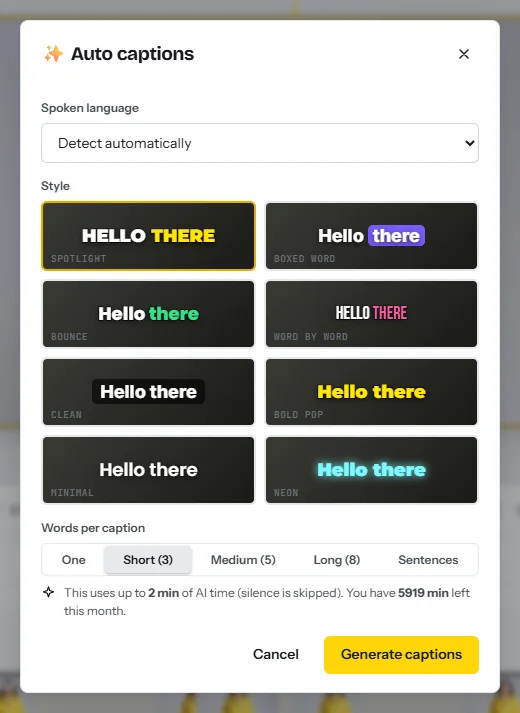
- Add captionsIn the Text tab choose Auto captions (paid plans), one of eight styles such as Spotlight or Boxed word, and about three words at a time. Click a caption to fix the product name, and keep captions above the bottom 20% (safe zones).
- Add the hook titleIn the Text tab, click a style and type the hook in three to six words in the top third (add text to video). Add a logo only if the brief asks.
- Make the hook versionsDuplicate the project twice. In each copy replace the first three seconds with hook B or C and change the title.
- Make the 15-second cutsDuplicate each of the three projects, delete the proof part and shorten the demo until the cut runs 15 seconds.
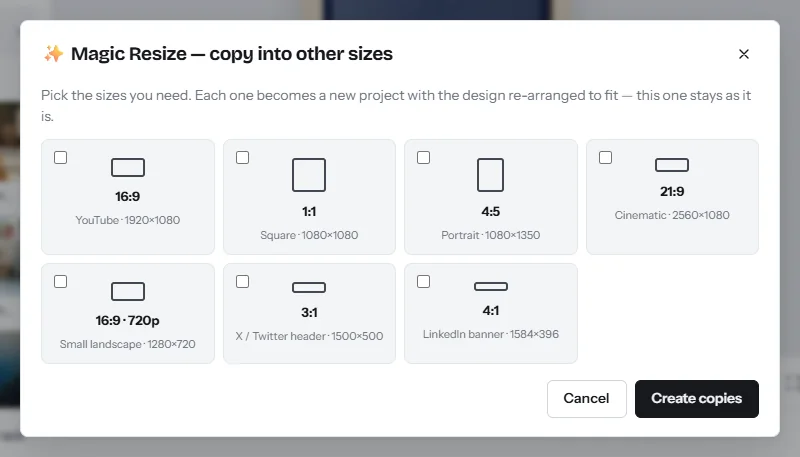
- Make the other shapesIn each of the six projects press Ctrl+K, choose Copy into other sizes, tick 4:5 and 1:1 and click Create copies. Each copy is a new project: drag the picture so the product stays in view; captions re-wrap. See resize video.
- ExportClick Export in each project. On Starter the MP4s are 1080p with no watermark. Name them for the media buyer: mug_hookA_30s_9x16.mp4.
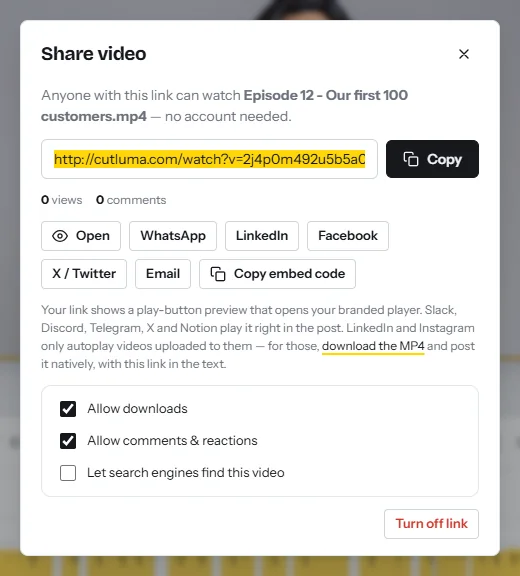
- Send for reviewAfter an export click Get share link. Turn on Allow comments & reactions so the client can comment at an exact moment, and leave Allow downloads off until the invoice is paid.
Two formats without a talking take. For a green screen video, select your clip and turn on Remove background (AI) under Background removal (free), then put a screenshot of the product page on the track below; see how to use a green screen online. For voice over product shots, paste the script into AI voiceover (paid plans) and pick one of 13 English voices.
Checks before you deliver
- First frame. Movement or a face, never black or a logo.
- Words. Product name, price and claims match the approved script. Read the captions with the sound off.
- Sound. No music unless the client supplied it; licences for ads differ from those for personal posts.
- Files. 18 MP4s, no watermark, each played once on a phone.
A portfolio in a weekend
Film six samples on Saturday with products you own and use, edit on Sunday, and label them as sample work so nobody thinks a brand paid you.
- Testimonial: the five-part script, you and the product.
- Unboxing: hands and close-ups, voice recorded afterwards.
- Problem and solution: the mess first, then the fix.
- Voice-over only: product shots, for clients who want no face.
- Green screen: you in front of a review or a product page.
- Hook test: one video with three hooks, to show you deliver variations.
Start one or two from the product launch templates or the TikTok templates. Put the six share links on one page above your rate card. The Free plan is enough for samples, with a small watermark.
How to get the first clients: the pitch and the contract
Use two routes. Marketplaces bring briefs and handle payment, at lower prices. Direct pitches take longer and let you set usage terms. Write to small brands that already run ads: over 40% of UGC campaigns on Collabstr came from companies spending less than $5,0001.
Agree these points in writing before you film.
- Deliverables. Number of videos, lengths, shapes, hooks, captions, raw footage or not.
- Usage rights. Where the brand may use the video (own accounts, paid ads, website), in which countries and for how long: 30, 90 or 180 days, or forever at the perpetual price.
- Ads from your handle. A Spark Ads code or a partnership ads permission, and for how many months. On TikTok a caption cannot be edited once the post is authorized as an ad19.
- Exclusivity. Which product category, how long, and the fee.
- Revisions. Rounds included (marketplaces include two or three34); a changed brief is a new job.
- Payment terms. Amount, currency, 50% before filming, the rest before the licence starts, and a due date.
- Claims. The brand approves the script and holds the proof for its claims.
- Your likeness. No AI copies of your face or voice without a separate written agreement.
A 30-day plan
| Week | Work | Output |
|---|---|---|
| 1 | Choose two product categories you really use. Write six scripts. Film and edit the weekend portfolio. | Six samples with share links |
| 2 | Write the rate card with three add-ons. Build the portfolio page. Open profiles on two marketplaces. | One page with samples and prices |
| 3 | Send five direct pitches each working day. Apply to every brief that fits your categories. | 25 pitches sent |
| 4 | Deliver the first paid or test job with the 18-file workflow. Adjust prices from what you learned. | One delivered job, one agreement used |
When jobs come in regularly, sell monthly batches as in how to start a social media video agency. To be paid on sales instead, read video affiliate marketing; for other models see how to make money with video.
Risks, rules and mistakes
This is general information, not legal advice. In the United States the FTC’s Endorsement Guides do not have the force of law themselves, but practices against them can lead to enforcement under Section 5 of the FTC Act11. A disclosure should be in the video itself, not only in the description, and the final responsibility rests with the influencer and the brand, not the platform1112. An FTC rule announced in August 2024 prohibits creating or selling testimonials that misrepresent that the speaker had actual experience with the product13.
In the United Kingdom the CMA (guidance updated September 2025) counts any incentive as payment, including a gift or a commission, asks for a clear label such as “Ad”, and warns against “#gifted”, “#spon” and “#sponsored”14. The ASA expects the label at the start and names both creator and brand in a ruling15.
- The brand posts or runs the video from its own account. Your duty is honesty: do not pose as an unpaid customer, and describe only what you experienced.
- You post it, or the brand runs it from your handle. It is branded content. TikTok requires the commercial content disclosure setting16; Facebook and Instagram require the branded content tool with the brand tagged17. Add your own “Ad” label in the video too, because the FTC says not to assume a platform tool is enough12.
Check the category before you accept a brief. TikTok’s Branded Content Policy, in effect from 31 August 2026, does not allow branded content for weight-loss, teeth-whitening or hair-growth products, among others16. Meta limits weight-loss branded content to people aged 18 or older17.
- No contract. Without a written usage term you cannot charge for a renewal or stop a use you did not agree to.
- Rights grabs. “All rights, all media, forever” at the base fee is the perpetual price, 50% to 150% on top in the guides718. Offer 90 days and a renewal price.
- Under-pricing. Paid averages sit about 14% under listed prices1, so a $100 listing pays less than $100.
- Taxes. This is self-employed income in most countries; keep invoices and set money aside.
FAQ
How much do UGC creators charge per video?
On Collabstr in 2025 the average UGC package was listed at $180 and paid $1541. Marketplaces sell videos to brands from $99 or $10034, and one 2026 guide puts most quotes at $150 to $3006.
Do I need followers to become a UGC creator?
No. The brand publishes the video or runs it as an ad, so it pays for the file and the usage rights, not your reach. A portfolio of samples replaces the follower count.
Do UGC creators have to disclose that a video is an ad?
When you post a paid video on your own account, yes: label it in the video and use the platform’s disclosure tool1216. When the brand runs it from its own account, what you say must still be true and based on real use1113.
How much should I charge for usage rights?
Marketplace guides quote 20% to 50% of the base fee for paid ad usage and 50% to 150% for perpetual rights6718. They do not agree, so set one rule and apply it to every client.
Can I make UGC videos without showing my face?
Yes. Hands-only demos, unboxings and voice-over product shots are common briefs. CutLuma’s AI voiceover (paid plans) uses about 60 AI minutes per 1,000 characters for English voices.
Which CutLuma plan does a UGC creator need?
Starter at $6 a month: no watermark, unlimited projects and 300 AI minutes. The editor runs in desktop Chrome, Edge, Brave and Firefox, so film on your phone and edit on a computer.
Sources
- Collabstr — Annual Influencer Marketing Report 2026 (2025 marketplace data, 21,000 collaborations)
- Influencer Marketing Hub — Influencer Marketing Benchmark Report 2026 (survey, 600+ respondents)
- Billo — How Billo pricing works: what you pay for UGC videos (prices as of October 2026)
- Insense — Pricing and pricing FAQ (2026)
- Trend — Pricing: how Creator Credits work (2026)
- Billo — What Are UGC Ads? How They Work, What They Cost (June 2026)
- JoinBrands — How Much Do UGC Creators Charge? 2026 Rate Guide (August 2026)
- TikTok Business Help Center — Spark Ads in Video Shopping Ads: increase in ad performance (updated March 2026)
- Marketing Dive — Meta streamlines brands’ creator partnerships: partnership ads data from Meta’s press release (December 2025)
- Goldman Sachs Research — The creator economy could approach half-a-trillion dollars by 2027 (April 2023)
- US Federal Trade Commission — FTC’s Endorsement Guides: What People Are Asking
- US Federal Trade Commission — Disclosures 101 for Social Media Influencers
- US Federal Trade Commission — Final Rule Banning Fake Reviews and Testimonials (August 2024)
- UK Competition and Markets Authority — Social media endorsements: guidance for content creators (updated 3 September 2025)
- UK ASA and CAP — Recognising ads: Social media and influencer marketing
- TikTok — Branded Content Policy (effective 31 August 2026)
- Meta Business Help Center — Branded Content Policies
- Billo — Mastering UGC usage rights: what licensing costs (June 2026)
- TikTok Business Help Center — Spark Ads creation guide (authorization codes, captions)
The figures on this page are published ranges and worked examples, not promises of income. What you earn depends on your niche, your skills and how consistently you work. Platform rules and rates change: check the linked sources before you rely on a number.





