- Startup cost
- $6 to $12 a month
- Ad revenue threshold
- 1,000 subscribers and 4,000 watch hours; 8,000 from 1 February 2027
- Creator share of ad revenue
- 55% on long videos
- AI time per 8-minute video
- 17 to about 450 minutes
- YouTube shares ad revenue at 1,000 subscribers plus 4,000 watch hours in 12 months, or 8,000 for channels applying from 1 February 2027, and pays the creator 55% of watch-page ad revenue1311.
- The July 2025 “inauthentic content” policy makes templated, mass-produced videos ineligible; AI tools are allowed when the video carries your own insight2.
- Across 300 channels measured from May 2025 to May 2026 the median RPM was about $2.30, and Education & Science led at $10.227.
- One 8-minute video with an English AI voice uses about 450 AI minutes in CutLuma, more than a Starter month of 300; with your own voice it uses about 17.
What a faceless YouTube channel is, and what YouTube stopped paying for
A faceless channel publishes videos built from a script, a narrator’s voice, stock footage, screen recordings, AI images, charts and animated text. Nobody appears on camera, so the product is the research and the explanation. The income is mainly ad revenue from the YouTube Partner Program; how to make money with video compares the other models.
The format is allowed; some versions of it are not paid. On 15 July 2025 YouTube renamed its repetitious content policy to “inauthentic content” and clarified that it covers repetitive or mass-produced videos; the same note says this content was always ineligible2. Reviewers expect a channel to be the creator’s original work and, in YouTube’s words, not “mass-produced, generic, repetitive, or manipulative”2.
| Format | Status, October 2026 | Reason in YouTube’s policy [2] |
|---|---|---|
| Narrated explainer with your own script and analysis | Eligible | Each video differs in substance and has educational or creative value |
| Image slideshow or scrolling text | Not eligible | Little or no narrative, commentary or educational value |
| AI videos from one generic template | Not eligible | Looks mass-produced, without the creator’s own insight |
| Reading articles aloud; clips or compilations without commentary | Not eligible | Reused content: no significant commentary of your own |
Permission does not help: the reused content policy is separate from copyright, and monetization can be removed from the entire channel2. Tools are not the problem: they are acceptable when the finished video still shows the creator’s own vision2.
How the money works: thresholds, revenue share and RPM
The YouTube Partner Program has two levels, and the entry threshold for ad revenue doubles on 1 February 202711. A channel started today will most likely apply under the new figure, so plan for 8,000 hours.
| Level | Subscribers | Activity needed | What it unlocks |
|---|---|---|---|
| Expanded programme, in listed countries; unchanged in 2027411 | 500 | 3 public uploads in 90 days, plus 3,000 watch hours in 12 months or 3 million Shorts views in 90 days | Channel memberships, Super Chat, Super Thanks, Shopping |
| Ad revenue sharing, applying until 31 January 20271 | 1,000 | 4,000 watch hours in 12 months, or 10 million Shorts views in 90 days | 55% of watch-page ad revenue, 45% of the Shorts allocation3 |
| Ad revenue sharing, applying from 1 February 202711 | 1,000 | 8,000 watch hours in 365 days, or 20 million Shorts views in 90 days | The same; existing partners keep their status |
Watch time from the Shorts feed does not count towards the watch hours1, so a long-video channel earns them with long videos. Reaching the numbers starts a review of the whole channel, which typically takes about a month1.
- 4,000 hours (until 31 January 2027)
- 8,000 hours (from 1 February 2027)
Doubling the average view duration halves the views you need.
Arithmetic: hours × 60, divided by minutes watched per view; thresholds from YouTube Help111
RPM is what you earn per 1,000 views after YouTube’s share, counting views that showed no ad9. The most traceable recent measurement is from AIR Media-Tech, a creator network that read the YouTube Analytics of 300 channels it works with, May 2025 to May 2026. The median RPM was about $2.30, and Education & Science led at $10.227. Two cautions: the channels had 10,000 to 50 million subscribers and were not chosen for being faceless, and four niches, including Business & Finance, had fewer than ten channels7.
The spread inside a niche is wider than the gap between most niches. *Fewer than ten channels.
Source: AIR Media-Tech, 300 channels, May 2025 to May 20267
Treat every figure as a range; how much YouTube pays goes further. No named study publishes how long faceless channels take to reach the thresholds, so none is given here.
Faceless niches: what makes each viable and where the originality risk is
Choose the niche by one test: can you add something the sources do not contain? A comparison you built, a chart from public data, a test you ran on screen.
| Niche | What makes it viable | Originality risk |
|---|---|---|
| Explainers: science, history, how things work | Highest measured median RPM, $10.227; questions stay searchable | Medium. A script reworded from one article reads as reused |
| Software and tool tutorials | Viewers search for the exact task; your screen is the footage | Low. Your own recording and steps are original |
| Data stories: rankings and comparisons | A chart built from public data is your own analysis | Medium. A weekly “top 10” on one template looks interchangeable |
| Business and finance explainers | Median RPM $2.01 in a small sample, top quarter $5.177 | High. An AI persona posing as an expert cannot monetize2 |
| Narrated stories and documentaries | Long viewing sessions suit mid-roll ads | High. Templated plots, or reading someone else’s text |
What you need and what one 8-minute video costs
You need a computer with desktop Chrome, Edge, Brave or Firefox and, to narrate yourself, any microphone. The Free plan has no AI time and exports with a small watermark, so a channel needs a paid plan; see pricing.
The plan decision is about the voice. English speech averages about 150 words a minute10, so 8 minutes is roughly 1,200 words. Example: a 1,200-word script of 7,200 characters, read by an English AI voiceover at about 60 AI minutes per 1,000 characters, uses about 430 AI minutes (7.2 × 60 = 432). Auto captions use about one AI minute per minute of speech (8), Magic Clips listens to the finished video for about 8 more, and a publish kit costs about one. Total: about 450 AI minutes, more than the 300 in a Starter month.
- AI voiceover432 min96%
- Auto captions8 min2%
- Magic Clips8 min2%
- Publish kit1 min0%
The voice is 96% of the AI time. Narrate it yourself and the video uses 17 AI minutes.
Arithmetic from CutLuma’s AI-time figures and a 7,200-character example script
| Setup | AI minutes per video | Videos a month | Plan cost per video |
|---|---|---|---|
| Starter ($6), your own voice | 17 | 4 (68 of 300 minutes) | $1.50 |
| Starter ($6), AI voice | About 450 | None: one video exceeds 300 minutes | Not possible |
| Pro ($12), AI voice | About 450 | 2 (about 900 of 1,200 minutes) | $6.00 |
| Business ($29), AI voice | About 450 | 4 (about 1,800 of 6,000 minutes) | $7.25 |
On Starter, narrate with your own voice using the free voiceover recorder. For AI narration take Pro, which covers about two 8-minute videos a month with their captions, or Business, whose 6,000 minutes hold up to 13. Leftover minutes pay for AI images and for text to video, which uses about 20 to 35 AI minutes for a short video. Stock footage, templates, charts and the screen recorder add no AI time.
Paid plans include generation credit for CutLuma Studio: $1 on Starter, $3 on Pro. A still frame costs 5¢ and AI video starts at 30¢ for a 4-second shot, so $3 covers eight shots with their frames: a cold open, not 8 minutes of footage.
Write the script: hook, promise, sections and pattern breaks
The script is where the channel’s originality lives, so write it yourself from sources you can name. A structure for 8 minutes:
| Time | Part | What it does |
|---|---|---|
| 0:00 to 0:15 | Hook | The surprising fact or question, over your strongest picture |
| 0:15 to 0:40 | Promise | What the viewer will know by the end, and where your information comes from |
| 0:40 to 2:30 | Section 1 | The background, with one chart or screen recording |
| 2:30 to 5:00 | Section 2 | The mechanism: how it works, step by step |
| 5:00 to 7:15 | Section 3 | Your analysis: what the sources miss, a comparison you built |
| 7:15 to 8:00 | Payoff | Answer the hook in one line and name the next video |
Mark a pattern break wherever the screen would show the same kind of picture for more than a few sentences: a chart, a screen recording, a full-screen number, a change of music. Write each break in brackets and the script doubles as the shot list.
Produce the video in CutLuma, step by step
Work in this order: voice, pictures, sound, captions. Plan a full working day for the first video.
Voice and structure first
- Open a 16:9 projectStart a new project and choose the YouTube 16:9 format. Split the script into its six parts, each under 2,000 characters, the limit of one AI voiceover.
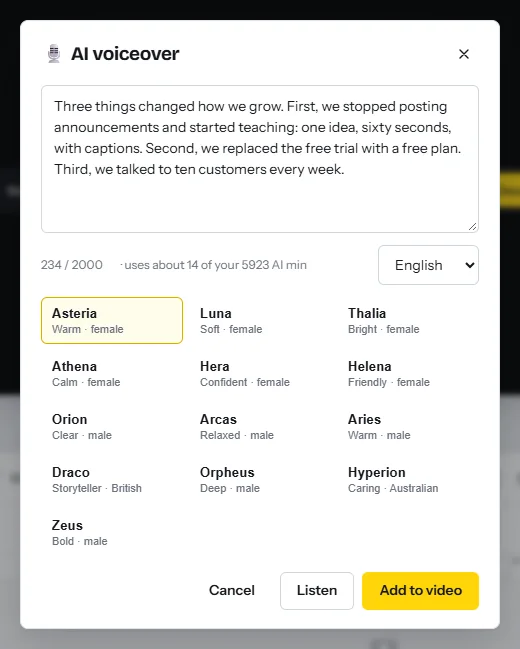
- Make or record the voiceFor an AI voice, open the AI tools tab and choose Read a script aloud. Paste one part, pick a voice, press Listen, then Add to video. Repeat for each part with the same voice, in order on the audio track. To narrate yourself, press Ctrl+K, choose Record voiceover and turn on voice clean-up.
- Add a short introPick a 16:9 opener from the YouTube intro templates, type the channel name and keep it to 3 to 5 seconds, after the hook. Reuse it: a shared intro and outro is acceptable under the policy2.
Pictures: stock, AI images, charts and screen recordings
- Cover the script with stockOpen Media, then Stock library (what is in it). Search for the thing the sentence names, videos first, then photos. One click places the file at the playhead; trim it to the sentence it covers.
- Generate what stock does not haveOpen Magic Media, describe the picture and pick a style such as illustration or cinematic. Each prompt returns two pictures in the 16:9 shape of the project. Give each still a slow zoom or pan; see the B-roll guide.
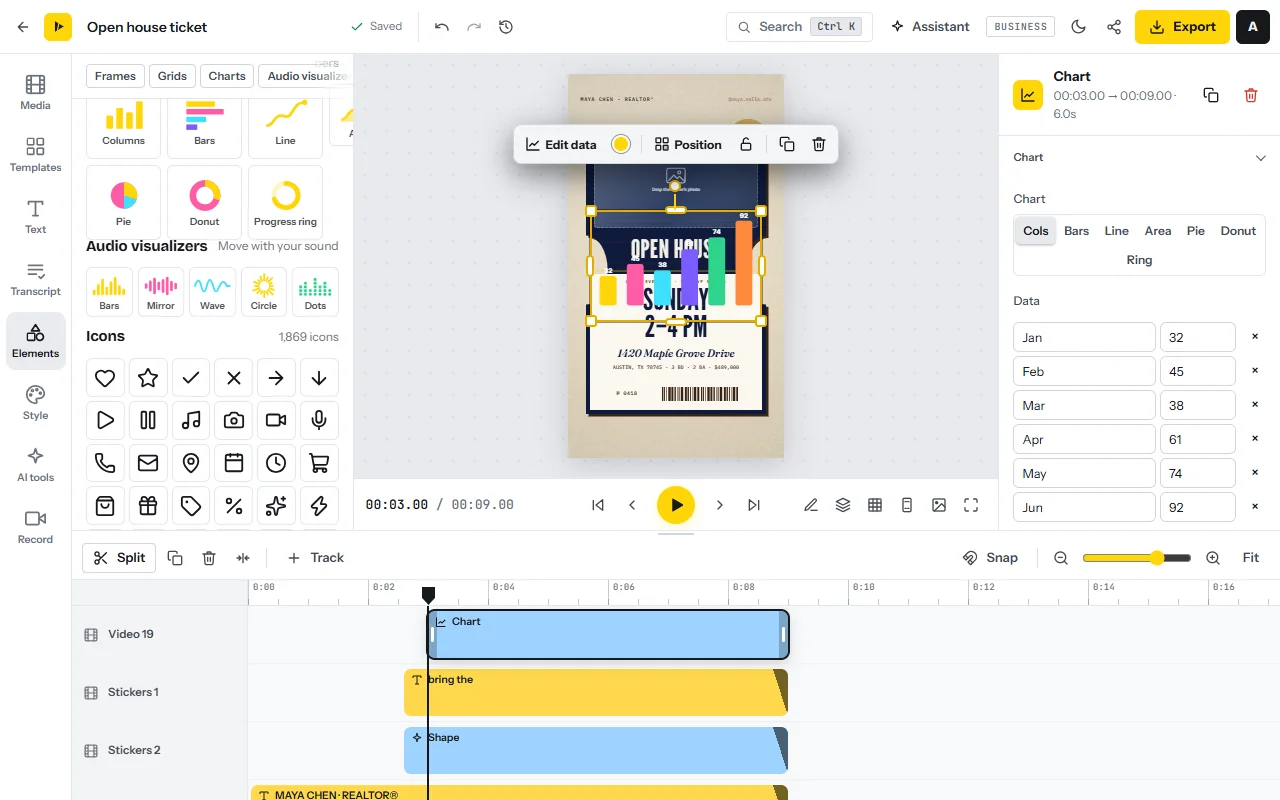
- Build charts from your own numbersOpen Elements and pick an animated chart: columns, bars, line, area, pie, donut or a progress ring. Type the values or press “Paste from a spreadsheet” with two columns, up to 24 rows. Name the data source on screen.
- Record the screen as evidenceOpen the Record tab and use the screen recorder on a tab or window, camera off: the report you quote, the software you explain. Auto-zoom follows your clicks and long pauses are cut.
- Add number cards and section titlesUse templates from stats and data or lists and tips.
Sound, captions and export
- Add music that steps backAdd a track from the music tab of the stock library and turn on Lower under speech.
- Caption the narrationRun Auto captions on the voice, choose the language and one of the 8 styles, then correct names and numbers.
- Export the MP4Press Export: 1080p on Starter, up to 4K on Pro. CutLuma does not post to YouTube; you upload the MP4 yourself.
- Check with the sound off. Pictures and captions should carry the argument alone.
- Check the sources. Every number on screen has its source on screen or in the description.
Publish and promote: the publish kit, Shorts and the first viewers
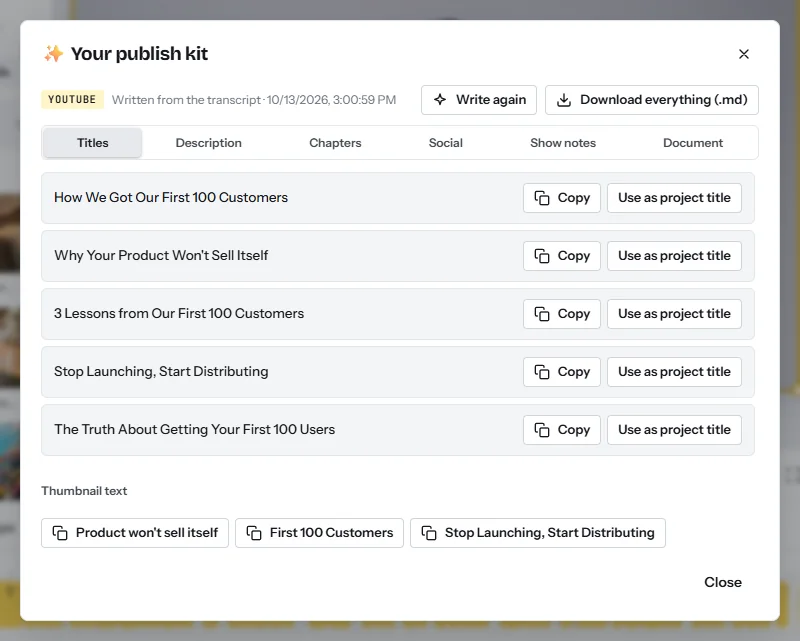
- Write the publish kitPress Ctrl+K, type “Publish kit” and pick YouTube. It reuses the caption transcript and writes five titles, a description with chapters, hashtags and thumbnail text for about one AI minute. Rewrite the title in your own words.
- Upload and answer “AI use”In YouTube Studio, answer Yes under “AI use” if the video has realistic AI-generated scenes, altered footage of a real place or event, or a real person made to say something. Script help, captions and clearly unrealistic pictures need no disclosure, and disclosing does not limit a video’s audience or earnings5.
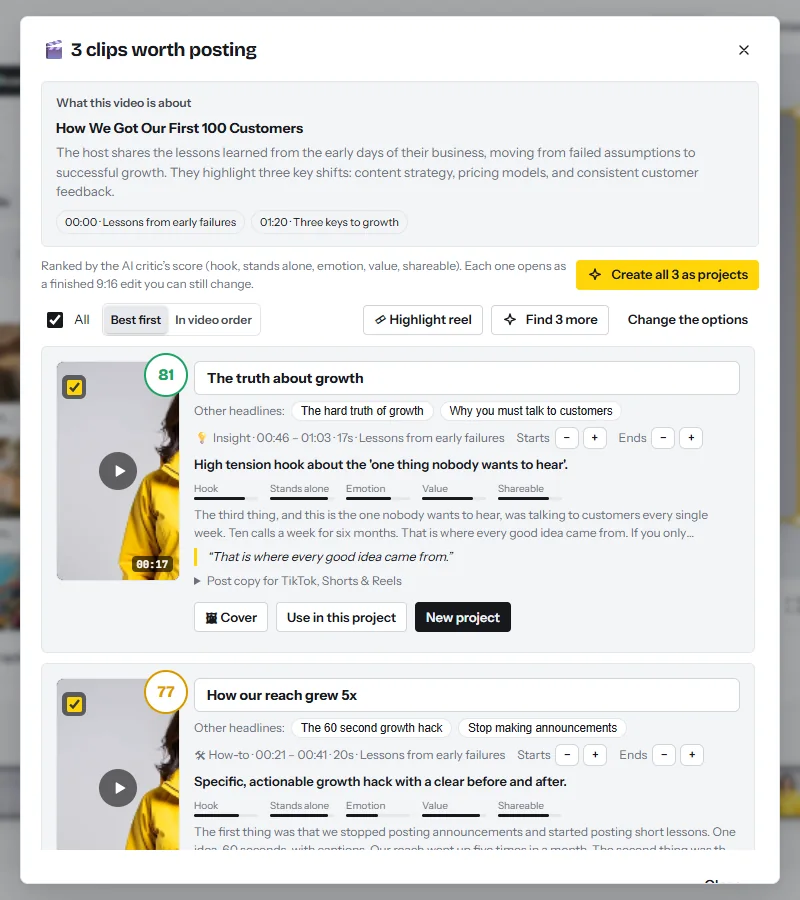
- Cut the ShortsOpen Magic Clips and add the finished video. It scores the moments that stand alone, up to ten per video, and edits each as a 9:16 clip. Check how charts and text sit in the tall frame, then export two or three (guide).
To test a subject first, text to video turns a one-line topic into a narrated short of up to about 50 seconds: press Write the script, edit every line, then press Make the video. Treat Shorts as promotion, not income. In AIR’s 2026 measurement of 274 channels, Shorts RPM ran from $0.02 to $1.48 depending on the niche, about 3% to 14% of long-video RPM8. More in short video monetization.
New channels are found through search and suggested videos, so word the title the way a person types the question. Wording to copy:
- The title as a question. “Why do airlines sell more seats than they have?”
- Pinned comment under each Short. “The full 8-minute breakdown, with every source, is on the channel: [title].”
A publishing checklist that keeps you clear of the inauthentic-content policy
Reviewers look at a channel’s main theme, its most viewed and newest videos, its titles, thumbnails and descriptions, and its About section2. Run this list before every upload.
- Original script. You wrote it from at least two sources you can name. Nothing is read out or reworded from an article or another video.
- Commentary. Every section has a sentence of your own judgement: what this means, what the sources miss.
- Your own analysis. At least one chart, comparison, test or screen recording exists only because you made it.
- Varied structure. Against your last three uploads, the opening, the section order and the visuals differ. Only the intro, outro and fonts repeat.
- Disclosure and pace. The “AI use” answer matches the video5, and you publish weekly, not daily look-alikes.
A 30-day plan for the first four videos
| Week | Work | Output |
|---|---|---|
| 1 | Choose the niche. List 12 questions people search for. Build the intro and one chart style. Write and narrate script 1. | 1 script, 1 intro, a topic list |
| 2 | Produce and upload video 1. Cut 2 Shorts with Magic Clips. Write script 2 with a different opening. | 1 long video, 2 Shorts |
| 3 | Produce video 2. Read the retention graph of video 1 and rewrite your hook. Write script 3. | 2 long videos, 4 Shorts |
| 4 | Produce videos 3 and 4. Watch all four in a row against the checklist. | 4 long videos, 8 Shorts |
Risks, rules and mistakes
- Copyright. The stock library shows public-domain and CC0 files. Music from elsewhere, film clips and news footage can still be claimed.
- Undisclosed realistic AI. Creators who repeatedly skip disclosure risk removal of content or suspension from the programme5.
- Going quiet. From 1 February 2027 a partner channel stays active with 1,000 watch hours in 365 days, 1 million Shorts views in 90 days, or 2 long videos or 5 Shorts every 90 days11.
- Tax. YouTube requires U.S. tax information from every monetizing creator, wherever they live3.
FAQ
Can a faceless YouTube channel be monetized in 2026?
Yes, when the videos are original. YouTube’s policies do not require a face on camera; they exclude mass-produced, templated or reused content2.
Does YouTube allow AI voiceovers and AI images?
The policies do not ban AI tools. They exclude AI content from generic templates without the creator’s own insight2, and realistic AI scenes must be disclosed5.
How many subscribers and watch hours do I need?
For ad revenue: 1,000 subscribers plus 4,000 watch hours in 12 months today, and 8,000 watch hours in 365 days for channels applying from 1 February 2027111. In listed countries, fan funding opens at 500 subscribers with 3 public uploads and 3,000 watch hours, unchanged411.
How much does a faceless channel earn per 1,000 views?
No study measures faceless channels alone. Across 300 channels measured from May 2025 to May 2026, the median RPM was about $2.30, with niche medians from $0.33 to $10.227.
What does one faceless video cost to make in CutLuma?
In the example, an 8-minute video with an English AI voice uses about 450 AI minutes: two a month fit on Pro ($12), $6 a video, and none on Starter. With your own voice it uses about 17, so four fit on Starter ($6) at $1.50 each.
Can text to video make the whole video for me?
Not a long one. Text to video makes a narrated short of up to about 50 seconds; an 8-minute video is built on the timeline from your own script.
Sources
- YouTube Help — YouTube Partner Program overview & eligibility (read October 2026)
- YouTube Help — YouTube channel monetization policies: inauthentic content, reused content, AI personas (read October 2026)
- YouTube Help — YouTube partner earnings overview: revenue share rates (read October 2026)
- YouTube Help — Overview of the expanded YouTube Partner Program (read October 2026)
- YouTube Help — Disclosing use of GenAI content (read October 2026)
- YouTube Help — Manage mid-roll ad breaks in long videos (read October 2026)
- AIR Media-Tech — How Much Does YouTube Really Pay in 2026? Real RPM Data From 300 Channels (updated July 2026)
- AIR Media-Tech — Which YouTube Niche Makes the Most Money in 2026? Ranked by Real RPM and CPM (updated July 2026)
- YouTube Help — Understand ad revenue analytics: RPM and CPM (read October 2026)
- National Center for Voice and Speech — Voice production tutorial: rate of speech
- YouTube Help — Changes to the YouTube Partner Program: thresholds from 1 February 2027 (read October 2026)
The figures on this page are published ranges and worked examples, not promises of income. What you earn depends on your niche, your skills and how consistently you work. Platform rules and rates change: check the linked sources before you rely on a number.





