- Startup cost
- $6 a month
- Income type
- Monthly retainer
- Example retainer
- $400 to $1,000 a client
- Work per client
- About 7.5 hours a month
- In LocaliQ’s 2026 report, 66% of small businesses used unpaid social media, 26% used video marketing and 50% had no employee dedicated to marketing2.
- Published prices for 12 short videos a month ran from $269 for editing only to $1,350 for an agency plan with ads in October 202697.
- Example: a 12-video package at $650 takes about 7.5 hours a month after setup, about $86 an hour after the $6 CutLuma Starter plan.
- Six of the twelve formats in the content menu need no new footage, and a batch day of 12 videos fits in about five hours.
What a social media video agency sells, and the numbers behind it
You sell one thing: a fixed number of finished short videos every month, for a fixed fee. The owner of the restaurant, clinic, gym, salon or shop films a few clips on a phone. You turn them into posts with the client’s logo, colours and captions, and send back MP4 files that they upload.
The gap between those numbers is the business. In LocaliQ’s 2026 report, over 90% of the small businesses surveyed used Facebook and 74% used Instagram, yet only 26% used video marketing2. Half had no employee dedicated to marketing, and 53% planned to invest more in video in 20262. Owners want video and lack the hours to make it.
Two in three already post. One in four uses video. Your customer is between those two bars.
Source: LocaliQ, Small Business Marketing Trends Report 20262
Marketers who use video say it works. In Wyzowl’s 2026 survey, 82% said video gave them a good return and 83% said it directly increased sales1. Read this as direction, not proof: the survey had 266 respondents, and Wyzowl sells video production. Start clients on Instagram Reels and Facebook: 56% of those marketers called Instagram effective and 55% Facebook, against 29% for TikTok1.
The viewers are there. Pew Research Center’s 2025 survey of 5,022 US adults found that 84% use YouTube, 71% Facebook, 50% Instagram and 37% TikTok4. BrightLocal’s 2026 survey of 1,002 US adults found that 97% read reviews for local businesses and 24% go on to visit the business’s social media channels3. SOCi’s 2024 Consumer Behavior Index reported that 67% of 18 to 24 year olds use Instagram to search for local businesses11. SOCi sells marketing software and gives no sample size, so treat it as an indication.
What local businesses pay: published retainer prices
No neutral survey measures what a small video retainer costs, so anchor your prices to price lists you can open. These were the published figures in October 2026, in US dollars.
| Source | What is sold | Published price |
|---|---|---|
| Upwork, small business rates | Account management, 2 channels, all services | $400 to $2,000 a month6 |
| LYFE Marketing (US agency) | Social media management for small businesses | $500 to $2,500 a month7 |
| LYFE Marketing | 12 vertical videos, page monitoring, sponsored posts | $1,350 a month7 |
| LYFE Marketing, video page | 12 vertical videos; 20 vertical videos | $500; $800 a month8 |
| $99 Social (subscription) | Editing of the client’s footage: 12 videos; 20 videos | $269; $429 a month9 |
The sources disagree, and the reason is useful. The same agency lists 12 vertical videos at $500 on one page and at $1,350 on another, where the plan adds sponsored posts and follower ads87. Editing alone is cheap; the price rises with planning, account management and advertising.
Price above the edit-only subscription by adding the plan, the shot list and the local visit.
Sources: $99 Social9, LYFE Marketing87, October 2026; the third bar is this guide’s example
Three example packages
| Package | Videos a month | What is included | Example price |
|---|---|---|---|
| Starter | 8 | Template videos from the client’s clips and photos, captions, logo, 9:16 only, one round of changes | $400 |
| Standard | 12 | Starter, plus three videos in 4:5 or 1:1, a testimonial collection link and two rounds of changes | $650 |
| Growth | 20 | Standard, plus every video in two sizes, AI voiceover where it helps and a monthly planning call | $1,000 |
Unit economics of one client
| Line | First month | A normal month |
|---|---|---|
| Onboarding: assets, master design, shot list | 3 h | 0 h |
| Plan the month, sort the footage | 1.5 h | 1 h |
| Batch day, 12 videos | 6.5 h | 5 h |
| Changes, delivery and admin | 2 h | 1.5 h |
| Total hours | 13 h | 7.5 h |
| Revenue, Standard package | $650 | $650 |
| CutLuma Starter plan | $6 | $6 |
| Effective hourly rate | $49.54 | $85.87 |
The arithmetic: ($650 − $6) ÷ 13 hours = $49.54 in the first month, and $644 ÷ 7.5 hours = $85.87 after that. For comparison, Upwork lists social media managers at $14 to $35 an hour and mid-tier video editors at a median of $40610. The hours are planning figures, not measurements, and none of this is a promise of income. Time your first two months and reprice if a client takes more than 10 hours. Other models are in how to make money with video.
What you need and what it costs
- A computer with Chrome, Edge, Brave or Firefox. The client only needs a phone.
- The Free plan for samples. Full editor, templates, stock library and brand kit, with 3 projects, 1 GB and a small watermark on exports.
- The Starter plan ($6 a month) for client work. No watermark, unlimited projects, 15 GB and 300 minutes of AI time a month. Pro ($12) gives 100 GB and 1,200 minutes when you grow.
- Your own tools for the rest. A shared drive folder for footage and an invoicing tool: CutLuma has no invoicing or payments.
Budget the AI time. Auto captions use about one AI minute per minute of speech, and AI voiceover about 60 AI minutes per 1,000 characters for English voices. Example: three 30-second talking videos (1.5 minutes) and two 300-character voiceovers (36 minutes) come to about 38 AI minutes for one client’s month. Plans are on the pricing page.
A content menu: 12 repeatable video formats for a local business
Give every client the same twelve formats and change only the words and the clips. Each maps to a kind of template in the template gallery.
| Format | What the owner films | Template to start from |
|---|---|---|
| 1. Offer of the week | Nothing, or a product photo | Sale card with an end date, in Sales & business |
| 2. Price list or menu | Nothing | Menu board in Food & drink; price board in Local services |
| 3. Before and after | Two photos from the same spot | Before-and-after design in Local services |
| 4. Customer testimonial | Nothing: the customer records | Testimonial card in Sales & business |
| 5. Meet the team | A 10-second clip of one person | About-us or founder-note design |
| 6. How it is made | Three to five process clips | Recipe steps, or a list from Lists & tips |
| 7. The owner answers a question | A 30-second talking clip | A title from Hooks & intros, plus captions |
| 8. Myth and fact, or one tip | Nothing | Myth vs fact kit for clinics; a tip card for others |
| 9. New dish, product or service | A 5-second close-up | “Today’s special” card or a product card |
| 10. Hours, closures, new address | Nothing | Announcement card, or a Holidays design |
| 11. Now hiring | Nothing | Now-hiring card |
| 12. Book now | Nothing | “Book your slot” card, class schedule or appointment card |
Six of the twelve need no new footage, so you can always deliver. Pick the category by trade: Food & drink for restaurants, Fitness & wellness for gyms, Fashion & beauty for salons, Local services for trades and shops, Medical & health for clinics and dentists, and Construction for contractors. For estate agents, see the real estate video business playbook.
Client onboarding checklist: brand assets, shot list, approvals
- Brand assets. Logo as a transparent PNG or an SVG, up to three brand colours, the font name, the business name, a tagline, the website or handle, and the phone number.
- Facts. Prices, opening hours, address, booking link, and this month’s offers with end dates.
- No passwords. You deliver MP4 files and the client uploads them.
- One approver. One named person says yes or no within two working days, for two rounds of changes.
- Written consent. The owner confirms in writing that every staff member and customer who appears has agreed.
- Dates. Footage arrives by the 20th. Videos are delivered by the 1st.
The shot list the owner can film on a phone
Ask for eight vertical clips of 5 to 15 seconds each, with the phone held still and a clean lens.
- The front of the business, with the sign in the frame.
- The product being made: a pour, a cut, a spray, a weld.
- The finished product or result in close-up.
- One staff member at work, who has agreed to appear.
- The owner giving one tip to the camera, 30 seconds, in a quiet room.
- A before and an after, from the same spot.
- A happy customer, only with their permission.
- Anything new this month: a dish, a machine, a class.
Set up a client in CutLuma (once per client)
- Make a folder for the clientOn the dashboard, click New folder, name it after the client, and drag each project card onto it.
- Fill in the brand kitIn the editor, open the Style tab and choose Brand kit. Type the name, tagline and website or handle, upload the logo, set the colours and font, and click Save brand kit.
- Build the master designOpen a template from the client’s category in the Templates tab. In the brand kit, click Brand all text, Add my logo and Add a closing card.
- Save it as your own templateAt the top of the Templates tab, under Your templates, click Save and name it, for example “Corner Bakery, master 9:16”. Do the same for an offer card, a price list, a tip and a testimonial frame.
- Create a testimonial linkOn the dashboard, open Testimonials and click New collection link. Add a title and questions. Customers record up to three minutes in their browser, with no app and no account. See video testimonials.
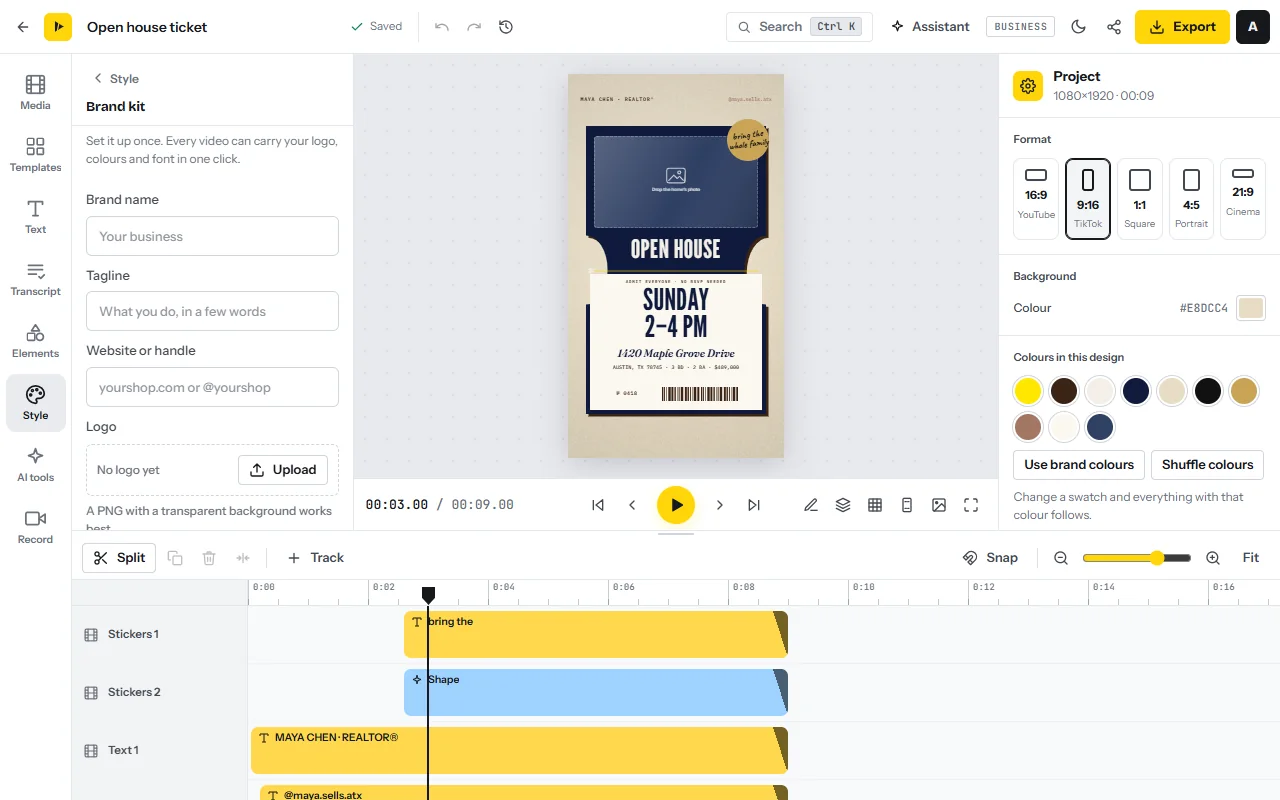
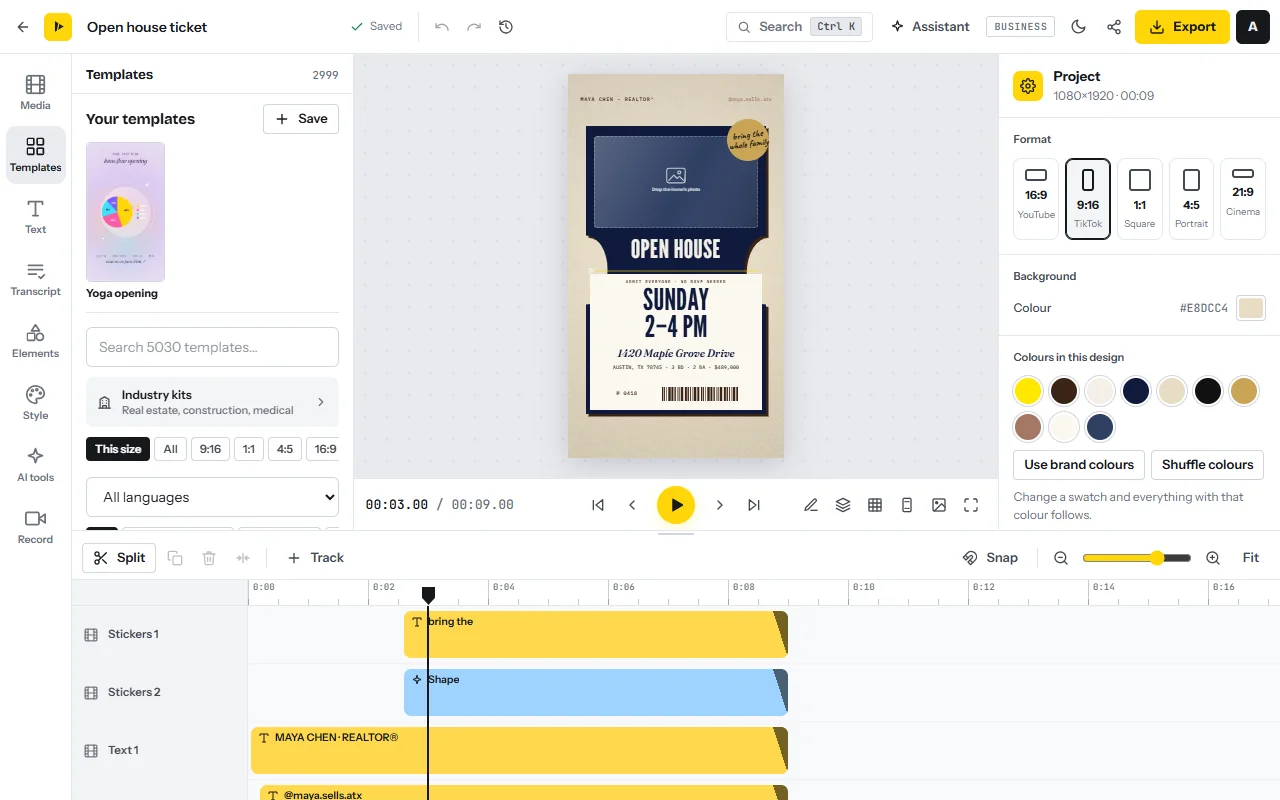
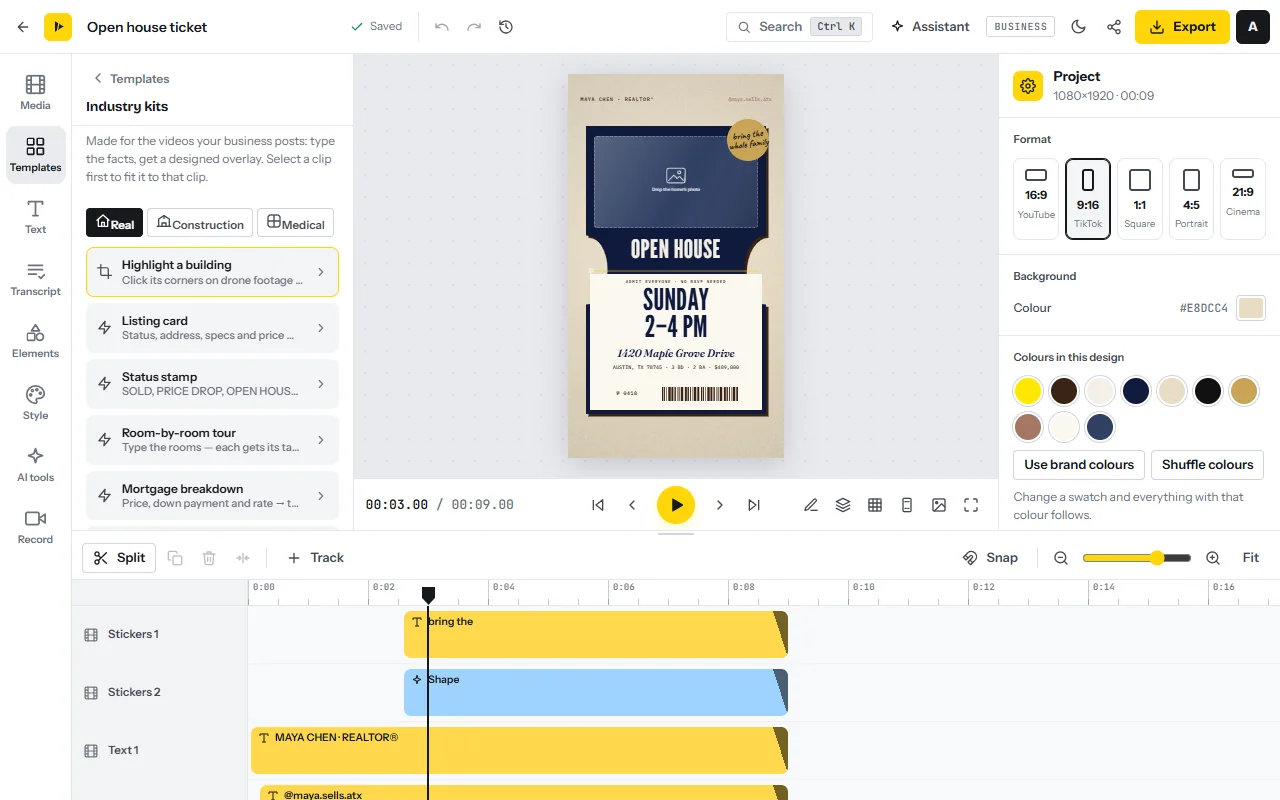
Clinics and contractors have ready kits under Industry kits in the Templates tab: the medical video maker adds a doctor lower third and a disclaimer footer, and the construction video maker a progress tracker and a before/after slider.
The batch day: 12 videos for one client in five hours
Make all twelve videos in one sitting. The times are a budget to plan against; expect about 6.5 hours the first time.
- Load footage20 min7%
- 4 text-only videos60 min20%
- 5 videos over clips100 min33%
- 2 talking videos45 min15%
- 1 testimonial25 min8%
- Checks and resizing30 min10%
- Export and share20 min7%
300 minutes for 12 videos is 25 minutes a video.
This guide’s planning schedule: an example, not a measurement
- Load the footage and the brand (20 minutes)Create a project from the master design and drop every clip from the shared folder into the Media tab. Re-save the client’s values in the brand kit.
- Make four text-only videos (15 minutes each)Start each from a design under Your templates and type the new words. For a new idea, press Ctrl+K and open Magic Design: describe the video in one sentence, pick 9:16 and choose one of four designs. It is a paid feature that uses AI time.
- Make five videos over the client’s clips (20 minutes each)Open the saved design, drop the clip onto it, trim it and type the label: the dish and its price, or the name of the staff member. If a clip is missing, open Media → Stock library for a cutaway or music. The stock library shows files that need no credit.
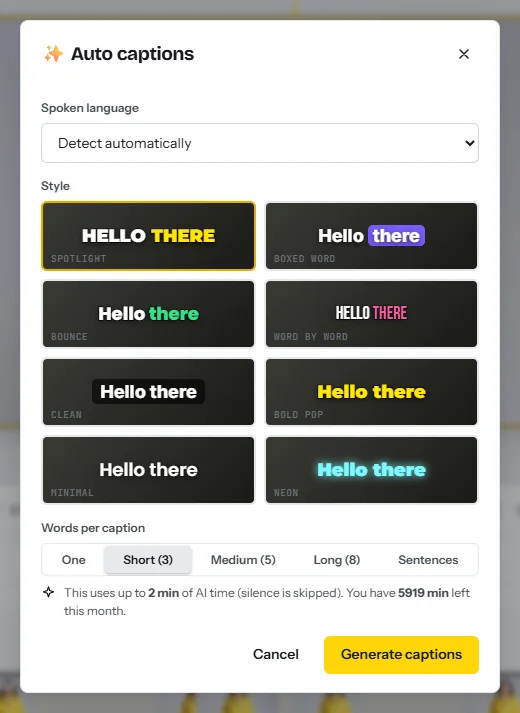
- Make two talking videos with captions (about 22 minutes each)Drop in the owner’s clip and run Auto captions. Choose the language and one of 8 styles, then click any caption to fix a name or a price. If the owner will not speak, type a script of up to 2,000 characters in AI voiceover and pick a voice.
- Make the testimonial (25 minutes)Open the best video from the Testimonials page in the editor. Cut it to the strongest sentence, add captions, then Add my logo and Add a closing card.
- Run the privacy passFor clinics, and for any clip with bystanders, open Industry kits and click Blur faces automatically. It keeps a blur on every face as people move. Use the manual privacy blur for patient charts, screens and number plates.
- Resize three videos for the feedIn the project panel, click Copy into other sizes to make 4:5 or 1:1 copies. The design is re-arranged for the new shape. See resize video.
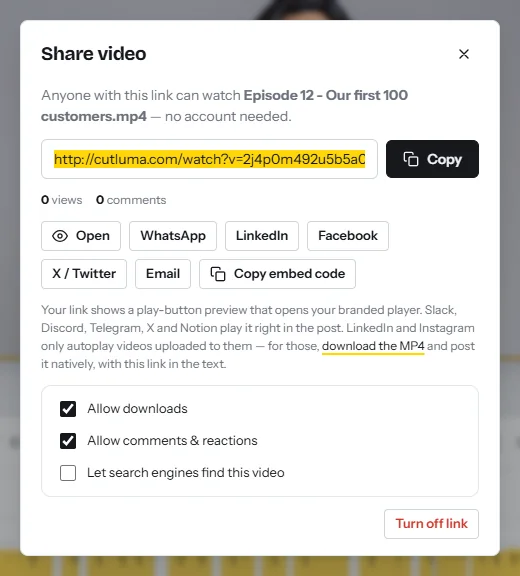
- Export and send for approval (20 minutes)Click Export and download each MP4. On the finished screen, click Get share link, leave Allow comments & reactions on and send the links to the approver, who can comment at the exact moment they want changed. CutLuma does not post or schedule: after approval, the client uploads the MP4 files.
Quality checks before you deliver
- First frame. Text is on screen from the first second, with no logo animation at the start.
- Facts. Read every price, date, name and phone number against the client’s message.
- Safe zones. Keep text and the logo out of the bottom quarter and away from the right edge, where the app buttons sit.
- Sound and people. Music sits under speech, and every face has agreed or is blurred. Watch each file once on a phone.
How to get the first three clients
Visit businesses that post photos and never video, at a quiet hour. In LocaliQ’s survey, small businesses ranked price first and proven results second when choosing a marketing partner2, so arrive with a fixed price and a finished sample. Make the sample for that business: a template from their category with their real dish or service and price.
By message, send the same words with the sample as a CutLuma share link.
The one-page offer
- What you get. 12 short vertical videos a month with your logo, colours and captions, and a link for customer testimonials.
- What you do. Film the clips on the shot list, and approve within two working days.
- What it costs. $650 a month, paid in advance. Extra videos are $50 each.
- What is not included. Posting, replying to comments, paid ads and filming visits.
- Terms. Month to month, two rounds of changes, cancel with 14 days’ notice.
No survey we found measures reply rates for this kind of pitch, so count your own. Then ask every happy client for one introduction: 83% of small businesses named customer referrals as their best source of new customers2. To be paid per video by brands instead, read how to become a UGC creator.
A 30-day plan
| Week | What you do | Output |
|---|---|---|
| 1 | Choose two trades. Build six sample videos on the Free plan. Fix your packages and write the one-page offer. | 6 samples, 1 offer page |
| 2 | Pitch 20 businesses, 10 in person and 10 by message, each with its own sample. | 20 pitches, a count of replies |
| 3 | Onboard the first client: assets, shot list, folder, brand kit, master design, testimonial link. Move to Starter. | 1 client set up |
| 4 | Run the first batch day, send share links and deliver. Invoice month two and ask for one referral. | 12 videos delivered |
Risks, rules and mistakes
- Scope creep. “Can you also post it and answer the comments?” is a second job. Price every extra.
- Consent for staff and customers. Rules on filming people differ by country and state. Get written agreement from everyone who can be recognized, and from a parent for a child.
- Relying on one client. Aim for at least three clients, so that none is more than about a third of your income.
- Under-pricing. You cannot beat a $269 edit-only subscription on price9. Sell the plan, the shot list and the local visit.
- Promising results. CutLuma has no analytics for social accounts. Promise deliveries and dates, not views or sales.
- Taxes. Retainer income is usually self-employment income: register as your local law requires.
FAQ
How much should I charge for social media videos for a local business?
Published prices for 12 short videos a month ran from $269 for editing alone to $1,350 for an agency plan with ads in October 2026. This guide’s example is $400 for 8 videos, $650 for 12 and $1,000 for 20.
How many clients can one person handle?
In this guide’s example a 12-video client takes about 7.5 hours a month after setup, so five clients are about 37.5 hours a month and $3,250 at the example price.
Do I need to film the videos myself?
No. The owner films short clips on a phone, customers record testimonials on a link, and six of the twelve formats need no new footage.
Does CutLuma post the videos to Instagram or TikTok?
No. You export MP4 files, the client approves them on a share link, and the client uploads them.
Which CutLuma plan does a small video agency need?
Build samples on the Free plan. Use Starter at $6 a month for client work: no watermark, unlimited projects and 300 AI minutes. Move to Pro at $12 for 100 GB.
Can I make videos for clinics and dentists?
Yes, with care. Use the medical kits, blur faces automatically, and never show a patient without the clinic’s signed authorization.
Sources
- Wyzowl — Video Marketing Statistics 2026 (State of Video Marketing survey, 266 respondents, late 2025)
- LocaliQ — The Big Small Business Marketing Trends Report for 2026 (over 300 small business owners)
- BrightLocal — Local Consumer Review Survey 2026 (1,002 US adults)
- Pew Research Center — Americans’ Social Media Use 2025 (5,022 US adults)
- YouTube — YouTube for Press, “YouTube by the numbers” (2026)
- Upwork — Social Media Manager Hourly Rates and Cost to Hire (viewed October 2026)
- LYFE Marketing — Social Media Management Pricing in 2026
- LYFE Marketing — Short Video Management Pricing in 2026
- $99 Social — Short-Form Video Service pricing (viewed October 2026)
- Upwork — Video Editor Hourly Rates and Cost to Hire (viewed October 2026)
- SOCi — The Evolution of Search and Social: Marketing Predictions for 2025, citing its 2024 Consumer Behavior Index
- TikTok Business Help Center — About the Commercial Music Library (updated July 2025)
- US Department of Health and Human Services — HIPAA Privacy Rule: Marketing
The figures on this page are published ranges and worked examples, not promises of income. What you earn depends on your niche, your skills and how consistently you work. Platform rules and rates change: check the linked sources before you rely on a number.





