- Startup cost
- $6 a month, plus a sales platform from $0
- First sale
- 2 to 4 weeks with a paid pilot
- Income type
- Per sale, or a share of a subscription
- Lesson length
- Under 6 minutes
- Udemy pays 37% of the net amount of a marketplace sale and 97% when the buyer uses your coupon or referral link (Instructor Terms, July 2026)2.
- On your own page the platform takes about 3% to 10.5% of a $100 sale, plus $0 to $179 a month, and you bring every buyer678910.
- Median watch time in 6.9 million edX sessions was at most 6 minutes for every video length, so plan lessons of 4 to 6 minutes1.
- In MITx and HarvardX courses in 2017–18, 3.13% of all participants finished and 46.02% of paying learners finished12. Charge, even for the pilot.
- A 20-lesson course needs about 260 of the 300 AI minutes in the $6 Starter plan for transcripts, captions and chapters.
What a video course business sells, and how big the market is
You sell a result, packaged as video: a full course, a paid tutorial library or a workshop recording. Buyers pay to be able to do something at the end, not for hours of video.
Statista expects 2.61% growth a year to 2031 and revenue per user of $98.95 a year13. The market is large and slow, so a new course wins by being specific. With 290K+ courses on one marketplace3, “Excel for beginners” exists many times. “Excel for restaurant stock control” may not.
Example: Thinkific reports $460.0 million of customer sales in 2025 and more than 35,000 customers11, about $13,100 each. Large companies that train their own customers lift that average, so most solo creators sell less.
- Workshop recording or mini-course. One problem, 30 to 60 minutes.
- Core course. One skill in about 20 short lessons with exercises.
- Course with feedback. The core course plus reviewed assignments or calls.
Where to sell a course: marketplace or your own platform
A marketplace has the buyers and keeps most of the money. Your own page keeps most of the money and has no buyers until you bring them. Fees are from the platforms’ own pages as of October 2026, in US dollars.
| Where | What it costs you | Who brings the audience | Customer list |
|---|---|---|---|
| Udemy (marketplace) | No monthly fee. You get 37% of a marketplace sale, 97% with your coupon or link2 | Udemy: 84M learners, 290K+ competing courses3 | Udemy’s. Student data may not leave Udemy2 |
| Skillshare (subscription) | No fee, no price. A Teacher Fund is shared by qualifying minutes watched4 | Skillshare’s paying members | Skillshare’s |
| Gumroad | No monthly fee. 10% + $0.50 per sale; 30% through its Discover marketplace9 | You, plus Discover | Yours |
| Teachable Starter | $39 a month + 7.5% per sale, 5 products6 | You | Yours |
| Podia Mover | $49 a month + 5% per sale, plus card processing of 2.9% + 30¢10 | You | Yours |
| Thinkific Basic | $40 a month billed annually; 2.9% with Thinkific Payments7 | You | Yours |
| Kajabi Basic | $179 a month, 5 products; 2.9% + $0.30 with Kajabi Payments8 | You | Yours |
Taxes and subscriptions are not included. Teachable says standard payment processing fees may still apply.
Udemy counts your share on the net amount: the price minus taxes, mobile platform fees and a 3% service fee2. Example: a $20 website sale has a net amount of $19.40. A marketplace sale pays you 37%, or $7.18. With your coupon it pays 97%, or $18.82. Udemy’s promotional programmes can change the share2.
Skillshare sells a subscription, not single courses. Since July 2026 you are paid only with 50 followers and more than 400 qualifying minutes watched in the month, or 650 if you published no class in the past 18 months4. Skillshare says future payouts cannot be estimated in advance4.
How to price an online course: three types and a worked example
No report gives the right price for your topic. Set a price per product type, estimate sales, and let the pilot correct you. The example assumes 1,000 email subscribers. Prices and conversion rates are assumptions, not benchmarks.
| Course type | Example price | Assumed buyers per 1,000 | Gross sales | After a 10% + $0.50 fee |
|---|---|---|---|---|
| Workshop recording or mini-course | $29 | 30 (3%, assumption) | $870 | $768 |
| Core course, 20 lessons | $99 | 20 (2%, assumption) | $1,980 | $1,772 |
| Course with feedback | $299 | 10 (1%, assumption) | $2,990 | $2,686 |
The fee is Gumroad’s direct rate9: $3.40, $10.40 and $30.40 a sale. If your real conversion is half the assumption, every result is half. One $99 direct sale leaves $88.60, and one $20 Udemy marketplace sale leaves $7.182, so about 12 marketplace sales equal one direct sale. Price feedback by your hours: 2 hours for each of 10 buyers is 20 hours.
Validate before you record: the paid pilot and the message to send
Record 3 lessons, not 20, and sell them. In every MITx and HarvardX course on edX to May 2018 (12.67 million registrations), 52% of the people who registered never opened the course12. A sign-up is not demand. A payment is.
Free university courses on edX, not creator courses. The gap between paying and other learners is what matters.
Source: Reich and Ruipérez-Valiente, Science, 2019, Table S312
- Write the promise“After this course you can [result] in [time].” List the 20 lesson titles under it.
- Record module 1 and a trailerThree 5-minute lessons and a 60-second trailer, made with the workflow below.
- Open founding placesOffer 10 to 20 places at about half the planned price, in exchange for a comment on every lesson.
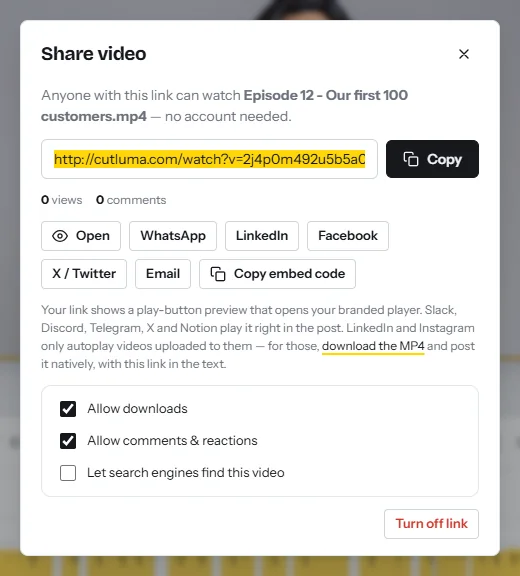
- Deliver with share linksExport each lesson, create a share link and press Put them on the share page in the publish kit to show chapters under the player. Links stay out of search engines unless you switch that on, and viewers comment at a moment in the video.
- Decide with a rule set in advanceExample: 5 paid places from the first 50 people you ask means you record the rest; fewer than 2 means you change the promise. Views and comments per lesson on the dashboard show where people stopped.
The lesson standard: length, structure, picture and sound
The best evidence is a 2014 study by Guo, Kim and Rubin of 6.9 million viewing sessions in four edX courses1. Length was the strongest signal of engagement. Median watch time was at most 6 minutes for every length, and students often watched less than half of videos longer than 9 minutes1.
Five groups of about equal size, sorted by length. The shortest group is 0 to 3 minutes.
Source: Guo, Kim and Rubin, 20141
| Element | Standard for every lesson | Reason |
|---|---|---|
| Length | 4 to 6 minutes, one task | Median watch time is at most 6 minutes1. Skillshare asks for 2 to 8 minutes5 |
| Structure | Numbered title card, the result in one sentence, the demonstration, a recap with one exercise | Fewer students try the exercise after long videos1 |
| Your face | On screen at the start and beside the slides | A talking head mixed with slides is more engaging than slides alone1 |
| Setting and pace | Your desk, eyes on the lens, natural speed | A personal feel can beat a studio. Engagement rose with speaking rate (mean 156 words a minute)1 |
| Picture | 16:9, 1920 × 1080, text zoomed to 110–125% | It must be readable on a phone |
| Sound | Microphone close, quiet room, same level in every lesson | Poor audio or video quality is a common reason Skillshare closes a class5 |
In one course, students tried 46% of the exercises after a video showing the teacher’s face and 33% after other videos1. They watched tutorials for only 2 to 3 minutes and returned to them more often, so add chapters for skimming1. The study covered free science courses from 2012, not paid ones, but Skillshare’s 2026 guidance gives a similar range5.
What you need and what it costs
- A computer with Chrome or Edge. The screen recorder runs in the browser. Phones cannot record their screen from a browser.
- A microphone close to your mouth. It matters more than the camera.
- A webcam and a light in front of you. Camera looks correct the lighting and can blur the background.
- Your slides as a PDF, and a sales platform from $0 a month.
Recording, auto-zoom, silence removal, the teleprompter, templates and the brand kit are free. The Free plan allows 3 projects and exports 1080p with a small watermark, enough for the pilot. A course needs one project per lesson, so use Starter at $6 a month: no watermark, unlimited projects, 15 GB and 300 AI minutes (pricing). Example: 20 lessons in one month cost $0.30 each. Download each finished MP4 and delete raw takes to save storage, or use Pro at $12 with 100 GB.
Recording day in CutLuma: step by step
Record one module in one sitting so the light and the sound match. How to record your screen with your webcam explains the share dialog and computer sound.
- Set up the brand kit onceIn the Style tab open Brand kit, add your logo, colours and font, and press Save brand kit.
- Build a lesson shellFrom the course templates add a lesson title card and a key takeaways card, press Brand all text, then Ctrl+K and Save as a template. Start every lesson from it.
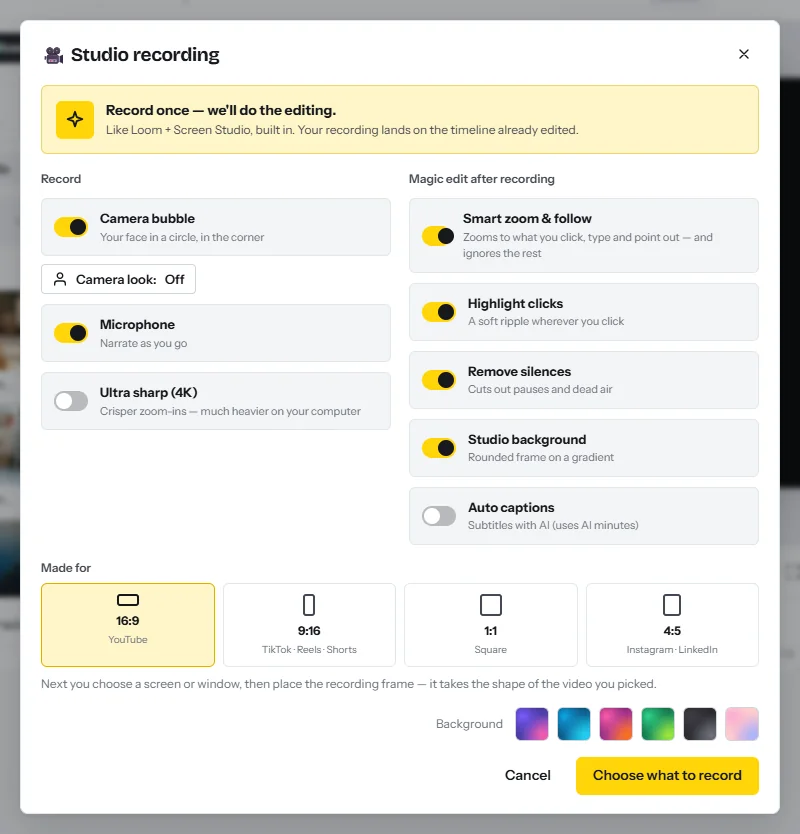
- Set the camera lookIn the Record tab click Studio recording, then Camera look: lighting, blurred background, name tag.
- Choose the optionsLeave Camera bubble, Microphone, Smart zoom & follow and Remove silences on. Under Made for choose 16:9.
- Test for ten secondsClick Choose what to record, pick the tab or window, say one sentence and play it back. Zoom the app to 110–125%.
- Record the screen lessonsOne lesson per project, named with its module and lesson number. Pause when you need to think: pauses are cut when you press Stop.
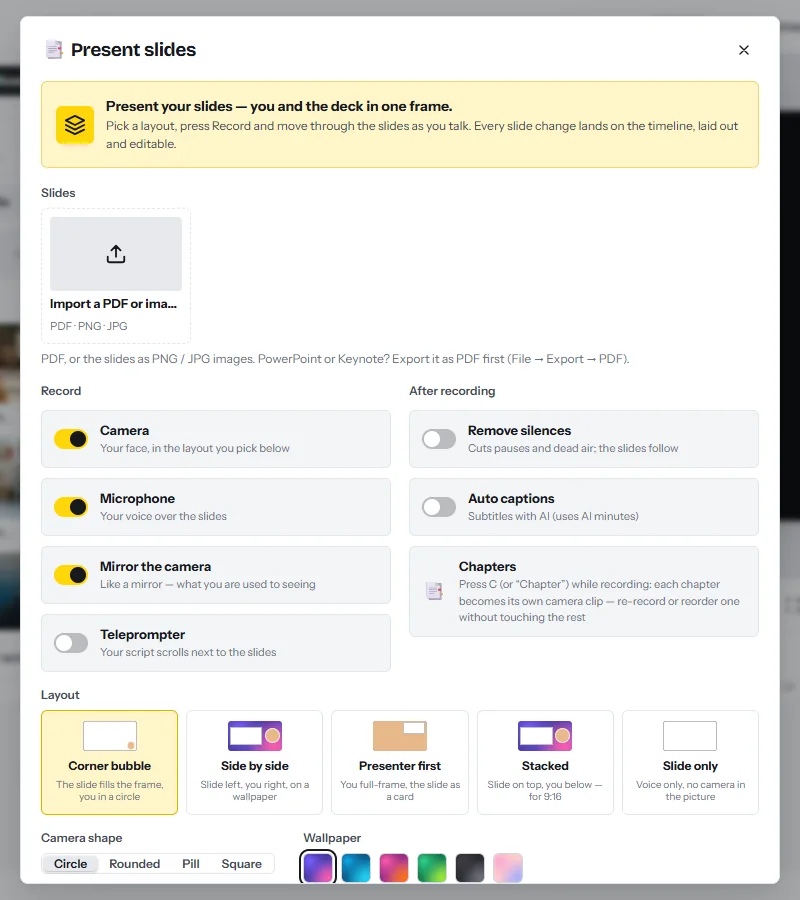
- Record the slide lessonsClick Present slides and import the PDF. Choose a Layout that shows you beside the slides, turn on Teleprompter for notes, and press Start recording. Arrow keys change the slide and C marks a chapter. See present your slides.
- Record the welcome and the trailerClick Camera (the webcam recorder) and tick Teleprompter. The teleprompter scrolls your script next to the lens and stays out of the video.
Editing every lesson in CutLuma: step by step
The take is on the timeline with zooms added and pauses cut (how silence removal works). Repeat these steps for every lesson.
- Trim the start and the endPress S to split at the playhead, select the piece and press Shift+Delete.
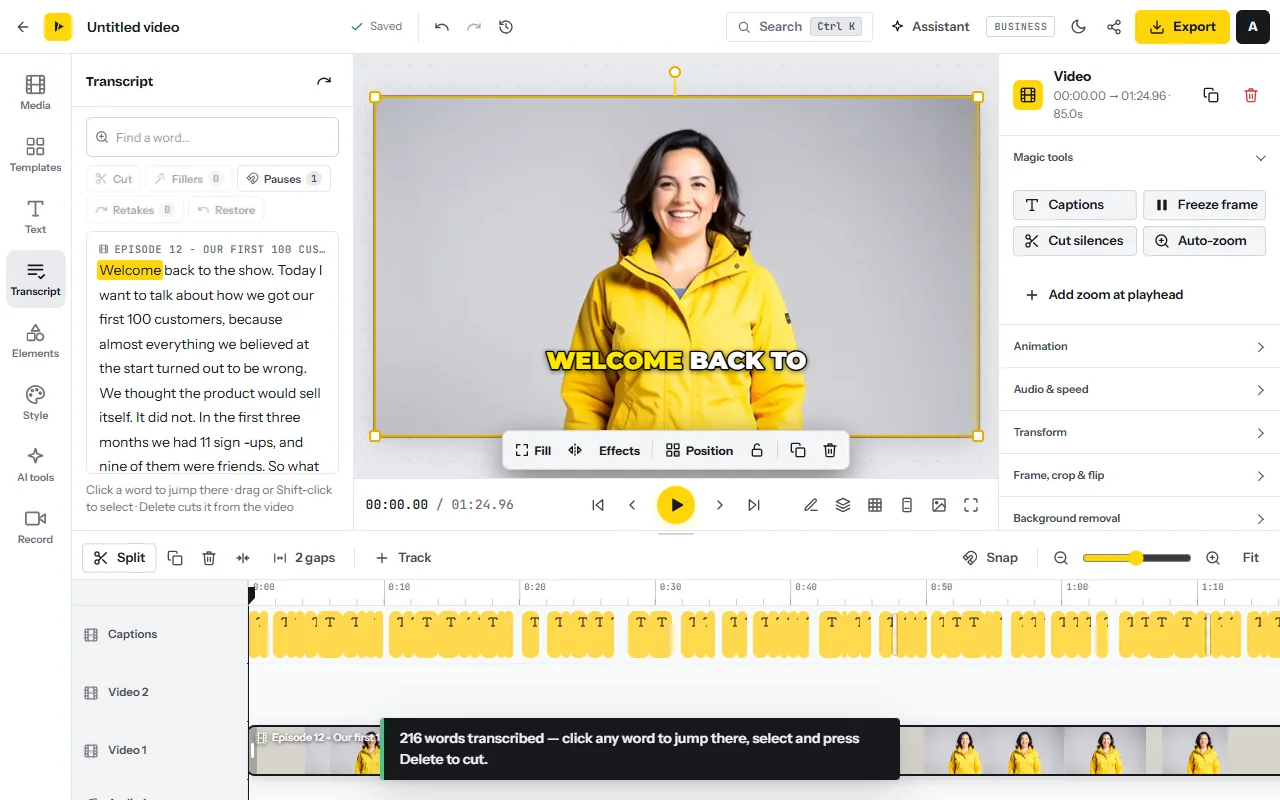
- Cut filler words and retakes as textOpen the Transcript tab and press Transcribe. Run Fillers, Pauses and Retakes, each with a preview. Select a sentence and press Delete to cut it. See edit video as text.
- Clean the soundSelect the voice clip and turn on Reduce background noise and Enhance voice, the same in every lesson.
- Fill in the title card and the recapType the lesson number and title. Write the recap as actions and add one exercise.
- Add captionsIn the Text tab open Auto captions, choose the language and a plain style, then correct names and technical terms. See auto captions.
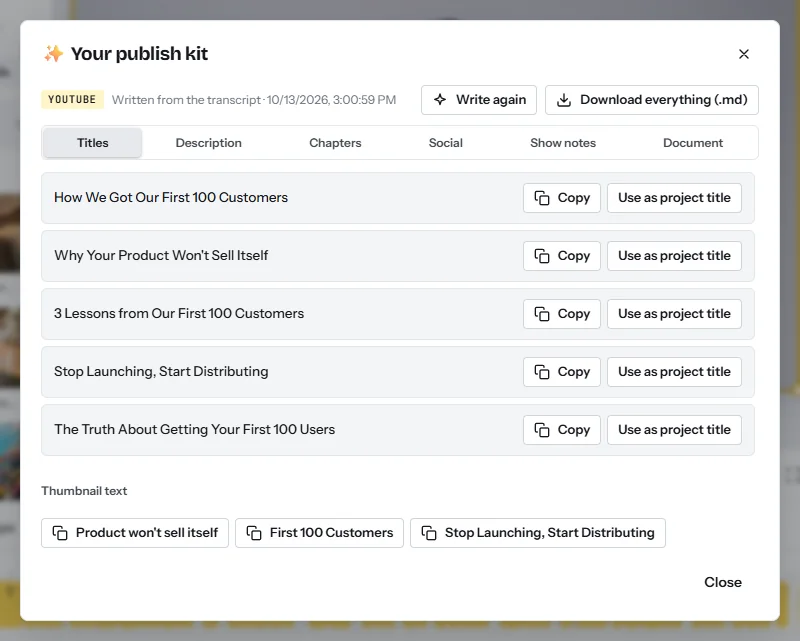
- Write the chapters and the notesClick the share icon next to Export to open the publish kit. Copy the description and chapters, press Mark them on the timeline, and download the document as lesson notes. See description and chapters.
- Check it as a studentWatch once at phone size: readable text, the same voice level as the last lesson, no private tab or notification, the right lesson number.
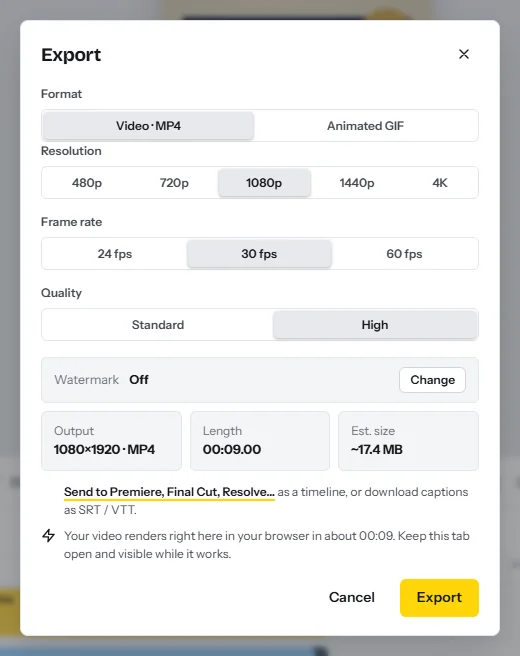
- Export and uploadPress Export and choose Resolution 1080p, Frame rate 30 fps and Quality High on a paid plan. Download the MP4 and upload it to your course platform yourself.
| Step that uses AI time | One lesson | 20 lessons |
|---|---|---|
| Transcript of the take (about 7 minutes of speech) | 7 AI minutes | 140 |
| Captions on the finished 5-minute lesson | 5 AI minutes | 100 |
| Publish kit | 1 AI minute | 20 |
| Total | 13 AI minutes | 260 of the 300 in Starter |
| Optional: one more language | 1 to 2 AI minutes | 20 to 40 |
These follow the product’s rates: about one AI minute per minute of speech for a transcript or captions, and about one for a publish kit. Silence removal, zoom, sound clean-up and export use none. Budget 25 minutes of editing per lesson, so 20 lessons take about 4 hours to record and 8 hours to edit.
To sell the course in a second language, click Translate the whole video in the AI tools tab and choose A copy per language. Translate video covers captions and on-screen text in 17 languages, translate captions alone covers 35, and AI dubbing speaks six: English, Spanish, French, Chinese, Japanese and Korean. See how to translate a video and the multilingual video business.
A 30-day plan from idea to first sales
| Days | Work | Output |
|---|---|---|
| 1 to 3 | Write the promise, 20 lesson titles and a list of 50 people to ask. Open a sales account with no monthly fee | Outline and checkout link |
| 4 to 7 | Set up the brand kit and lesson shell. Record and edit module 1 and a trailer | 3 lessons and a trailer |
| 8 to 12 | Send the pilot message. Deliver by share link and read every comment | Paid places and a go or no-go decision |
| 13 to 26 | Record two modules a week and edit each lesson the next day. Fix what the pilot found unclear | 20 lessons and 3 testimonials |
| 27 to 30 | Build the sales page with the trailer, lesson list and refund terms. Announce the full price | Public launch |
Publish the trailer and the first lesson free where your audience already is. How much YouTube pays covers what those views earn, and video affiliate marketing covers income from tools you recommend.
Risks, rules and mistakes
- Copyright in slides. Photos, icons and fonts in a slide template each have a licence. Use your own or licensed material. The editor’s stock library shows only files that need no credit.
- Music and screenshots. No commercial songs under a lesson. An article, video or paid report that you show on screen belongs to its owner: quote a short part or ask.
- Platform dependence. Udemy can change its rates with 30 days’ notice2, and Skillshare changed who gets paid in July 20264. Build your own email list.
- Outdated lessons. Software changes. One task per lesson means you record 5 minutes again, not an hour.
- Taxes. Course income is taxable and digital sales can carry VAT or sales tax. Gumroad, as merchant of record, collects it for you9.
FAQ
How much does Udemy pay instructors?
Since the Instructor Terms of July 2026, 37% of the net amount when Udemy’s marketplace brings the sale and 97% when the student uses your coupon or referral link. On a $20 sale that is $7.18 or $18.82.
Is it better to sell a course on Udemy or on my own website?
Udemy brings buyers and keeps 63% of the net amount of those sales. Your own page costs about 3% to 10.5% of a $100 sale, sometimes plus a monthly fee, and you bring every buyer.
How long should an online course video be?
Under 6 minutes. In 6.9 million edX viewing sessions the median watch time was at most 6 minutes for every video length. Skillshare asks for lessons of 2 to 8 minutes.
How much does it cost to create an online course?
With a laptop, a microphone and a webcam, $6 for a month of CutLuma Starter covers about 20 lessons with captions and chapters. A sales platform costs from $0 a month with 10% + $0.50 per sale.
What should I charge for an online course?
There is no reliable benchmark for every topic. Pick a price for the type, for example $29, $99 or $299, sell 10 to 20 founding places and see how many people pay.
Do I have to give refunds on an online course?
In the EU a consumer can cancel within 14 days unless they expressly agreed to lose that right when streaming started. Marketplaces apply their own policy and deduct refunds from your share.
Sources
- Guo, Kim and Rubin — How Video Production Affects Student Engagement: An Empirical Study of MOOC Videos (ACM Learning at Scale, 2014)
- Udemy — Instructor Terms (last updated 29 July 2026)
- Udemy — About Udemy: learners, instructors and courses (viewed October 2026)
- Skillshare Help Center — Earn From Your Teaching (June 2026 update)
- Skillshare Help Center — Get Started With Teaching (2026)
- Teachable — Pricing (October 2026)
- Thinkific — Pricing (October 2026)
- Kajabi — Pricing (October 2026)
- Gumroad — Pricing (October 2026)
- Podia — Pricing (October 2026)
- Thinkific — Fourth Quarter and Full Year 2025 Financial Results (March 2026)
- Reich and Ruipérez-Valiente — The MOOC Pivot, Science 363 (2019), authors’ postprint with supplementary tables
- Statista Market Insights — Online Learning Platforms, Worldwide (updated September 2026)
- Your Europe (European Union) — Returns and the right of withdrawal
The figures on this page are published ranges and worked examples, not promises of income. What you earn depends on your niche, your skills and how consistently you work. Platform rules and rates change: check the linked sources before you rely on a number.





