- Startup cost
- A phone and a $6 or $12 plan
- Income type
- Per listing or a monthly bundle
- Published prices
- $35 to $570 per video
- Skill level
- Beginner to intermediate
- Drone
- Optional, and it needs a licence
- In NAR’s 2025 generational report, 51% of US buyers found their home on the internet, and 83% of online searchers rated photos “very useful”1.
- Only 12% of sellers said their agent marketed the home with video, against 86% for the MLS website1.
- Public price lists show $150 to $570 for a walkthrough, $80 to $190 for a vertical cut and $35 for a photo reel add-on478.
- Commercial drone flights in the US need an FAA Remote Pilot Certificate under Part 107, so start with packages that need no drone910.
- Some MLSs accept only unbranded videos: deliver one file with the agent’s card and logo, and one without1617.
What a real estate video business sells, and the data behind it
You film the property yourself, or the agent films 20 minutes on a phone from your shot list and you edit that footage with the listing photos. The second way needs no camera or travel, so start there.
- Listing video. A 60- to 90-second 16:9 tour for the listing page, YouTube and the MLS.
- Reel and feed cut. The same tour in 9:16 for Reels, TikTok and Shorts, and in 4:5 for the feed.
- Status posts. Just listed, open house, price drop and sold.
- Neighbourhood guide, agent-brand video. Streets and travel times, or the agent talking to camera with captions.
- Developers and short-let hosts. Site progress updates, or a tour of a holiday flat.
NAR is the US National Association of Realtors. Its 2025 Home Buyers and Sellers Generational Trends Report rests on 5,390 responses from people who bought between July 2023 and June 2024; 43% of them began by looking online for properties1. The next Profile of Home Buyers and Sellers, for the year to June 2025, reports 52% finding their home online and 70% searching on a mobile or tablet device2.
Photos come first: sell video as a second use of the photos and as social media reach.
Source: NAR, 2025 Generational Trends Report, Exhibit 3-61
Video does not replace photos. The opening is on the supply side: few agents use video at all.
Selected methods from the exhibit. About one seller in eight saw the agent use video.
Source: NAR, 2025 Generational Trends Report, Exhibit 7-81
In NAR’s 2021 survey, a further 35% of Realtors did not use video but hoped to3. In the 2026 REALTORS Technology Report, 81% said they adopt new technology mainly for efficiency and productivity, and 56% use AI to create social media posts19. Your customer is short of time, not of interest.
What real estate video costs: published rates
No single survey covers this market. The table uses four public US price sources, read on 13 October 2026, in US dollars. Collect five local price lists before you set yours.
| Source | What is sold | Published price |
|---|---|---|
| PropPhoto: 888 packages from 428 photographers4 | Video walkthrough, booked alone | $200 typical; $150 to $300 (14 packages) |
| PropPhoto4 | Social media edits | $350 typical; $150 to $400 (6 packages) |
| PropPhoto4 | Drone video | $250 typical; $150 to $250 (5 packages) |
| HomeJab, national service56 | Walkthrough video | From $220; $249 in one shape and $349 in both on its home-builder list |
| HomeJab6 | Extra vertical capture; extra cut | $100; $50 |
| Coronado Photo & Media, Miami7 | 3-minute 4K walkthrough, drone included | $270 to $570 by home size |
| Coronado7 | Vertical social video, 30 to 60 seconds | $130 without drone; $190 with |
| Coronado7 | 1-minute drone video; 1-minute reel from photos | $175 alone, $55 as an add-on; $35 as an add-on |
| Tasty Edits, editing only8 | Horizontal video; vertical short | $278 to $327; $80 to $94 |
Filming is priced by the visit and the size of the home. Extra shapes are cheap add-ons.
Sources: PropPhoto, HomeJab, Coronado Photo & Media and Tasty Edits price pages, October 202645678
- The second shape is an add-on. An extra vertical capture is $100 and an extra cut $50 on one list6, so sell the three shapes as one set.
- A reel from photos is the cheapest item. One studio adds it for $357. Use it to open the door.
- Small samples. PropPhoto’s video figures rest on 5 to 14 packages each4.
Three example packages and what one listing earns
| Example package | What the agent gets | Example price | Your time | Per hour |
|---|---|---|---|---|
| A. Photo reel | A 30-second vertical reel from the listing photos, plus a 4:5 copy | $60 | 45 minutes | $80 |
| B. Phone-footage set | A 16:9 tour, a 9:16 reel and a 4:5 cut from the agent’s clips and photos, branded and unbranded | $200 | 2.5 hours | $80 |
| C. Filmed set | You film for an hour, then everything in B plus the agent’s captioned intro | $350 | 5 hours | $70 |
What you need and what it costs
You need a phone that films in 4K, a computer with desktop Chrome, Edge, Brave or Firefox, and the listing sheet: address, price, beds, baths, area and the agent’s name, phone and licence line.
| Plan | Price a month | When it fits |
|---|---|---|
| Free | $0 | Practice and samples: full editor, industry kits and stock library, 3 projects, 1080p with a small watermark, no AI time |
| Starter | $6 | Client work in 1080p: no watermark, unlimited projects, 300 AI minutes |
| Pro | $12 | 4K masters and files up to 5 GB, with 1,200 AI minutes |
| Business | $29 | Volume: files up to 10 GB and 6,000 AI minutes |
A tour made from photos, clips, music and text uses no AI time. Example with narration: a 900-character script for AI voiceover uses about 54 AI minutes (about 60 per 1,000 characters for English voices), captions on a one-minute piece to camera about 1, and two translated copies 2 to 4. That is about 59 AI minutes a listing: 5 such listings a month on Starter, 20 on Pro. See pricing.
The phone-footage shot list: 20 minutes on site
Send this to the agent, or use it yourself. Film horizontally in 4K and keep the main feature of each room in the middle third of the frame, because a 9:16 crop keeps only about a third of the width. Lights on, blinds open, phone in two hands, slow moves. No people, number plates or family photographs.
| Shot | How to film it | Seconds |
|---|---|---|
| 1. Front of the property | From across the street, phone still | 8 |
| 2. Approach | Walk slowly to the front door | 6 |
| 3. Entrance and hall | Step in and stop | 6 |
| 4. Living room, wide | From a corner, slow pan | 8 |
| 5. Living room, detail | Fireplace, window or view | 5 |
| 6. Kitchen, wide | From the doorway, slow pan | 8 |
| 7. Kitchen, detail | Slide along the worktop | 5 |
| 8. Dining area | Phone still | 5 |
| 9. Main bedroom | From the door, slow pan | 8 |
| 10. Main bathroom | Phone still, mirror out of frame | 5 |
| 11. Second bedroom or office | From the door | 5 |
| 12. Garden, balcony or view | Slow pan, horizon level | 8 |
| 13. The street | Walk ten steps along the pavement | 8 |
| 14. Agent to camera (optional) | Vertical: the address, three facts, how to book a viewing | 20 to 30 |
The listing-video edit in CutLuma: build the 16:9 master
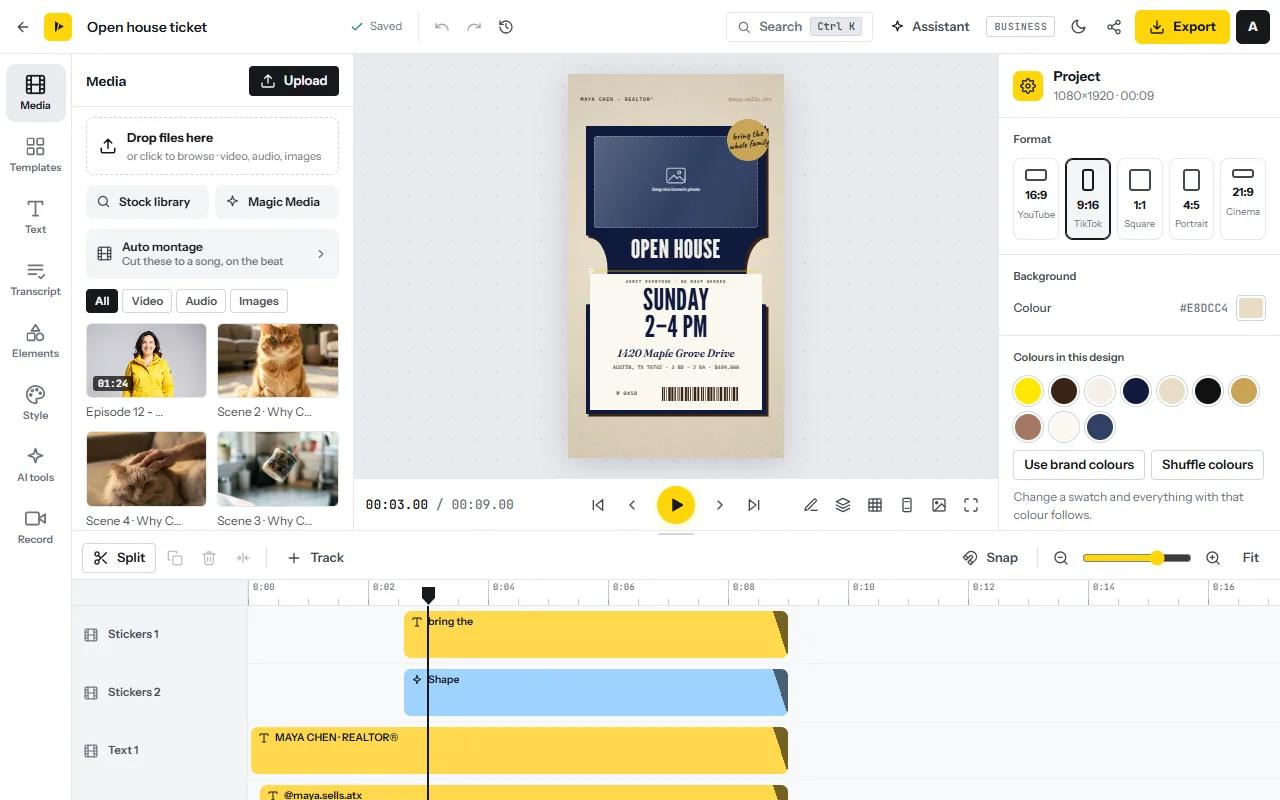
Build the wide version first. The real estate kit is free with a free account. To start from a finished design, browse the real estate templates; the real estate video editor page has the short version.
- Open the real estate kitOpen Real estate videos and sign in. The editor opens on Industry kits, showing the real estate kits. With no clip selected, the right-hand panel shows Format: choose 16:9.
- Add the photos and clipsName the files in tour order (01-front, 02-hall), then drop them into the Media tab.
- Let Auto montage make the first cutIn Media click Auto montage (the montage and slideshow maker). Set Order to By name, choose a song or a built-in beat under Music, the Smooth or Cinematic look, the 16:9 Shape and a Length (Auto shows every picture once). Type the address in Title and click Create montage. A montage runs up to 90 seconds.
- Put the best room firstDrag clips to reorder and trim; press S to split. Select a photo and set its Motion to zoom in, zoom out or pan for a Ken Burns move.
- Choose music you may useOpen Media → Stock library, search the music tab and click a track (stock library). Fade it out, and turn on Lower under speech if anyone talks (add music).
Listing facts, privacy and branding
- Add the listing cardSelect the opening clip and click Listing card. Choose a Status such as JUST LISTED, OPEN HOUSE, PRICE DROP or SOLD, type Address, Beds, Baths, Area, Price and the Agent line, check the preview and click Add to video. Every line stays editable.
- Label the roomsSelect a walkthrough clip and open Room-by-room tour. Type the rooms one per line; each tag shows for an equal part of the clip. On single photos, use the Text tab (add text).
- Highlight the propertyOn aerial or street footage, click Highlight a building, click the corners of the building or plot, type a Label, set Dim around it and click Done. The outline follows the camera move.
- Hide what should not be publicUnder Privacy, click Blur a plate / screen and drag the area over a number plate or a neighbour’s house number. Blur faces automatically finds every face and keeps a blur on it.
- Add the agent and the logoOpen Agent lower third and fill in Name, Title · brokerage, Phone / handle and Licence (optional). Add the logo and a closing card from Style → Brand kit, or drop in a transparent PNG (add a logo).
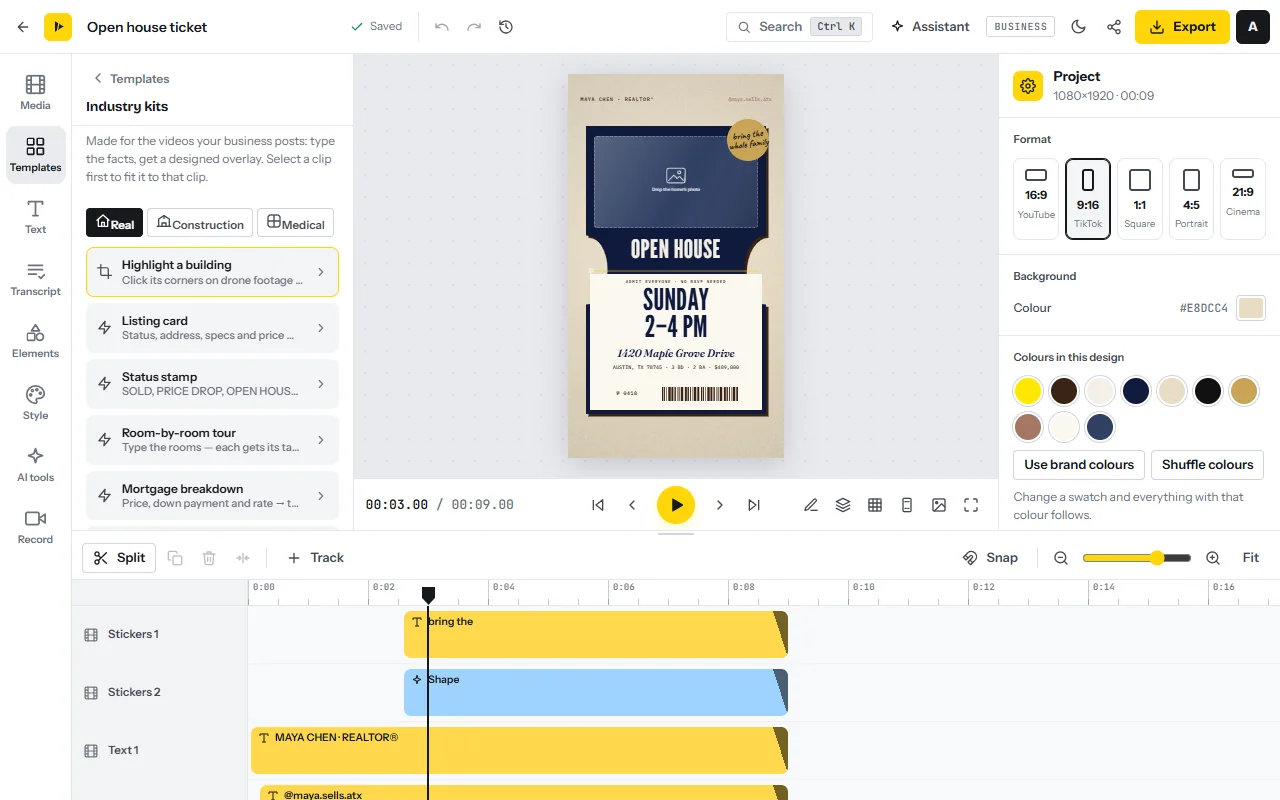
Save this project and start the agent’s next listing from a copy. For a neighbourhood guide, the Minutes to… kit turns “5 min | Downtown” into pins on screen. For a developer, the construction kit adds a progress tracker.
Narration, captions, approval and the three shapes
- Add narration (optional)In AI tools click Read a script aloud. Paste up to 2,000 characters, pick a voice, click Listen, then Add to video. Paid plans only.
- Caption the agent’s piece to cameraIn the Text tab open Auto captions (auto captions), choose the language and a style, and generate. Correct the street name, the price and the agent’s name.
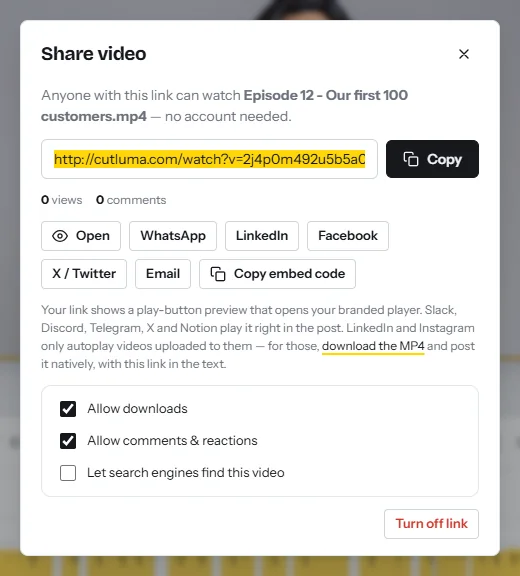
- Export and send for approvalClick Export, set Resolution (1080p, or 4K on Pro), and download the MP4. Then click Get share link, keep Allow comments & reactions ticked and Copy the link. The agent watches without an account and comments at a moment in the video.
- Make the 9:16 and 4:5 copiesIn AI tools click Make copies for other sizes, tick 9:16 and 4:5 and click Create copies. Each copy is its own project. On Free, with 3 projects, change Format in the right-hand panel instead (resize video).
- Reframe every shotIn each copy, drag each picture on the preview until the room’s feature is in frame. In 9:16, keep text and logo out of the bottom quarter and off the right edge.
- Export an unbranded file for the MLSIn the 16:9 project, delete the agent lower third, the logo and the closing card, export, then press Ctrl+Z to bring them back.
- Add a second languageIn AI tools click Translate the whole video (Translate video). Pick Arabic, Spanish or another of the 17 languages, choose A copy per language and click Translate. Arabic is laid out right to left.
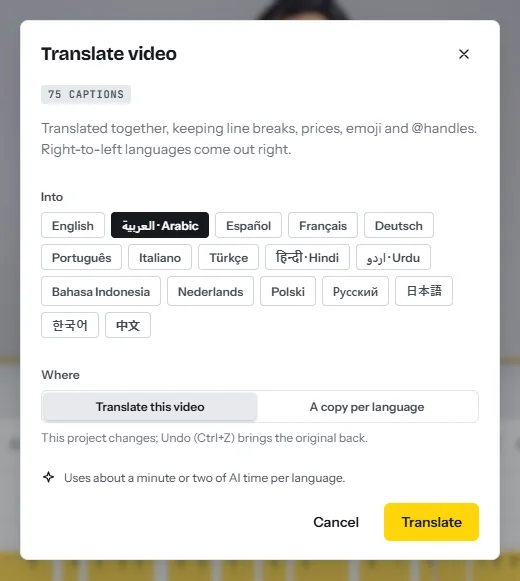
Translation changes the text, not the voice. AI voices exist only for English, Spanish, French, Chinese, Japanese and Korean, so in an Arabic copy, delete the narration and keep the music. Have a native speaker read each copy. See how to translate a video and the multilingual video playbook.
Checks before you deliver
- Facts. Address, price, beds, baths and area match the listing sheet exactly.
- Privacy. No faces, number plates, family photographs or documents are readable.
- Text. Nothing is cut off or under app buttons; the video sizes cheat sheet has the safe zones.
- Files. Three branded shapes and one unbranded 16:9 file, named with the address.
Getting the first agents: who to ask and what to say
- Listings with photos and no video. Search the property portals for your area and note each agent.
- Small brokerages and open houses. One office manager can introduce ten agents.
- Developers and short-let hosts. Regular progress videos, or one tour per property.
Offer one free sample per agent, and deliver it by share link: the view count shows whether the agent passed it on. We found no published response rates for this outreach, so count your own. For retainers and several clients, read how to start a social media video agency or the overview of video business models.
A 30-day plan
| Days | Work | Target |
|---|---|---|
| 1 to 7 | Film your own home with the shot list. Build the three shapes and an unbranded file. Collect five local price lists. | One sample set and a one-page price list |
| 8 to 14 | List 30 local agents whose listings have no video. Send ten messages a day for three days, each offering one free sample. | 30 messages sent |
| 15 to 21 | Edit each sample within 48 hours of receiving the files. Send it by share link, apply the comments, time every job. | Every agreed sample delivered |
| 22 to 30 | Send each sampled agent the price list and ask for the next listing. Offer a monthly bundle to agents with several. | A first paid listing; prices corrected from your timings |
Risks and rules: drones, fair housing, privacy, music and the MLS
- Fair housing wording. HUD’s rule makes it unlawful to publish an advertisement for a sale or rental that indicates a preference or limitation because of race, colour, religion, sex, handicap, familial status or national origin, in words, photographs or symbols13. Describe the property, not the buyer: “three bedrooms and a fenced garden”, not “perfect for a young family”.
- Privacy. Get the seller’s written consent to film, through the agent. Blur neighbours’ number plates and faces, and keep tenants out of frame.
- Music. Meta’s Music Guidelines prohibit use of music for commercial or non-personal purposes unless you have obtained appropriate licences14. Use the CutLuma stock library, a licence you bought, or YouTube’s Audio Library on YouTube15.
- MLS branding. MLS Now allows no agent or company name, links or branding in a listing’s virtual tour16. SmartMLS accepts only unbranded videos, and lets the agent narrate without naming themselves or the office17. Rules differ, so check your local MLS before every upload.
- Under-pricing and tax. Price the set, not the $35 reel, and keep records: this income is taxable where you live.
FAQ
How much do real estate videographers charge?
Price lists read in October 2026 show $150 to $570 for a walkthrough, $130 to $190 for a filmed vertical video and $80 to $94 for editing a vertical short478.
Do I need a drone to sell listing videos?
No. The packages here need only a phone and the listing photos. In the US, flying a drone for work needs an FAA Remote Pilot Certificate under Part 107910.
Can I make a listing video from photos only?
Yes. Auto montage sets the photos to music with a slow zoom on each, and the listing card adds the facts. One Miami studio sells a photo reel as a $35 add-on7, so treat it as an entry product.
Can the agent’s logo be on a video in the MLS?
Often not. MLS Now and SmartMLS, for example, accept only unbranded videos or tours1617. Deliver a branded and an unbranded file, and check the local rules.
What music can I use in a listing video?
Music you hold a licence for: Meta’s Music Guidelines prohibit commercial use without one14. CutLuma’s stock library has free-to-use tracks that need no credit.
Sources
- National Association of REALTORS — 2025 Home Buyers and Sellers Generational Trends Report (survey of 5,390 buyers, July 2023 to June 2024)
- National Association of REALTORS — 2025 Profile of Home Buyers and Sellers, published highlights (November 2025)
- National Association of REALTORS — New Survey: These Tech Tools Are a Must (2021 Technology Survey, 3 August 2021)
- PropPhoto — Real estate photography pricing, computed from 888 packages by 428 photographers (updated 13 October 2026)
- HomeJab — Professional real estate walkthrough videos (price page, 2026)
- HomeJab — Pricing for model, new home community and local area packages (2026)
- Coronado Photo & Media, Miami — Pricing (2026)
- Tasty Edits — Real estate video editing services and prices (2026)
- Federal Aviation Administration — Certificated Remote Pilots including Commercial Operators (Part 107; updated 25 March 2025)
- Federal Aviation Administration — Become a Certificated Remote Pilot
- European Union Aviation Safety Agency — Open category: low risk civil drones
- UK Civil Aviation Authority — Drones
- US Department of Housing and Urban Development — 24 CFR 100.75, Discriminatory advertisements, statements and notices (Code of Federal Regulations, 2025 edition)
- Meta — Music Guidelines (effective 26 March 2024)
- YouTube Help — Use music and sound effects from the Audio Library (2026)
- MLS Now — Add a Virtual Tour to a Listing (help centre, updated March 2026)
- SmartMLS — Add a virtual tour to your listing (help centre, updated July 2025)
- Apartments.com.au (Urban) — Real estate videos secure wider buying audience: Jellis Craig (4 April 2013)
- National Association of REALTORS — 2026 REALTORS Technology Report, published highlights
The figures on this page are published ranges and worked examples, not promises of income. What you earn depends on your niche, your skills and how consistently you work. Platform rules and rates change: check the linked sources before you rely on a number.





