- Startup cost
- $6 to $12 a month
- Income type
- Per video minute, per language
- Languages
- 35 for captions, 17 with on-screen text, 6 dubbed
- Skill level
- Intermediate: you need a native reviewer
- Creators who uploaded multi-language audio tracks got over 25% of their watch time from non-primary languages on average in July 2025, up from over 15% in January 202312.
- YouTube’s free automatic dubbing gives an English video audio tracks in 20 languages, but the dubs cannot be edited and change only the sound5. A paid service sells the checked translation and the translated picture.
- Rev lists translated subtitles at $6.49 to $15.99 a video minute16. In CutLuma, captions and on-screen text for a 10-minute video in three languages use about 16 AI minutes (16 cents on Pro), plus a native reviewer.
- CutLuma translates captions into 35 languages and captions with on-screen text into 17, and it dubs six: English, Spanish, French, Chinese, Japanese and Korean.
What a multilingual video business sells, and the numbers behind it
The product is a video that already exists, delivered again in another language. Three parts can be translated: the captions, the text in the design (titles, labels, prices, buttons) and the voice. Do it for your own channel, or sell it to creators, course sellers and companies whose videos exist in one language.
YouTube published the first figure twice: over 15% in January 20232 and over 25% in July 2025; in September 2025 it began opening multi-language audio to millions of creators1. These are YouTube’s own averages for creators who chose to dub: proof that the audience exists, not a forecast.
In YouTube’s own examples, dubbed tracks gained three times more views on Jamie Oliver’s channel, whose English videos are available in Spanish, Portuguese and Hindi3. Mark Rober averages over 30 languages per video1. The documentary company W4tch TV offers videos in nine languages and used AI translation to keep costs low3.
For clients who sell something, add CSA’s second figure: 40% will not buy from websites in other languages14. That survey is about online shopping and the caption survey covers one country, so treat both as a direction.
Which languages to choose: speakers, web content and tool support
Choose a language by three questions: how many people use it, how much is published in it, and how far the tools go. Ethnologue’s 2026 list counts first-language and second-language users together12.
Ethnologue ranks single languages, so Egyptian Arabic (118.4 million) is counted apart from Standard Arabic.
Source: Ethnologue, The Ethnologue 200, 2026 list12
Speakers are not supply. On 13 October 2026, English was used by 49.5% of the websites whose content language W3Techs knows13. That counts websites, not videos or people, but the gap is useful: Hindi has 611 million speakers and under 0.1% of websites, and Standard Arabic has 335 million and 0.6%.
| Language | Share of websites [13] | How far CutLuma goes |
|---|---|---|
| English | 49.5% | Captions, text, 13 natural voices |
| Chinese | 1.3% | Captions, text, 1 basic voice |
| Hindi | Under 0.1% | Captions, text |
| Spanish | 6.0% | Captions, text, 4 natural voices |
| Arabic | 0.6% | Captions, text (right to left) |
| French | 4.5% | Captions, text, 1 basic voice |
| Bengali | 0.1% | Captions only |
| Portuguese | 4.1% | Captions, text |
| Indonesian | 1.2% | Captions, text |
| Urdu | Under 0.1% | Captions, text (right to left) |
| German | 5.9% | Captions, text |
| Japanese | 4.9% | Captions, text, 1 basic voice |
Translate captions covers 35 languages. Translate video changes captions and on-screen text together in 17 (Translate video text does the design alone): the eleven marked “text” above, plus Russian, Italian, Turkish, Korean, Dutch and Polish. AI dubbing speaks six: English with thirteen natural voices, Spanish with four, and French, Chinese, Japanese and Korean with one basic voice each.
Captions, on-screen text or a full dub: which level for which video
| Level | What changes | Use it for | Languages |
|---|---|---|---|
| Captions only | Subtitles are translated; timing and style stay | Talking videos with no text in the design; languages outside the 17 | 35 |
| Captions and on-screen text | Subtitles plus every title, label, price and button | Tutorials, product videos and lessons where the design carries information | 17 |
| Full dub | The above plus an AI voice, sentence by sentence | Long lessons that people listen to; an audio track for YouTube | 6 |
Tell clients what is free. YouTube’s automatic dubbing reached hundreds of thousands of channels in December 20244. It is now on by default for eligible creators and can give an English video audio tracks in 20 languages, including Arabic, Hindi and Spanish5. These dubs cannot be edited, have trouble with proper nouns, idioms and jargon5, and change only the sound. A paid service sells what that track lacks: a translation checked by a native speaker, a picture in the viewer’s language, and one MP4 per language for course platforms, sales pages and social posts.
What localization costs: published human prices and the AI-time arithmetic
Two providers publish prices per video minute, in US dollars (October 2026).
| Service | Price per minute | Notes |
|---|---|---|
| Rev: translated subtitles | $6.49, $10.49 or $15.9916 | $6.49 for Spanish and Hindi; $10.49 for 11 languages, Arabic and French among them; $15.99 for Japanese and Korean |
| Rev: human captions, same language | From $1.9916 | English and Spanish only |
| 3Play Media: translation | $10.50 to $3617 | $10.50 is its estimate for $0.07 a word at 150 words a minute |
| 3Play Media: AI dubbing | $32 to $7417 | $32 for Latin American Spanish, $74 for Japanese; 5-minute minimum |
The basic voices for French, Chinese, Japanese and Korean use far less. Before you run any dub, read the estimate in the dubbing dialog and trust it over your arithmetic: it states the AI minutes for your video.
The reviewer costs more than the AI. Upwork lists a median of $15 to $25 an hour for translators18. Example: if a native speaker needs 30 minutes for a 10-minute video (an assumption; time your first jobs), a review costs $7.50 to $12.50 per language, or $0.75 to $1.25 per video minute.
The CutLuma bars are arithmetic: AI time on the Pro plan plus a reviewer at $25 an hour for 30 minutes per 10-minute video. Without the reviewer they are about 1 cent and 54 cents.
Sources: Rev16 and 3Play Media17 price pages, October 2026; CutLuma bars are arithmetic from the plan prices and the Upwork rate18
Captions and on-screen text fit the Starter plan ($6): 300 AI minutes cover about 18 three-language jobs. One natural-voice dub of a 10-minute video needs more than a whole Starter month, so dubbing belongs on Pro ($12, about two such dubs) or Business ($29, about 11). The Free plan has no AI time. See pricing.
The workflow in CutLuma: one 10-minute video into Spanish, French and Arabic
The job: a 10-minute English tutorial with titles on screen. Spanish gets a full dub, French a dub with the basic voice, Arabic captions and on-screen text over the original voice. How to translate a video covers the basics; these steps add the checks a paid job needs.
- Open the clean originalOpen the project or import the clean MP4. The speech must be in one of the 16 auto-caption languages, among them English, Arabic, Spanish, French, Hindi and Chinese.
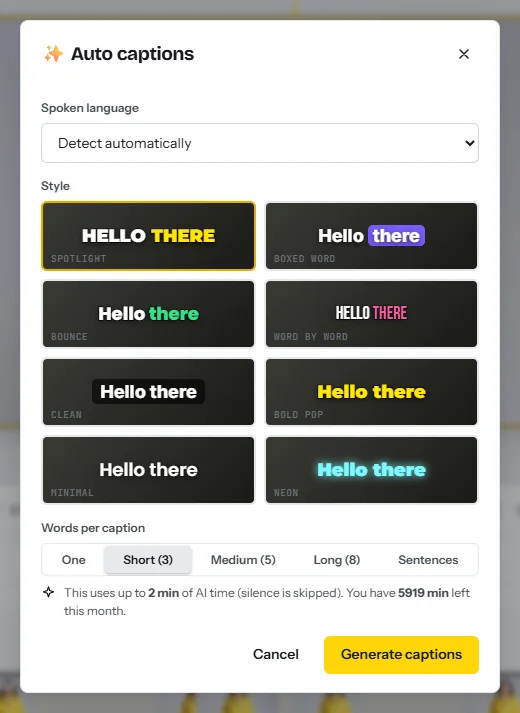
- Caption the speechIn the Text tab, open Auto captions, set the spoken language, choose a style and generate. Auto captions use about one AI minute per minute of speech.
- Correct the source and list the termsFix names, numbers and technical terms in every caption: a mistake here is copied into all three languages and both dubs. List the words that must not be translated, for your reviewers.
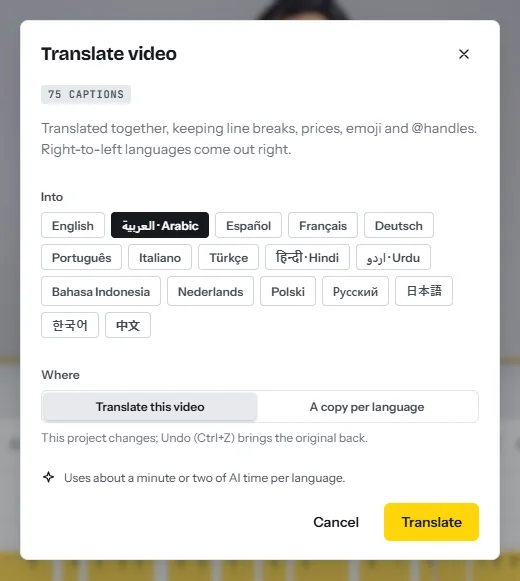
- Translate into three copiesIn the AI tools tab, click Translate the whole video. The dialog shows how many texts and captions it found. Tick Spanish, French and Arabic and choose A copy per language. You get three projects named by language, for a minute or two of AI time each, and the original does not change.
- Check each copy on the canvasPlay each copy. Translated lines are often longer, so shorten titles that now touch the edge or cover a face. Prices, numbers and @handles are kept for you.
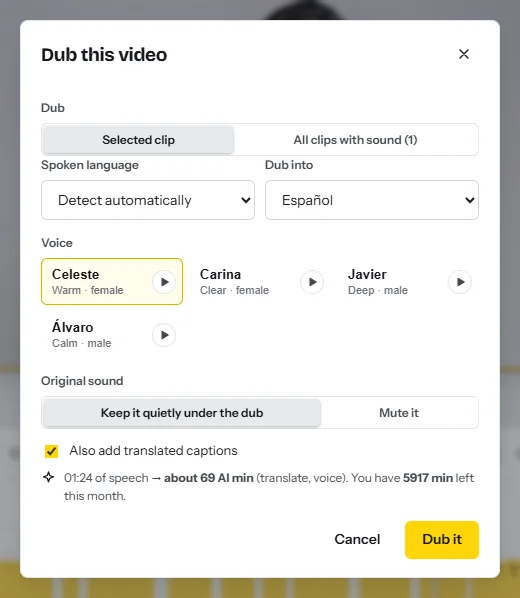
- Dub the Spanish copyPress Ctrl+K and choose Dub into another language. Set Dub into to Español and pick one of the four voices from the previews. Under Original sound, choose Keep it quietly under the dub or Mute it. Untick Also add translated captions: this copy already has them.
- Listen for trimmed linesEach sentence starts where the speaker started it, may run into the next pause, and is only hurried up to 1.25× before it is trimmed. Where an ending is cut, shorten the line and speak it again with AI voiceover.
- Dub French, then judge itRepeat with Français, which has one basic voice. If it does not suit the brand, use Remove the dub and deliver French with captions and on-screen text only.
- Check the Arabic copyArabic keeps the original voice. Captions and titles change to an Arabic typeface and run right to left. Check the lines that mix Arabic with English words or digits; the Arabic subtitle generator page and how to add Arabic subtitles list what to look for.
- Send each version to a native speakerShare a link to each copy, with the term list, and ask for wrong meaning, names, tone and humour. The dub is translated by sentence and the captions by line, so the wording can differ: have both checked.
- Write titles and descriptionsOpen the publish kit in each copy and set Write it in to that language: five titles and a description with chapters for about one AI minute. For a language missing from its list, translate by hand.
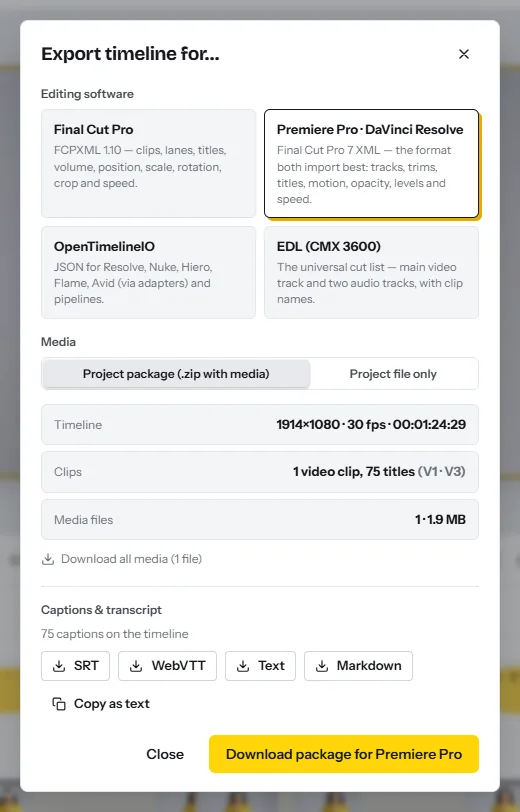
- ExportClick Export for one MP4 per language with the captions burned in. On a paid plan, press Ctrl+K and choose Export captions as SRT / VTT / transcript to download each subtitle file.
Checks before you deliver
- Numbers. Prices, dates and units match the corrected original in every version.
- Voice and text agree. The dubbed line and its caption say the same thing, and no sentence is cut mid-word.
- Phone test. Watch the first minute of each MP4 on a phone, muted and then with headphones.
Two extras: the templates include layouts written in 15 languages, such as Arabic and Spanish, and the editor’s menus come in 8 languages.
How to publish translated videos on YouTube: tracks or a separate channel
One YouTube video can carry several subtitle tracks and audio tracks, and viewers switch in the player settings6. The alternative is a separate video per language. The table holds what YouTube documents as of October 2026; you upload the files yourself.
| Method | What YouTube documents | Limit to know |
|---|---|---|
| Subtitle track | In Studio, under Subtitles, add a language and upload a file with timing8; .srt and .vtt are supported9 | An .srt file must be plain UTF-8, and style markup is not recognized9 |
| Your own audio track | In Studio, under Languages, add a language and upload an audio-only dub6 | Needs Advanced features11; roughly the same length as the video; delete an automatic dub in that language first6 |
| Automatic dub | Marked “auto-dubbed”; you can review, unpublish or delete it5 | Cannot be edited; videos over 120 minutes or with copyrighted content may be ineligible5 |
| Translated title and description | Can show up in search for viewers who speak that language7 | You supply the text |
| Separate channel | YouTube calls multi-language audio a way to expand “without creating and managing multiple separate channels”6 | A new channel earns its feature access on its own11 |
Tracks change the sound and the subtitles, not the picture. A video with burned-in captions or text in the design still shows English words under a Spanish audio track, so upload those translated MP4s as separate videos. For a talking video without text, upload the clean original once and add subtitle files and, with Advanced features, your dubs.
Selling localization as a service: an example price list and a pitch
Good clients already have viewers abroad. YouTube says a creator is a good candidate for multi-language audio with viewership from several geographies or frequent comments in different languages6, so read a channel’s comments first. Course sellers (see how to create and sell an online course) and companies with training videos also buy.
| Package, per language | Example price | Published comparison |
|---|---|---|
| Captions only | $3 a video minute | Rev subtitles: $6.49 to $15.9916 |
| Captions and on-screen text | $5 a video minute | 3Play translation: $10.50 to $3617 |
| Full dub, English or Spanish voice | $12 a video minute | 3Play AI dubbing: $32 to $7417 |
| Subtitle file, translated title and description | $10 a video | None published |
| Minimum order | 5 video minutes | 3Play’s dubbing minimum is 5 minutes17 |
A 30-day plan
| Week | What to do | Output |
|---|---|---|
| 1 | Pick two languages you have a native reviewer for. Localize two of your own videos | Samples in two languages; your measured review time |
| 2 | Publish the samples with subtitle tracks. Write your price list | A sample link and a one-page price list |
| 3 | Find 30 channels or course sellers with comments in your languages; send 10 pitches a day | 30 pitches sent, replies logged |
| 4 | Do the free first minute for each reply, then the first paid job | One paid job delivered, a testimonial requested |
Risks, rules and mistakes
- Mistranslation. YouTube says even its own dubs have trouble with proper nouns, idioms and jargon5. Never deliver a language nobody on your side can read.
- Humour and culture. Jokes, slang, currencies, dates and units need rewriting, not correcting. Health, legal and financial videos need a professional translator.
- Rights. A translation or dub of someone else’s video is an adaptation of their work: get written permission and agree who owns the result. CutLuma’s link import asks you to confirm that you own the video, and YouTube may remove an audio track whose copyrighted content differs from the original6.
- Under-pricing and tax. A price below the reviewer’s fee plus your time loses money on every job. Ask a local accountant how to declare income from clients abroad.
FAQ
How do I translate a YouTube video into another language?
Caption it in the spoken language, correct it, translate the captions and on-screen text, and have a native speaker check them. Then upload the subtitle file as a language track, or the translated MP4 as a separate video if the picture contains text.
Which languages can CutLuma dub?
Six: English (thirteen voices), Spanish (four), and French, Chinese, Japanese and Korean with one basic voice each. Other languages, such as Arabic and Hindi, get translated captions and on-screen text over the original voice.
How much does it cost to translate or dub a video?
In October 2026, Rev lists translated subtitles at $6.49 to $15.99 a video minute16 and 3Play Media lists AI dubbing at $32 to $7417. In CutLuma the AI time for captions and text costs cents; the native reviewer is the main cost.
Does YouTube dub videos automatically?
Yes, for eligible creators: an English video can get automatic audio tracks in 20 languages, marked “auto-dubbed”. They cannot be edited5, and they change only the audio.
Should I start a separate channel for each language?
Only when the picture changes, for example burned-in captions or translated titles. Otherwise YouTube documents subtitle tracks and multi-language audio on one video6.
Can I translate someone else’s video and upload it?
Not without the owner’s written permission. A translation or dub is an adaptation of their work, and YouTube lists copyrighted content as a reason a video gets no automatic dub5.
Sources
- YouTube Blog — Unlock a world of viewers with multi-language audio (10 September 2025)
- YouTube Blog — MrBeast, now in Spanish! Say hello to multi-language audio on YouTube (23 February 2023)
- YouTube Blog — From X Factor to Jamie Oliver: How multi-language audio took 3 channels global (30 July 2024)
- YouTube Blog — Break down language barriers with auto dubbing on YouTube (10 December 2024)
- YouTube Help — Use automatic dubbing (2026)
- YouTube Help — Add Multi-language features to your videos (2026)
- YouTube Help — YouTube tools to translate your content (2026)
- YouTube Help — Add subtitles & captions (2026)
- YouTube Help — Supported subtitle and closed caption files (2026)
- YouTube Help — Disclosing use of GenAI content (2026)
- YouTube Help — Learn about feature access for YouTube Creators (2026)
- Ethnologue — What are the top 200 most spoken languages? The Ethnologue 200 (2026 list)
- W3Techs — Usage statistics of content languages for websites (13 October 2026)
- CSA Research — Consumers Prefer their Own Language: “Can’t Read, Won’t Buy – B2C” press release (7 July 2020)
- Streaming Media — 80% of Video Caption Users Aren’t Hearing Impaired, Finds Verizon (20 May 2019)
- Rev — Subscription plans and per-minute pricing (October 2026)
- 3Play Media — Pricing list (October 2026)
- Upwork — Translator hourly rates (October 2026)
The figures on this page are published ranges and worked examples, not promises of income. What you earn depends on your niche, your skills and how consistently you work. Platform rules and rates change: check the linked sources before you rely on a number.





