- Startup cost
- $12 a month, plus a microphone
- Income type
- Sponsors, platform shares, memberships, own offers
- Published ad rate
- $24 to $26 CPM, 60-second host read
- Weekly work
- About 4 hours per episode
- In January 2026, 58% of Americans aged 12 and over had consumed a podcast in the last month, and 57% had both listened to and watched one, up from 48% a year earlier12.
- US podcast advertising revenue reached $2.9 billion in 2025, up 17.6%, and that figure still counts audio only5.
- Host-read ads are listed at $24 to $26 CPM for 60 seconds and $18 to $22 for 30 seconds, against $12 to $15 for programmatic ads6.
- A 45-minute episode uses about 91 AI minutes in CutLuma, so a weekly show fits the $12 Pro plan.
Video podcasts in 2026: the audience and the ad money
A podcast is now a show that people listen to in one place and watch in another. Edison Research surveyed 2,050 Americans aged 12 and over in January 2026 for The Infinite Dial: 80% had listened to or watched a podcast at some point, and 45% had in the last week1.
- 2025
- 2026
Monthly use grew 3 points in a year; listening and watching grew 9.
Source: Edison Research, The Infinite Dial 2025 (5,020 people) and 2026 (2,050 people)12
YouTube reported more than 1 billion monthly viewers of podcast content in February 20254. Edison’s Podcast Metrics for the third quarter of 2026 ranks YouTube first among US weekly podcast consumers as the platform they use most, ahead of Spotify at 17% and Apple Podcasts at 9%3.
Data
| Revenue | |
|---|---|
| 2015 | $105.7M |
| 2016 | $169.1M |
| 2017 | $313.9M |
| 2018 | $479.1M |
| 2019 | $708.1M |
| 2020 | $842.3M |
| 2021 | $1,448.7M |
| 2022 | $1,825.3M |
| 2023 | $1,925.2M |
| 2024 | $2,433.1M |
| 2025 | $2,862.2M |
Source: IAB / PwC Internet Advertising Revenue Report, full year 20255
The IAB and PwC report says it still uses the audio-based definition of a podcast, while video is becoming the leading channel for podcast consumption5. Sponsor money is priced on audio downloads and the audience growth is in video; a show recorded on video can sell both.
How a video podcast makes money
Some income streams have an entry threshold stated on the platform’s own page. The others have none. Thresholds are as of October 2026.
| Income stream | How it pays | Audience needed |
|---|---|---|
| Host-read sponsor you sell yourself | Flat fee per episode, priced from a CPM6 | No fixed threshold |
| Libsyn Ads marketplace | It sells the ad; you keep 70%7 | 20,000 downloads per episode7 |
| Libsyn automatic ads | 50% share under 50,000 downloads a month, 60% above8 | No minimum downloads8 |
| Spotify Partner Program | 50% of ads Spotify sells, plus Premium video revenue9 | 3 episodes, 2,000 consumption hours and an audience of 1,000 on Spotify in 30 days9 |
| YouTube Partner Program | Share of ad and Premium revenue | 1,000 subscribers, plus 4,000 watch hours in 12 months or 10 million Shorts views in 90 days10. For channels applying from 1 February 2027: 8,000 hours or 20 million views15 |
| Memberships on Patreon | Monthly fees, less 10% and payment fees12 | No fixed threshold |
| Your own course, service or affiliate links | The sale, less payment fees | No fixed threshold |
What sponsors pay: published CPM rates
Podcast ads are priced per thousand downloads (CPM). Libsyn Ads publishes its rates and the formula: the downloads an episode receives in its first 30 days, times the CPM, divided by 1,0006. Its calculator uses $25 as the industry average6.
A host read is worth about twice a programmatic ad for the same downloads, so sell host reads first.
Source: Libsyn Ads, podcast advertising rates, 20266
Worked example: two ad slots at three audience sizes
Example: you sell a 60-second mid-roll at $25 CPM and a 30-second pre-roll at $20 CPM, both inside the published ranges6. You read the ads in the recording, so they play in the audio and in the video. Reach is the downloads plus the views one episode collects in 30 days; each price is reach × CPM ÷ 1,000.
| Downloads + views per episode | 60-second ad at $25 | 30-second ad at $20 | Per episode | Four episodes |
|---|---|---|---|---|
| 1,000 | $25 | $20 | $45 | $180 |
| 5,000 | $125 | $100 | $225 | $900 |
| 20,000 | $500 | $400 | $900 | $3,600 |
What the platforms pay
On YouTube, a podcast show is a playlist and each episode is a video in it; an MP3 cannot be an episode11. The videos earn through the YouTube Partner Program; the rates are in how much YouTube pays. Existing partners keep their status when the entry threshold rises on 1 February 202715. Fan funding opens earlier, at 500 subscribers plus 3,000 watch hours in a year or 3 million Shorts views in 90 days, and that tier is not changing15.
On Spotify, Premium members in the eligible markets see no inserted ads on a video episode, and you are paid from how much they stream, by a formula Spotify does not publish9. A stream counts after 60 seconds, and the episode needs at least one ad break9.
For offers of your own, see how to create and sell an online course and video affiliate marketing.
What you need and what it costs
- A microphone for each person, close to the mouth, in a quiet room.
- A webcam and light in front of you. Camera looks adjust the lighting before you record and add a name tag and your logo.
- Headphones for everyone on a call, so no microphone records the other voice as an echo.
- A computer with desktop Chrome, Edge, Brave or Firefox, and a podcast host for the audio feed. CutLuma makes the files; it does not host a feed or post for you.
The plan depends on AI time. For a 45-minute episode, the transcript uses about 45 AI minutes, Magic Clips about 45 and the publish kit about 1, because it reuses the transcript: about 91 in total.
Four episodes a month use about 364 AI minutes. That is more than the 300 in the $6 Starter plan and well inside the 1,200 in the $12 Pro plan, or $3 an episode. A show every two weeks fits Starter. The Free plan records and exports 1080p with a small watermark, with no AI time. See pricing.
Record the episode
CutLuma records one computer: your screen, your camera and your microphone. It is not a remote studio with a separate file for each guest. For a remote guest there are two ways.
- Record the call window. Run the call in a browser tab and record that tab with the screen recorder. One file, both faces, both voices, at the quality of the call.
- Each side records locally. You and the guest each use the webcam recorder, the guest sends the file, and you merge the two: better quality, more work.
- Start the call and put on headphonesOpen the call in a browser tab and set it to show both people side by side.
- Open the studio recorderIn the editor, open the Record tab and choose Studio recording. Keep Microphone on. Switch Camera bubble off if the call already shows your face, and switch off smart zoom, click highlights and silence removal. Choose 16:9.
- Share the call tab with its soundClick Choose what to record and pick the call’s tab. Turn on the browser’s share-audio switch, or the guest’s voice is not recorded. Whether the switch appears depends on your browser; sharing a tab is the option most likely to offer it.
- Test for ten secondsRecord, press Stop and play it: you must hear both voices.
- RecordClap once at the start as a sync point. Read the sponsor message in the conversation. Press Stop and the take lands on the timeline. Plan 60 minutes for a 45-minute episode.
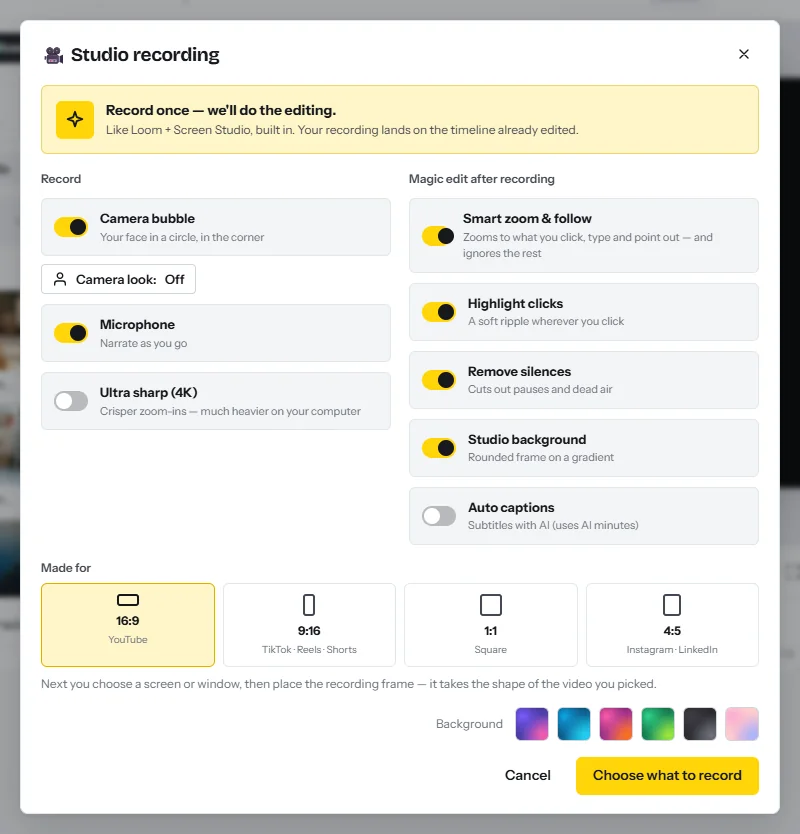
Edit the full episode in CutLuma
Plan about 60 minutes of work for a 45-minute recording. See also the podcast video editor page.
- Clean the sound (5 minutes)Select the recording and, in the clip settings, turn on Enhance voice and Reduce background noise.
- Transcribe (about 45 AI minutes)Open the Transcript tab (or press T), choose the language and press Transcribe. This is editing video as text.
- Run the clean-ups (10 minutes)Fillers removes um and uh, Pauses shortens pauses longer than a second, and Retakes drops a sentence said twice and keeps the last take.
- Read and cut (30 minutes)Select a tangent or a false start in the text and press Cut. It is removed from every track. Cut words stay struck through; Restore or Ctrl+Z brings them back.
- Add the intro and the episode card (10 minutes)Start with a 3 to 5 second intro from the YouTube intro templates, then a card with the topic and guest name from a template. Save both as your own template.
- Label the sponsor messageShow “Sponsored by” and the brand name on screen while you read the ad. On the intro music clip, turn on Lower under speech.
- ExportClick Export at 1080p. A long video renders in about its own running time.
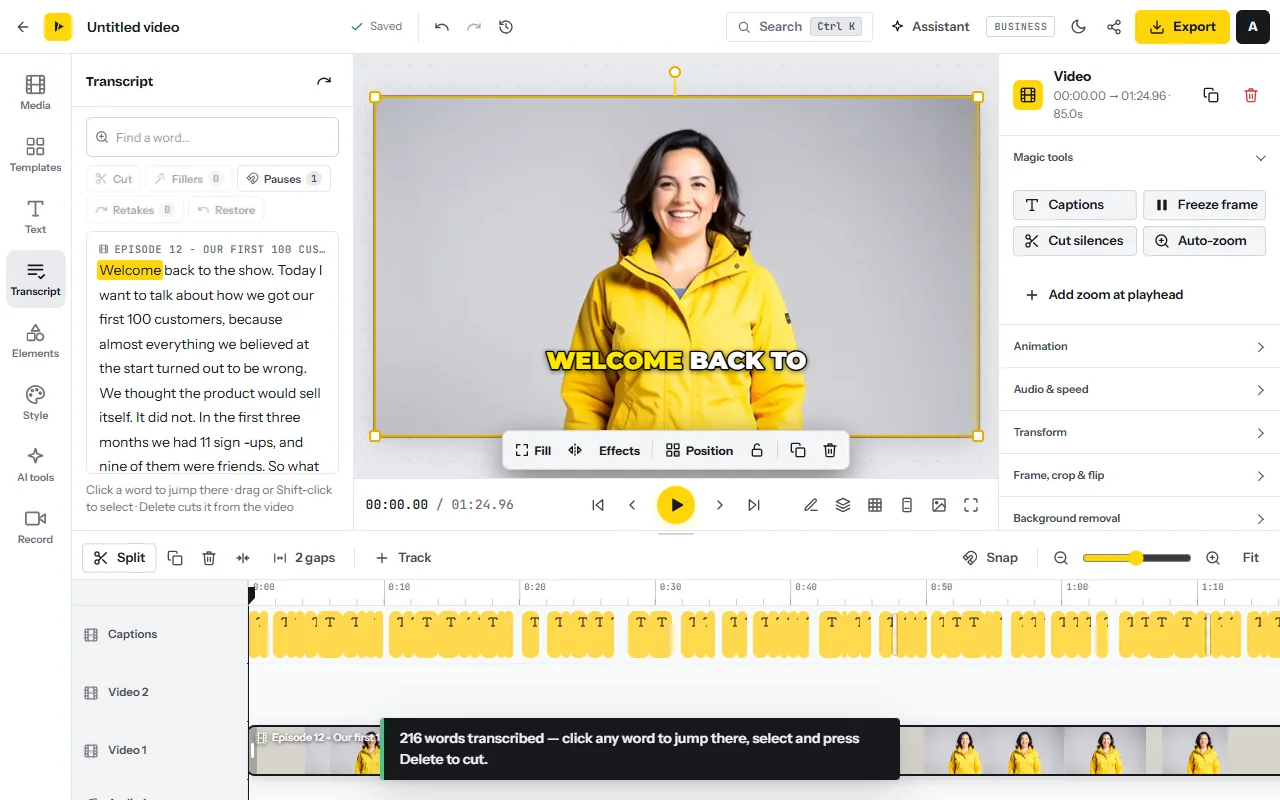
No AI time left? Remove silence is free: select the clip and press Cut silences under Magic tools. Before publishing, play every cut around the sponsor message and search the transcript for the guest’s name to fix its spelling.
Cut the clips: a plan for one episode
Magic Clips picks moments that work on their own, scores them and edits each one. Run it on the exported episode. Plan 45 minutes.
- Open Magic Clips with the exported episodeStart from the Magic Clips tool page and add the episode MP4. It needs a paid plan.
- Choose the whole episodeFor a long recording the dialog starts on the first 30 minutes. Press Whole video. The line at the bottom shows the AI time before you start.
- Set count, length and styleUnder How many clips? choose 10, under Clip length choose 30–60 s, and under Edit style choose Podcast. That style sets the Split screen layout, a hook headline, a progress bar and voice clean-up, without music, emoji or sound effects.
- Match the layout to your pictureKeep Split screen when two people are in the frame: each gets one half. Otherwise choose Fill; with Cut to whoever is talking ticked, the camera cuts to the speaker.
- Review by scorePlay each suggestion on its card, reject any that needs the rest of the episode to make sense, and open the best seven with New project.
- Make covers and exportPress Cover for a 9:16 cover and a 16:9 thumbnail from the best frame. Check names in the captions, then Export. For a square or 4:5 copy, use Resize video.
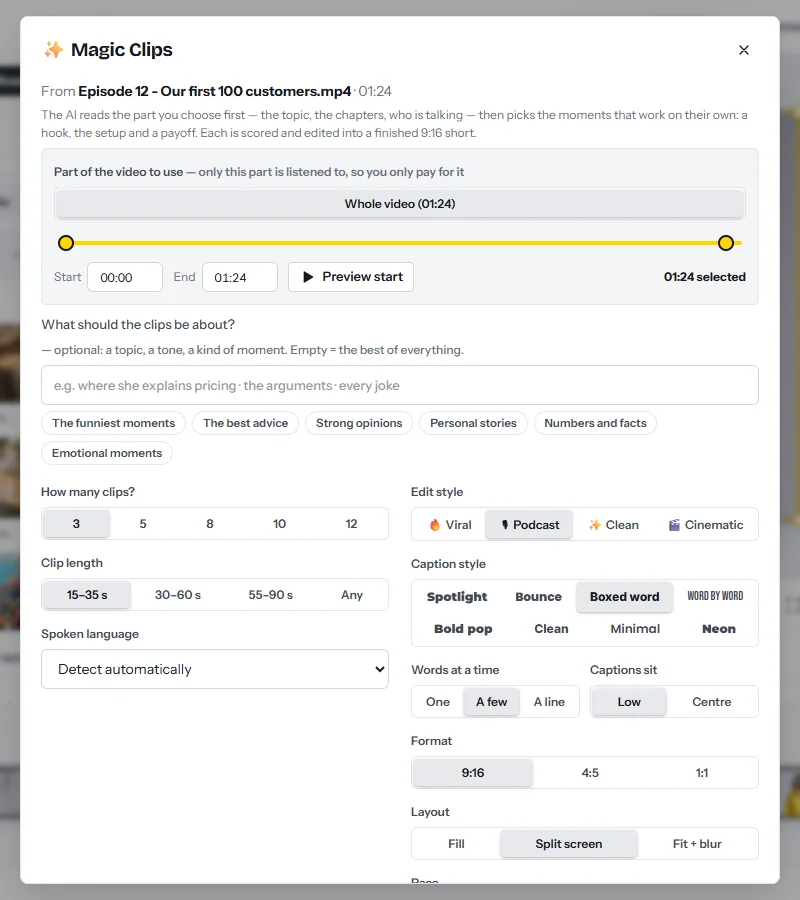
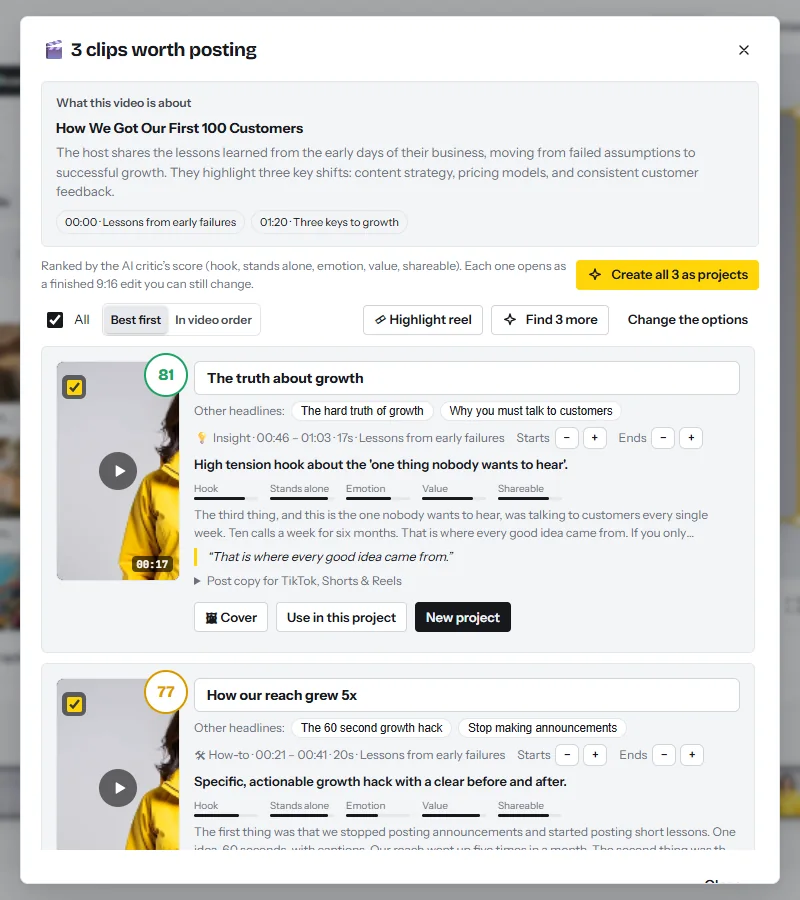
| Clips | Moment to pick | Format | Where and when |
|---|---|---|---|
| 1 teaser | The most surprising answer | 9:16 | Shorts, Reels, TikTok, the day before |
| 3 advice clips | One complete tip each | 9:16 | Shorts, Reels, TikTok, every second day |
| 1 story | A short story with an ending | 9:16 | Shorts, Reels, TikTok, mid-week |
| 1 opinion | A point people will argue with | 1:1 or 4:5 | LinkedIn and X |
| 1 guest clip | The guest’s best line | 4:5 | The guest posts it on launch day |
| 1 audiogram | An audio-only moment | 1:1 | Feed posts |
For the audiogram, the audio visualizer adds bars, a waveform, a circle or dots over your cover art; add auto captions on top.
CutLuma does not post or schedule: download each MP4 and upload it. Keep clips out of the podcast playlist, which YouTube reserves for full-length episodes11. See also how to start a clipping business and short video monetization.
Publish: titles, chapters, thumbnail and guest approval
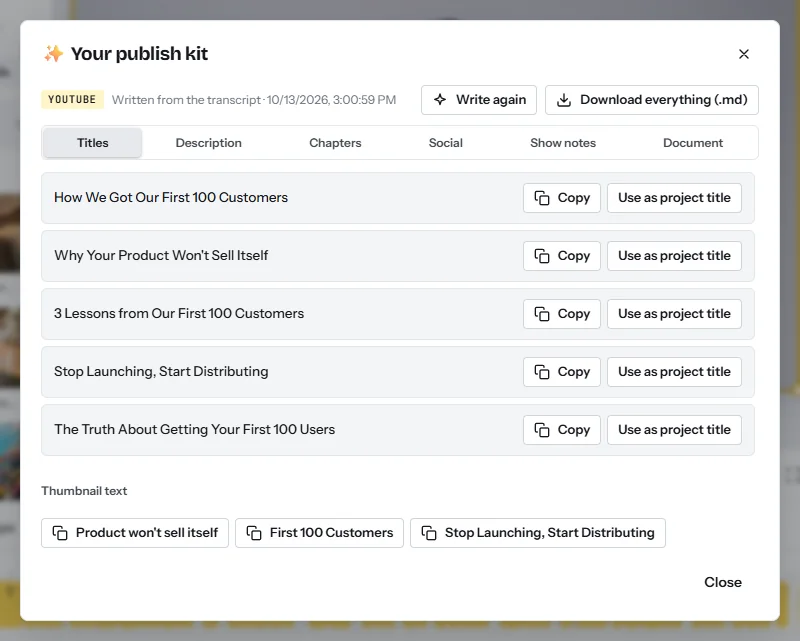
- Write the publish kit (about 1 AI minute)In the episode project, click the share icon next to Export and pick YouTube. The publish kit writes 5 titles, a description with chapters, hashtags, show notes, social posts and thumbnail text.
- Run it again for the audio feedPick Podcast and the show notes become the main result. Paste them into your podcast host.
- Send the guest a link to approveExport, create a share link, then press Put them on the share page in the kit’s chapters block. The guest jumps between chapters and leaves comments at exact times.
- Make the thumbnailUse the 16:9 thumbnail from a clip’s Cover button, or a template with the kit’s thumbnail text.
- Upload (30 minutes in all)Upload the MP4 to YouTube with the chapter list in the description, add it to the podcast playlist, and send the episode to Spotify through your host.
For teams that finish elsewhere: on a paid plan, the Export timeline for… link in the Export dialog writes the timeline for Premiere Pro, Final Cut Pro or DaVinci Resolve as a ZIP with the media, plus SRT and WebVTT captions. Keyframes, transitions, filters and design layers are not carried over.
Getting sponsors: the pitch email and the one-page media kit
A marketplace will not sell a small show: Libsyn’s asks for 20,000 downloads per episode7. Below that, sell directly to companies whose product you use, companies that advertise on shows in your subject, and your guests’ companies.
What goes on a one-page media kit
- The show in one sentence: who it is for and what an episode gives them.
- Downloads per episode in the first 30 days, averaged over five episodes. The published rates are based on this number6.
- YouTube views per episode in 30 days, given separately.
- Who listens: country, age and job, and where that data comes from.
- Ad formats and prices per episode, what else the sponsor gets, the date and your contact.
A sponsor pitch email you can copy
- Subject. “[Show] × [Brand]: a host-read ad for [3,000 independent dentists]”
- Opening. “Hi [Name], I host [Show], a weekly video podcast for [audience]. I have used [product] since [year].”
- Numbers. “Each episode reaches [X] downloads and [Y] YouTube views in its first 30 days (screenshots attached).”
- Offer. “I offer the mid-roll of four episodes in [month]: a 60-second message I read myself, your name on screen and your link in the description, for $[amount] per episode. That is a $25 CPM, in line with published host-read rates.”
- Close. “You approve the script before I record. Can I send two example reads this week?”
A 30-day plan for a new show
| Week | Do | Finished |
|---|---|---|
| 1 | Write the premise and ten topics. Book four guests. Build the intro and episode card. Record a test call. | Intro, card template, one test edit |
| 2 | Record and edit episodes 1 and 2. Create the YouTube podcast playlist and the audio feed. Publish both. | 2 episodes, 14 clips, 2 audiograms |
| 3 | Publish episode 3. Post a clip a day. Set up one membership tier or offer. List 30 sponsors. | 3 episodes, a sponsor list, one way to be paid |
| 4 | Publish episode 4. Write the media kit from real numbers. Send ten pitches. | 4 episodes, media kit, 10 pitches |
For other models, see how to make money with video.
Risks, rules and mistakes
- Guest release. Before recording, get written agreement that you may record, edit, publish, clip and use the guest’s name and picture. Approving a share link is not a release.
- Platform dependence. Spotify states that its eligibility criteria may change at any time9. Keep the feed with a host you control and collect email addresses.
- The wrong number. Sponsors buy downloads per episode in the first 30 days6, not subscribers. Never promise them sales.
- Under-pricing and tax. An episode is about four hours of work before any selling, and the income is taxable where you live.
FAQ
How many downloads do you need to get a podcast sponsor?
There is no fixed threshold when you sell the ad yourself. Libsyn’s marketplace asks for 20,000 downloads per episode; its automatic ads have no minimum78.
How much do podcast ads pay per 1,000 downloads?
Libsyn Ads lists $24 to $26 for a 60-second host-read ad, $18 to $22 for 30 seconds and $12 to $15 for programmatic ads6.
Does Spotify pay for video podcasts?
Yes. As of October 2026 the Spotify Partner Program asks for 3 episodes, 2,000 consumption hours and an audience of 1,000 on Spotify in the last 30 days. It pays 50% of the ads Spotify sells, and pays video by Premium streaming9.
Can you monetize a podcast on YouTube?
Yes. A podcast there is a playlist of videos11, and the videos earn through the YouTube Partner Program: 1,000 subscribers plus 4,000 watch hours or 10 million Shorts views today10, and 8,000 hours or 20 million views for channels applying from 1 February 202715.
Do I need video, or is audio enough?
Ad rates are priced on audio downloads, but 57% of Americans aged 12 and over have both listened to and watched a podcast1, and YouTube accepts only video11.
Can CutLuma record a remote guest?
It records one computer. Record the call window with tab audio on, or let each side record locally and merge the files.
Sources
- Edison Research at SSRS — The Infinite Dial 2026 (March 2026)
- Edison Research at SSRS — The Infinite Dial 2025 (survey of January 2025)
- Edison Research at SSRS — The Number 1 Podcast Platform, Edison Podcast Metrics Q3 2026 (October 2026)
- YouTube Official Blog — Celebrating 1 billion monthly podcast users on YouTube (February 2025)
- IAB / PwC — Internet Advertising Revenue Report, full year 2025 (April 2026)
- Libsyn Ads — Podcast advertising rates (2026)
- Libsyn Ads — For podcasters: marketplace requirements and revenue split (2026)
- Libsyn — Automatic Podcast Ads (2026)
- Spotify Support — Spotify Partner Program (2026)
- YouTube Help — YouTube Partner Program overview & eligibility (2026)
- YouTube Help — Create a podcast in YouTube Studio (2026)
- Patreon — Pricing (2026)
- US Federal Trade Commission — FTC’s Endorsement Guides: What People Are Asking
- YouTube Help — Add paid product placements, sponsorships & endorsements (2026)
- YouTube Help — Changes to the YouTube Partner Program (thresholds from 1 February 2027)
The figures on this page are published ranges and worked examples, not promises of income. What you earn depends on your niche, your skills and how consistently you work. Platform rules and rates change: check the linked sources before you rely on a number.





