- Startup cost
- $6 a month (Starter plan)
- Income type
- Monthly retainer, per clip, or per 1,000 views
- Published price per clip
- About $10 to $31
- Time per episode
- About 2.5 hours in the example
- YouTube Shorts average 200 billion daily views (2025), and Reels were 50% of Instagram time in April 202413.
- Published done-for-you plans cost about $10 to $31 a clip: $397 a month for 40 podcast clips, $495 for 16 short videos810.
- Whop put the average campaign payout at $1 per 1,000 views in 2025, so a $400 retainer equals 400,000 approved views12.
- Example: one weekly podcast client pays $400 for 32 clips, takes about 10 hours and uses 204 of the 300 AI minutes in the $6 plan.
- YouTube’s reused-content policy applies even with the creator’s permission, so work under contract for the owner instead of building a channel of other people’s clips13.
What a clipping business sells, and why there is demand
You sell attention the client already paid to record. A weekly show produces an hour of video that few people sit through; eight clips of 30 to 60 seconds put its best minutes in front of people who scroll. You find the moments, edit them for a phone screen and hand back files ready to upload.
Demand comes from the gap between wanting short video and having time for it. In Wyzowl’s 2026 survey, 69% of video marketers had made social media videos and 42% of businesses relied on outside video creators in some capacity5.
Two ways to be paid
- Clipping as a service. A show, coach, church or company gives you its recordings and pays per clip or a monthly retainer. The clips go on the client’s own accounts, and permission is part of the agreement.
- Clipping campaigns (content rewards). A brand funds a campaign and pays clippers per 1,000 views for clips posted on the clippers’ own accounts. There is no client to find, but income depends on views, approval and the budget.
This guide treats the service as the base, because its income can be calculated in advance. For the wider map, see how to make money with video.
What clip editors and clipping agencies charge
Plan pages publish real prices. The table shows five sources as of October 2026, in US dollars; the last column is division, not a quoted price.
| Source | What is sold | Published price | Per clip (arithmetic) |
|---|---|---|---|
| Clip Craft podcast plan10 | Up to 4 episodes a month, 10 clips each, plus a full edit | $397 a month | About $10 |
| Vidchops Weekly8 | 16 short videos a month, 3 revisions each | $495 a month | About $31 |
| Vidchops Pro8 | Up to 32 short videos a month | $995 a month | About $31 |
| Castos add-on9 | 4 clips of 15 to 45 seconds per episode | $990 a month | Depends on episodes |
| Fiverr guide, 20267 | Social media video, per finished minute | $10 to $100 a minute | $7.50 to $75 for 45 seconds |
| Upwork6 | Freelance editors by the hour | $6 to $25 typical; medians $10, $40 and $100 by tier | Depends on speed |
The cheapest plan sells forty clips at once: a bigger package means a lower price per clip.
Source: arithmetic from plan prices published by Clip Craft and Vidchops, October 2026810
Hourly marketplaces set the floor. Fiverr’s guide says a minute of finished video usually takes an editor one to two hours by hand7, so a client hiring at Upwork’s entry-level median of $10 an hour pays roughly $7.50 to $15 for a 45-second clip6. Win on speed, consistency and choice of moments, not only on price.
How pay-per-1,000-views clipping campaigns work
Whop’s Content Rewards is the best documented example; these rules come from its documentation and blog as of October 20261112. Other platforms set their own terms, so read them before you post.
- The brand sets the rate per 1,000 views, and a total budget11.
- Clipping is one campaign type: creators turn the brand’s videos or podcasts into short clips for TikTok, YouTube Shorts, X and Instagram Reels11.
- A minimum payout filters small clips. In Whop’s example, a $3 rate with a $6 minimum means only videos with 2,000 views reach the review queue11.
- A maximum payout caps big ones. A $3,000 maximum at a $3 rate stops a video earning at 1 million views11.
- You are paid after the brand approves the submission, according to its views11.
- $1 per 1,000 views (Whop average, 2025)
- $3 per 1,000 views (Whop documentation example)
Approved views only, before any cap.
Source: arithmetic from the rates in Whop’s blog and documentation1112
A $400 retainer for 32 clips equals 400,000 approved views at Whop’s 2025 average of $1 per 1,00012: 12,500 views for every clip, every month. One clip that travels can beat that; a month of ordinary clips will not.
Unit economics: one podcast client, worked through
Example: a weekly interview podcast, four 50-minute episodes a month, eight clips per episode for $400, a price between the plans above810. The hours are an assumption to replace with your own stopwatch; AI time and plan prices are CutLuma’s published figures.
| Item | Figure | How it is worked out |
|---|---|---|
| Clips | 32 a month | 4 episodes × 8 clips |
| Price | $400 a month | $12.50 a clip |
| Your time | 10 hours | 2.5 hours an episode: 15 minutes to run Magic Clips, 15 minutes a clip to review, correct and export, 15 minutes to deliver |
| AI time | 204 of 300 minutes | About one AI minute per minute of speech, plus 4 publish kits at about a minute each |
| Software | $6 | Starter plan |
| Left | $394 | About $39 per hour worked |
- Listening to 4 episodes200 min67%
- Publish kits4 min1%
- Left over96 min32%
Source: arithmetic from CutLuma’s published AI-time rates
Two clients of this size need 408 minutes, so move to Pro at $12 a month: its 1,200 AI minutes cover five such clients, or $2,000 a month for about 50 hours. These are sums from the example, not a forecast.
What you need and what it costs
- A desktop browser. The editor runs in desktop Chrome, Edge, Brave and Firefox.
- A paid plan. Magic Clips and auto captions are AI features and the Free plan has no AI time. Starter is $6 a month and Pro $12; a year costs ten months (pricing).
- The recording, with permission. A file from the client or a link to their published video; link import asks you to confirm you own it or have permission.
- Your own invoicing. CutLuma does not invoice or handle payments between you and a client.
The workflow in CutLuma: one episode to eight delivered clips
Three stages: set up the client once, let Magic Clips find and build the clips, then check and deliver them like an editor.
- Save the client’s brand kitIn the Brand kit panel, upload the logo, set the colours and font and click Save brand kit. The kit holds one brand, so change it before another client’s batch.
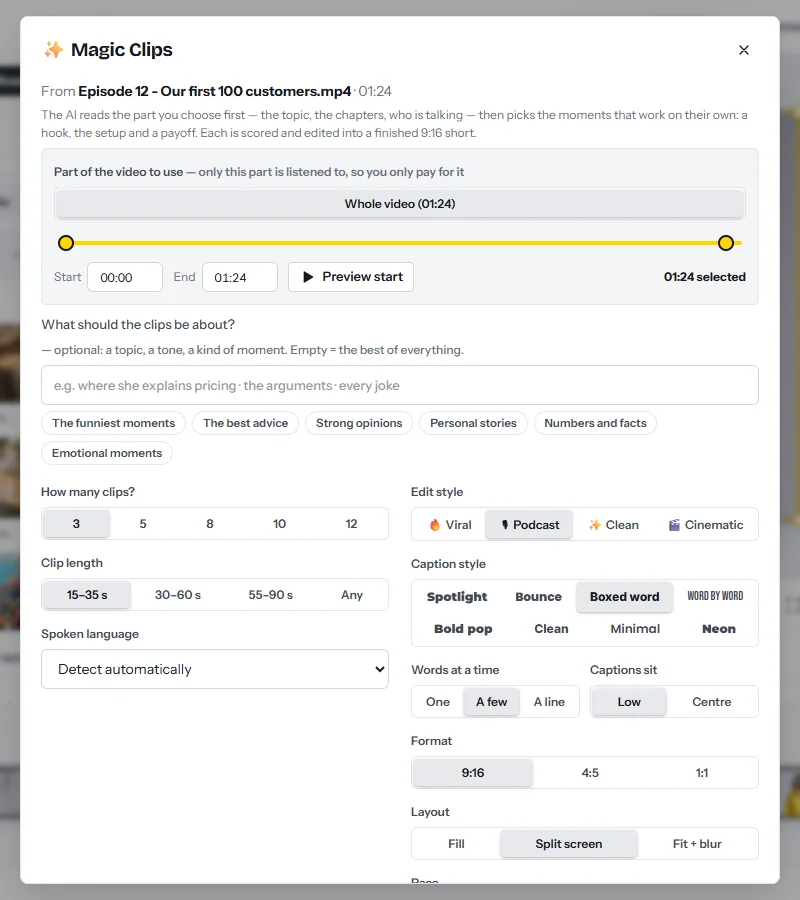
- Bring the episode inDrop the file into Magic Clips, or paste the client’s link in YouTube to shorts; TikTok, Vimeo, X, Instagram and Facebook links work too. Tick I own this video or have permission to use it. Videos can be up to three hours long.
- Choose the part to listen toUnder Part of the video to use, pick Whole video or a preset such as First 30 min, drag the handles or type the times. Long recordings start on their first 30 minutes, so widen the range. The bottom line shows the AI minutes the run needs and how many you have left.
- Set number and lengthUnder How many clips? choose 8 (3, 5, 8, 10 or 12). Under Clip length choose 30–60 s (or 15–35 s, 55–90 s or Any).
- Pick the edit styleViral, Podcast, Clean or Cinematic sets every switch at once; you can still change any of them. The table below describes the first three.
- Set format and layoutFormat is 9:16, 4:5 or 1:1. Layout is Fill (crop to the speaker), Split screen (two people, one half each) or Fit + blur (the whole picture, right for slides and screen shares). Tick My brand kit for the logo, colours and font.
- Run itClick Find the best clips. Magic Clips listens, maps the topic and speakers, finds moments with a hook, a setup and a payoff, and scores each one. An hour-long video takes a few minutes.
| Edit style | Captions and look | Layout and pace | What it adds |
|---|---|---|---|
| Viral | Spotlight, Punchy | Fill, Snappy 1.1× | Cold open, hook headline, payoff zooms, emoji and big-number pop-ups, sound effects, music, AI pictures, end card |
| Podcast | Boxed word, Natural | Split screen, Normal | Hook headline, coloured key words, big-number pop-ups, progress bar; no music or emojis |
| Clean | Clean, Natural | Fill, Normal | Captions only |
All four styles keep the speaker in frame, cut to whoever is talking, cut pauses and remove filler words. For client work, Podcast and Clean are the safer defaults: AI pictures use extra AI time, and music and emojis are a matter of taste. Split screen needs two people in the shot. Outside Magic Clips, Auto reframe does the same camera work on any wide video.
Review, package and deliver
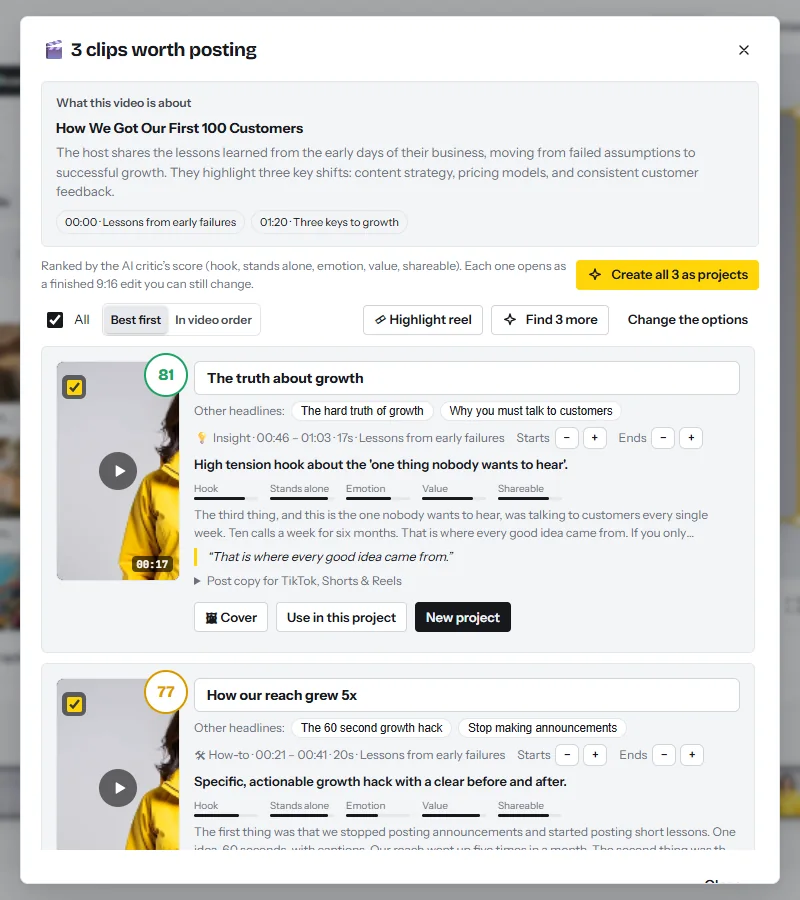
- Read the scores, then listenClips are listed best first, each with a score out of 100 and five bars: Hook, Stands alone, Emotion, Value, Shareable. Play every one on its card. The score is a filter; your ear decides.
- Build the projectsFix the headline in its field (Other headlines offers two more), then click New project, or Create all 8 as projects. Each build reframes on the speaker, cuts the pauses and adds word-by-word captions with key words coloured.
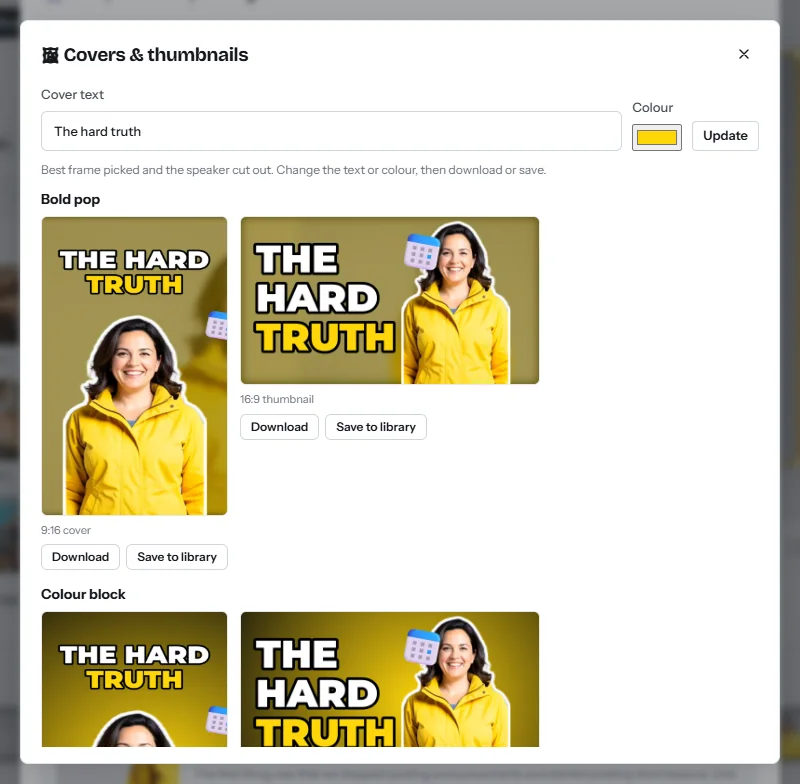
- Make the coverClick Cover: the best frame is picked, the speaker is cut out, and three designs (Bold pop, Colour block, Clean frame) come as a 9:16 cover and a 16:9 thumbnail.
- Correct each clipOpen the project and click any caption to fix a name or a number, as with auto captions. Drag a clip edge to give a sentence more room.
- Copy the post textPost copy for TikTok, Shorts & Reels gives a Shorts title and a caption with hashtags. For the full episode, the publish kit writes titles, a description with chapters and show notes for about one AI minute.
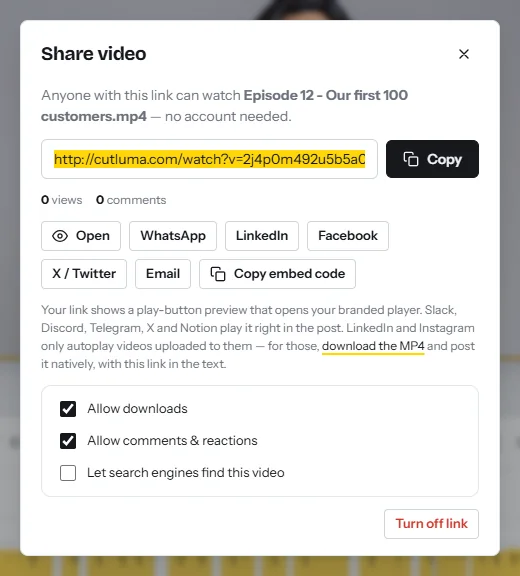
- Export and send for reviewClick Export (1080p on Starter, up to 4K on Pro), then Get share link. In Share video, keep Allow comments & reactions on so the client can answer on the page; Allow downloads decides when they can take the file.
- Make other formatsPress Ctrl+K and choose Copy into other sizes, or use Resize video. Check framing and captions before exporting again.
Quality checks before you deliver
- First sentence. A claim, a question or a story, with no “as I said” in front.
- Names and numbers. Read every caption once; transcription gets these wrong most often.
- Framing. The face is in frame in every cut and captions sit above the bottom fifth of the screen (safe zones).
- Meaning. The cut must not change what the guest meant.
- File. 1080 × 1920 pixels for 9:16, named by episode and clip number.
CutLuma does not post or schedule: you deliver MP4 files and post text, and the client uploads them. The manual method is in how to turn a long video into shorts.
How to get your first clipping clients
Look for people who publish long video every week and post few clips: video podcasts, coaches who run webinars, churches that stream services, founders who give talks, streamers. They already have the recording habit, and a weekly show is four episodes a month.
Do not clip a stranger’s episode to pitch them. Ask first and make the sample with permission. Copy this and fill in the brackets:
- “Hi [name], I watched [episode title]. The part at [timestamp] where [guest] explains [point] would work as a 40-second vertical clip.”
- “I cut long episodes into captioned clips for Shorts, Reels and TikTok. May I cut two sample clips from that episode? I will send them by private link and will not post them anywhere.”
- “If you like them, I deliver eight clips per episode within 48 hours of release for a fixed monthly price. If not, the samples are yours to keep. [Your name], [link to three clips you made]”
Send it where the host reads messages: the business email on the channel’s About page, LinkedIn, a direct message. Write each one by hand and follow up once after a week. Rules on unsolicited commercial email differ by country, so say who you are and stop when asked. No reliable reply rate is published for this; count your own.
After a yes, deliver the samples within two days by share link and offer a paid first month. Next steps: the social media video agency playbook, and how to monetize a video podcast for the business from your client’s side.
A 30-day plan
| Days | What you do | Output |
|---|---|---|
| 1 to 7 | Start the Starter plan. Record a 15-minute talk of your own, or get written permission for a friend’s episode, and run Magic Clips in all three styles. | 3 portfolio clips on share links |
| 8 to 14 | List 40 shows that publish weekly and post few clips, with one strong moment and its timestamp for each. | A sheet of 40 contacts |
| 15 to 21 | Send 8 hand-written messages a day for five days. Cut two samples within 48 hours for every yes. | 40 messages sent, samples delivered |
| 22 to 30 | Offer the monthly package, sign a one-page agreement and deliver the first paid episode with a stopwatch running. | 8 clips delivered and your real minutes per clip |
Risks, rules and mistakes
Permission comes first
A clip is a copy of someone else’s recording. The U.S. Copyright Office says unauthorized use can lead to an infringement action, that no rule permits a set number of words or a percentage of a work, and that permission is the recommended route in cases of doubt18. YouTube adds that giving credit does not by itself make a copy fair use20.
Put four things in a one-page agreement: the client’s permission to copy and edit recordings they own; the scope (clips per episode, format, turnaround, revision rounds); who owns the clips and your right to show them as samples; and when you are paid.
Reused-content rules on each platform
These rules matter most to campaign clippers, who post other people’s footage on their own accounts. A client posting clips of their own show made the content.
| Platform | What the rule says (October 2026) | What it means for a clipper |
|---|---|---|
| YouTube13141521 | Repurposed content cannot be monetized without substantive changes, even with the original creator’s permission; non-original Shorts are not counted for revenue sharing. Creators keep 45% of allocated Shorts revenue. The Shorts route into the Partner Program needs 1,000 subscribers and 10 million Shorts views in 90 days today, and 20 million for channels applying from 1 February 2027. Existing partners keep their status, but earning from the Shorts pool each month takes 10 million views over the last 90 days. | Do not plan on ad revenue from a channel of other people’s clips. |
| TikTok16 | The Creator Rewards Program needs 10,000 followers and 100,000 views in 30 days, and rewards original videos over one minute. Content copied from others is ineligible. | Reposted clips are unlikely to earn rewards. |
| Facebook17 | Meta said in March 2026 that minor edits to another creator’s post (borders, captions, a speed change) count as unoriginal; such accounts may be shown less and demonetized. | Captions on a repost are not enough. |
Pricing mistakes
- Charging $5 a clip. At 15 minutes a clip that is $20 an hour before revisions, messages and unpaid samples. Published plans start near $1010.
- Unlimited revisions. Name the number of rounds; one published plan gives three per video8.
- Selling views. You control the edit, not the algorithm. Promise clips, dates and quality.
Clipping money is business income: keep invoices and check the tax rules where you live. For what platforms pay for short video directly, read short video monetization.
FAQ
How much should I charge per clip?
Published plans in October 2026 work out at about $10 to $31 a clip810. A monthly package at $12 to $15 a clip sits inside that range.
How much do clipping campaigns pay per 1,000 views?
The brand sets the rate. Whop said in March 2025 that its clippers averaged $1 per 1,000 views12; at that rate 100,000 approved views pay $100.
Is it legal to clip someone else’s video?
Only with the owner’s permission or a contract, unless an exception such as fair use applies, which is decided case by case. Giving credit is not a substitute1820.
Can I monetize a YouTube channel of other people’s clips?
Not reliably. YouTube’s reused-content policy applies even when the original creator gave permission13.
Which CutLuma plan do I need?
Starter at $6 a month covers one weekly client: four 50-minute episodes use about 200 of its 300 AI minutes. Pro at $12 has 1,200 minutes and 4K export.
Does CutLuma post the clips for me?
No. You export MP4 files and copy the post text; you or the client upload them.
Sources
- YouTube Blog — Neal Mohan at Cannes Lions 2025 (18 June 2025)
- YouTube Blog — YouTube CEO Neal Mohan’s 2026 letter (21 January 2026)
- Meta Platforms — First Quarter 2024 earnings call transcript (24 April 2024)
- TikTok Newsroom — 1 billion people on TikTok (27 September 2021)
- Wyzowl — Video Marketing Statistics 2026 (266 respondents, late 2025)
- Upwork — How much does hiring a video editor cost? (viewed October 2026)
- Fiverr Guides — How much does a video editor cost (3 August 2026)
- Vidchops — Pricing plans (viewed October 2026)
- Castos — Short video clips, Productions add-on (viewed October 2026)
- Clip Craft on Whop — Podcast Repurposing Plan (viewed October 2026)
- Whop Docs — Content Rewards (viewed October 2026)
- Whop Blog — Content Rewards: grow your brand without wasting money or time (3 March 2025)
- YouTube Help — YouTube channel monetization policies: reused content (2026)
- YouTube Help — YouTube Shorts monetization policies (2026)
- YouTube Help — YouTube Partner Program overview & eligibility (2026)
- TikTok Creator Academy — Creator Rewards Program (updated 11 September 2026)
- About Meta — Rewarding Original Creators on Facebook (March 2026)
- U.S. Copyright Office — FAQ: Can I use someone else’s work? (fair use)
- YouTube Help — Learn about Content ID claims (2026)
- YouTube Help — Fair use on YouTube (2026)
- YouTube Help — Changes to the YouTube Partner Program (from 1 February 2027)
The figures on this page are published ranges and worked examples, not promises of income. What you earn depends on your niche, your skills and how consistently you work. Platform rules and rates change: check the linked sources before you rely on a number.





