- Share of long-video ads
- 55%
- Share of the Shorts pool
- 45%
- Ads threshold, October 2026
- 1,000 subscribers + 4,000 hours
- New creators from February 2027
- 1,000 subscribers + 8,000 hours
- First payout
- At a $100 balance
- The creator keeps 55% of long-video ad revenue, 45% of their Shorts pool allocation and 70% of memberships and Supers4.
- Ads need 1,000 subscribers and 4,000 watch hours in 12 months; new creators need 8,000 hours from 1 February 202713.
- Fan funding opens at 500 subscribers with 3,000 watch hours, and that tier is not changing23.
- Revenue is views ÷ 1,000 × RPM: at example RPMs of $2, $5 and $10, 100,000 long-video views are worth $200, $500 and $1,000.
- Watch time in the Shorts feed does not count towards the long-video threshold, so Shorts bring viewers and long videos earn1.
How YouTube pays creators: the shares in one picture
YouTube does not pay a wage or a fixed price per view. It collects money from advertisers, Premium subscribers and fans, and passes a contractual share of each to the channel. In January 2026 its CEO wrote that YouTube had paid over $100 billion to creators, artists and media companies in four years10, and YouTube counts more than three million people earning through the platform11.
Source: YouTube Help, partner earnings overview, read October 20264
Of the partner channels that earned five figures or more in US dollars in 2024, over 50% earned revenue from sources other than ads and YouTube Premium11. So the model here has three lines: long videos, Shorts and fans. How to make money with video covers the other models.
YouTube Partner Program thresholds in 2026 and the February 2027 change
The YouTube Partner Program has two doors. The expanded tier opens fan funding early, in the countries YouTube lists for it2. The full tier adds ad and Premium revenue1, and its numbers change for new creators on 1 February 20273.
| Tier | Subscribers | Long-video route | Shorts route | What it opens |
|---|---|---|---|---|
| Expanded tier | 500, plus 3 public uploads in 90 days | 3,000 watch hours in 12 months | 3 million Shorts views in 90 days | Memberships, Supers, Shopping for your own products2 |
| Full tier, October 2026 | 1,000 | 4,000 watch hours in 12 months | 10 million Shorts views in 90 days | Ad and Premium revenue1 |
| Full tier, new creators from 1 February 2027 | 1,000 | 8,000 watch hours in 365 days | 20 million Shorts views in 90 days | Ad and Premium revenue3 |
You need the subscribers and one route, not both. Only public long videos give qualified watch hours: private, unlisted and deleted videos, ad campaigns and the Shorts feed do not count1. You also need an eligible country, no active Community Guidelines strikes, 2-Step Verification and an AdSense for YouTube account; review typically takes about a month1.
To stay in, keep publishing: YouTube may turn off monetization after six months without an upload or post1.
Every YouTube income stream and who qualifies
| Income stream | What the creator keeps | Who qualifies |
|---|---|---|
| Ads on long videos and live streams | 55% of net ad revenue4 | Full tier; advertiser-friendly content7 |
| Ads in the Shorts feed | 45% of your allocation from the Creator Pool5 | Full tier; from February 2027, 10 million Shorts views in 90 days to earn each month3 |
| YouTube Premium | Part of a subscriber’s fee when they watch you7 | Full tier2 |
| Channel memberships | 70% of net revenue4 | Expanded tier, aged 18 or over, supported country7 |
| Super Chat, Super Stickers, Super Thanks | 70% of net revenue4 | Expanded tier, aged 18 or over, supported country7 |
| Shopping: your own products | The sale happens in your own connected store | Expanded tier; channel not made for kids27 |
| Shopping: affiliate | A commission set by each brand or retailer8 | In the programme, in a listed country, not a music channel8 |
Mid-roll ads are available only on monetized videos of 8 minutes or longer16, so a 7-minute and a 9-minute video are different products.
The affiliate programme covers 14 countries, among them the United States, India, Japan, Brazil and Mexico; commissions arrive 60 to 120 days after the purchase and are reversed on a return8. Video affiliate marketing covers that model.
Payment goes through AdSense for YouTube. A month’s earnings reach your balance between the 7th and 12th of the next month and are paid between the 21st and 26th, once the balance reaches the payment threshold4: $100, €70 or £609.
RPM and CPM: how views turn into money
- CPM is the cost an advertiser pays for 1,000 ad impressions, before YouTube’s share and only on views that showed an ad6.
- RPM is what you earned per 1,000 video views, after YouTube’s share, counting every view and adding Premium, memberships and Supers6.
- RPM is the lower number, because it comes after the share and divides by all views6. Forecast with RPM.
To find yours, sign in to YouTube Studio, select Analytics in the left menu and Revenue in the top menu; the content performance report includes RPM22. YouTube publishes no RPM by niche or country, and the lists online do not say who measured them, so this guide quotes none.
A worked model: revenue at three example RPMs
The formula is views ÷ 1,000 × RPM. The RPMs below, $2, $5 and $10, are examples that show the arithmetic, not averages or forecasts. Replace them with the RPM from your own Revenue tab22.
| Long-video views a month | At $2 RPM | At $5 RPM | At $10 RPM |
|---|---|---|---|
| 10,000 | $20 | $50 | $100 |
| 50,000 | $100 | $250 | $500 |
| 100,000 | $200 | $500 | $1,000 |
| 1,000,000 | $2,000 | $5,000 | $10,000 |
- Example RPM $2
- Example RPM $5
- Example RPM $10
Data
| Example RPM $2 | Example RPM $5 | Example RPM $10 | |
|---|---|---|---|
| 10k views | $20 | $50 | $100 |
| 50k | $100 | $250 | $500 |
| 100k | $200 | $500 | $1,000 |
| 250k | $500 | $1,250 | $2,500 |
| 500k | $1,000 | $2,500 | $5,000 |
Arithmetic from the formula above; the RPMs are examples
Shorts are paid from a pool
A Short has no ad of its own. Each month the revenue from ads between Shorts is pooled, music licensing is paid, and the remaining Creator Pool is divided by each creator’s share of engaged views in each country; you keep 45% of your allocation5. YouTube’s illustration: a country earns $100,000; the Creator Pool is $90,000; a Short with 1 million engaged views is 1% of it, $900; the creator keeps $4055.
| Engaged Shorts views | At $0.05 per 1,000 | At $0.15 per 1,000 | At $0.40 per 1,000 |
|---|---|---|---|
| 100,000 | $5 | $15 | $40 |
| 1,000,000 | $50 | $150 | $400 |
| 10,000,000 | $500 | $1,500 | $4,000 |
The $0.40 column matches YouTube’s illustration5; the lower two are placeholders, because the pool differs by country and month. From 1 February 2027 a channel also needs 10 million qualified Shorts views in the last 90 days to earn from the pool each month; missing that does not affect long-video earnings3.
Even at the rate in YouTube’s illustration, a Short needs 5 to 25 times the views of a long video.
Arithmetic: $100 ÷ rate × 1,000; threshold from YouTube Help9
The first 4,000 watch hours: how many videos it takes
Watch hours are views × minutes watched per view, and minutes per view are video length × the share people watch. YouTube Studio shows average view duration in each video’s retention report18. The retention figures below are examples; 4,000 hours is 240,000 minutes and 8,000 hours is 480,000.
| Video length | Example retention | Minutes per view | Views for 4,000 hours | Views for 8,000 hours |
|---|---|---|---|---|
| 8 minutes | 40% | 3.2 | 75,000 | 150,000 |
| 8 minutes | 50% | 4.0 | 60,000 | 120,000 |
| 12 minutes | 40% | 4.8 | 50,000 | 100,000 |
| 12 minutes | 50% | 6.0 | 40,000 | 80,000 |
| 20 minutes | 35% | 7.0 | 34,286 | 68,571 |
| 20 minutes | 45% | 9.0 | 26,667 | 53,333 |
Example plan: one 12-minute video a week is 52 videos a year. At 50% retention, 4,000 hours needs an average of about 770 views per video inside the 12 months, and 8,000 hours about 1,540. At 40% retention it is about 960 and 1,920. Only the last 12 months count1. For narrated videos, see how to start a faceless YouTube channel.
- Retention is the cheapest lever. From 40% to 50% on a 12-minute video, you need 20% fewer views with no extra filming.
- Length helps only if people stay. Twenty minutes at 35% gives 7 minutes a view; a tight 12 minutes at 60% gives 7.2.
The CutLuma workflow: one long video that the maths rewards
Each group of steps moves one number in the model: watch hours, views, or the session, meaning how many of your videos one visit includes. Free exports carry a small watermark, so a channel wants Starter at $6 a month: no watermark and 300 minutes of AI time (pricing).
Cut for watch time
- Open and transcribeDrop the recording into the editor; a new project starts at 16:9, 1920×1080. Press T to open the Transcript panel and click Transcribe. Edit video as text works in 17 languages, and the transcript stays on the clips, so you pay for it once.
- Remove retakes, fillers and pausesClick Retakes, Fillers, then Pauses. Each shows a preview first: a sentence said twice keeps the last take, and pauses longer than a second shrink to a beat.
- Delete what does not serve the titleSelect a tangent in the text and press Delete; it is cut from every track. Restore or Ctrl+Z brings it back.
- No AI time? Cut pauses for freeSelect the clip and press Cut silences under Magic tools in the right-hand panel. Remove silence runs on your device and cuts pauses of about 0.7 seconds or more.
- Fix the openingStart with what the viewer will get. For branding, make a 3 to 5 second sting with the YouTube intro maker and place it after the first line.
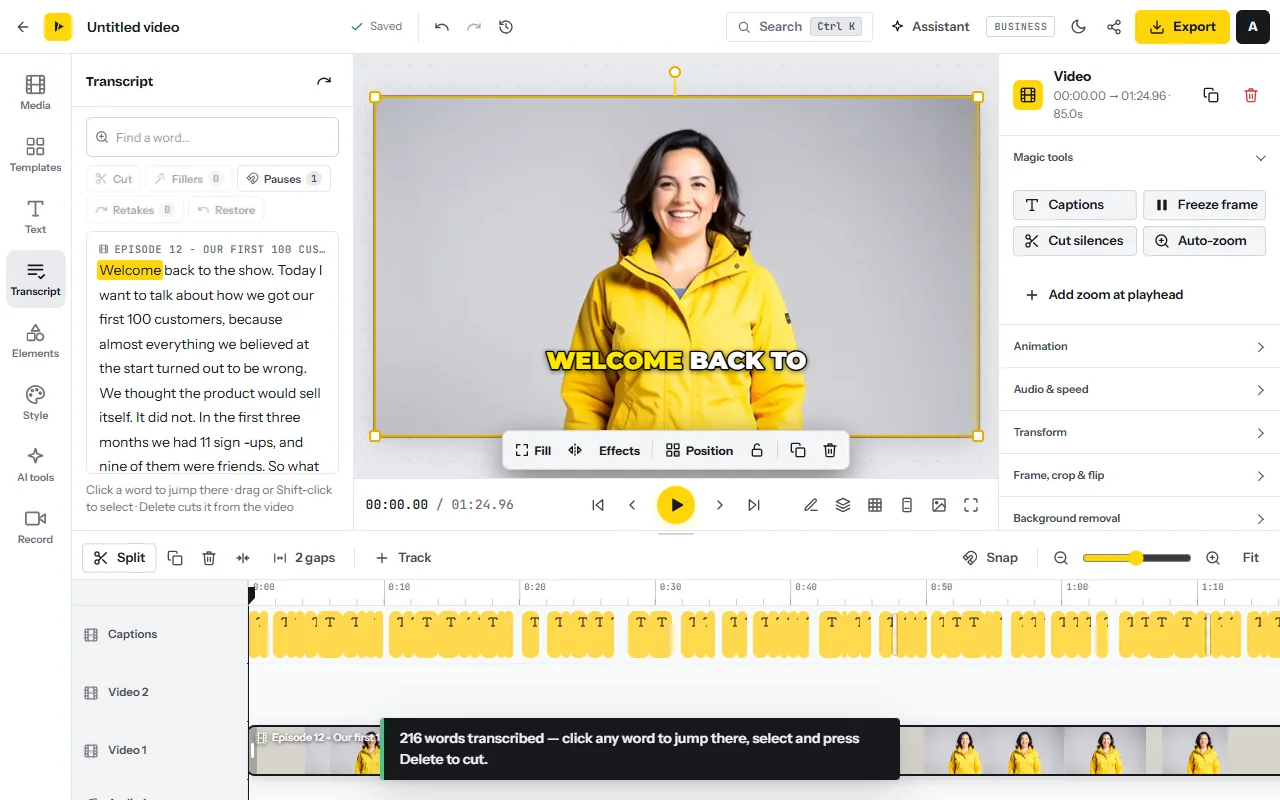
Why: YouTube’s retention report shows the percentage still watching after the first 30 seconds, and dips where viewers skipped or stopped18. After each upload, find the dips and cut that kind of passage from the next video. Watch the length: trimming a 9-minute video to 7 gives up mid-rolls16.
Package it: title, description and chapters
- Open the publish kitClick the share icon next to Export, choose YouTube under “Where will it go?” and click Write the publish kit. The publish kit reuses the transcript and costs about one AI minute.
- Choose a titleThe Titles tab gives five. Pick the one that states the result and click Use as project title.
- Copy the description and chaptersThe Description tab holds the description with chapters in m:ss form. On the Chapters tab, click Mark them on the timeline and check that each starts where the topic changes.
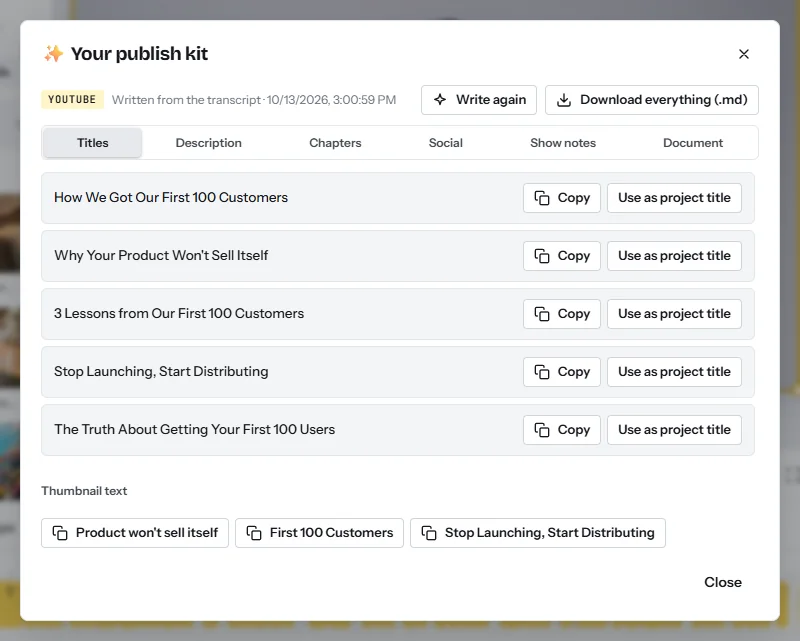
Why: the title decides whether a view happens, and chapters let a viewer jump to the part they came for instead of leaving. YouTube reads them when the first timestamp is 00:00, there are at least three in ascending order, and each chapter lasts at least 10 seconds17.
Export for YouTube
- Set the exportClick Export. Set Resolution to 1080p (4K on Pro if you filmed in 4K), Frame rate to the rate you recorded at, and Quality to the highest your plan offers.
- Check, download, upload yourselfListen to the cuts in the first two minutes for clipped words. The MP4 renders in your browser, and CutLuma does not post to YouTube: upload the file in YouTube Studio and paste the title and description.
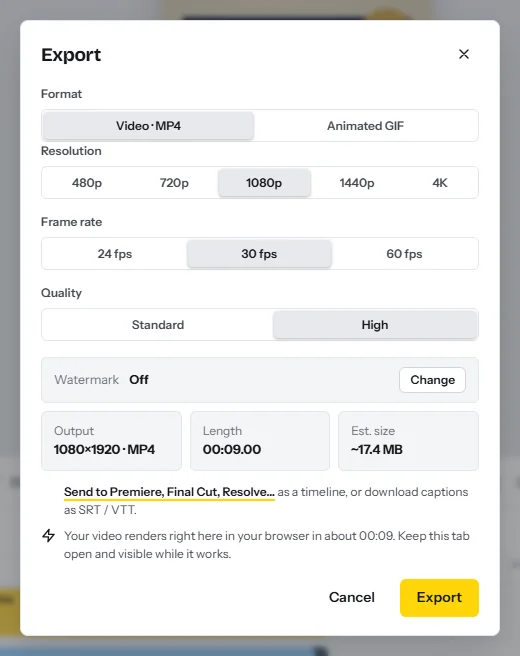
YouTube recommends MP4 with H.264 video and AAC-LC audio at the frame rate you recorded in, and lists 8 Mbps for 1080p at standard frame rates20. The video sizes cheat sheet has every size.
Captions and translated captions for reach
- Generate captionsAfter exporting, open the Text tab and click Auto captions. Choose the spoken language, generate, then click any caption to fix names and numbers (auto captions).
- Download the subtitle fileOn a paid plan, open Export, click Send to Premiere, Final Cut, Resolve… and download the captions as SRT. Upload the file in YouTube Studio as the subtitles for the video’s language.
- Translate and download againIn the AI tools tab, click Translate the subtitles and pick a language; Translate captions keeps the timing. Download that SRT, press Ctrl+Z to restore the original captions, and repeat.
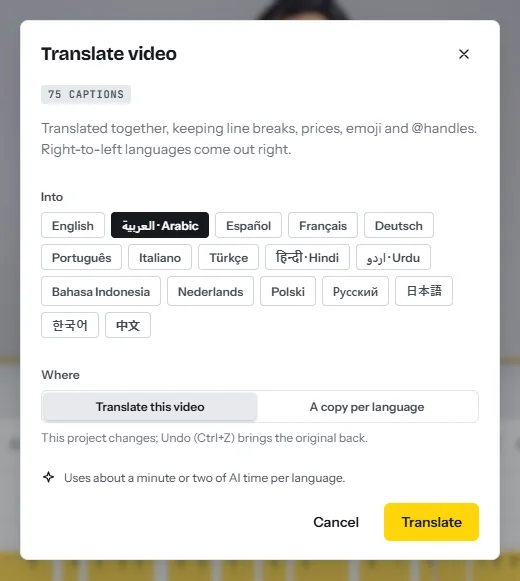
Why: YouTube says subtitles let you share a video with a larger audience, including viewers who speak another language, and each language is added separately19. It accepts SubRip (.srt) files in plain UTF-823.
Shorts that feed the long video
- Open Magic ClipsOpen Magic Clips and add the exported file, or paste the link to your published video and confirm it is yours.
- Choose the batchSet “How many clips?” to 3, 5, 8, 10 or 12 and “Clip length” to 15–35, 30–60 or 55–90 seconds, or Any, then click Find the best clips.
- Review by score and exportEach clip comes back scored, in 9:16, with captions, a hook headline and a Shorts title. Open the strongest, fix any caption and export each as its own MP4.
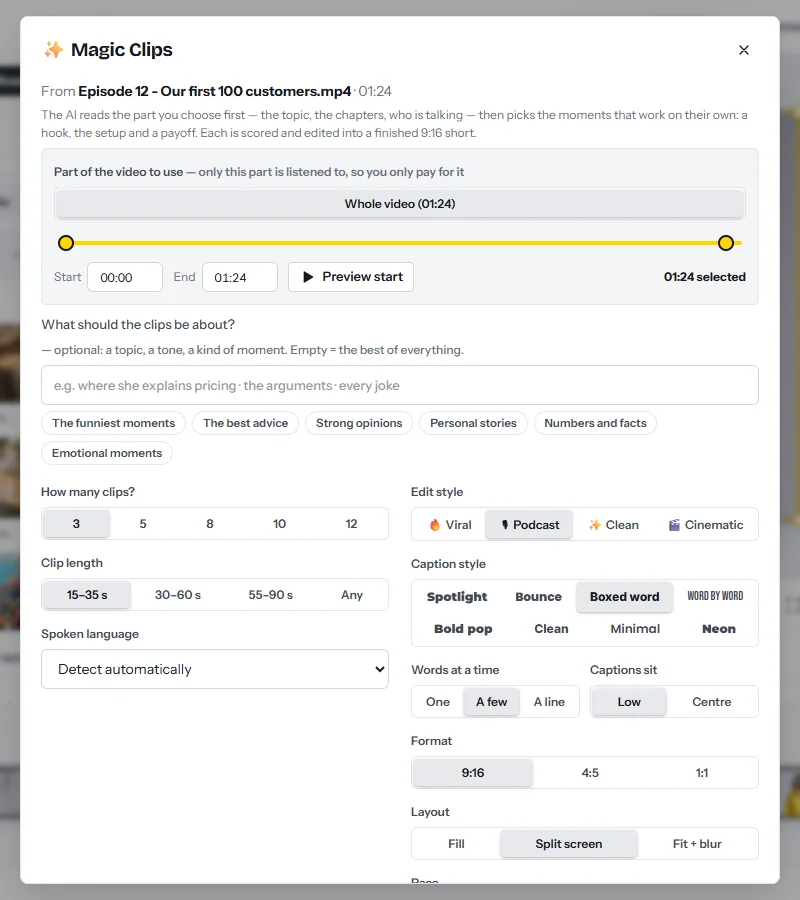
Why: Shorts average 200 billion daily views, YouTube said in January 202610, so they are where strangers meet a channel. They add no long-video watch hours1 and, for a small channel, no pool revenue after February 20273. Their job is to start a session that ends on the long video. A Short can run up to 3 minutes21. Short video monetization compares Shorts, Reels and TikTok.
Getting the first viewers: wording you can copy
- Title: the result and the constraint, for example “Edit a 10-minute video in 20 minutes (free, in the browser)”.
- First lines of the description: “In this video you will learn [result], step by step. It is for [who], and you need only [what].”
- Last line of each Short, and its pinned comment: “The full walkthrough is on the channel: [title of the long video].”
Publish one long video a week and two or three Shorts from it between uploads.
Risks: what can reduce or stop the payments
- Community Guidelines strikes. A first violation is typically a warning. Each later strike stays for 90 days, and three in the same 90 days may get the channel removed15. An active strike blocks joining the programme1.
- Reused and repetitive content. Channels that repurpose content already online without significant original commentary or changes, or whose videos look made from a template, can have earnings withheld or monetization turned off13. Use Magic Clips only on videos you own.
- Advertiser-friendly guidelines. Videos with inappropriate language, violence, adult or shocking content or controversial issues can be marked for limited or no ad earnings14.
- Music in Shorts. With one music track, only half of the revenue tied to a Short’s views enters the Creator Pool; with two tracks, a third5.
FAQ
How much does YouTube pay per 1,000 views?
There is no fixed rate. YouTube pays 55% of ad revenue on long videos4, and the result per 1,000 views is your RPM, shown in the Revenue tab of YouTube Studio22.
How much does YouTube pay for 1 million views?
For long videos, $2,000 to $10,000 at example RPMs of $2 to $10. For Shorts far less: in YouTube’s own illustration, a Short with 1 million engaged views earns its creator $4055.
How many subscribers do you need to get paid on YouTube?
Fan funding opens at 500 subscribers with 3,000 watch hours2. Ad revenue needs 1,000 subscribers and 4,000 watch hours, or 8,000 hours for new creators from 1 February 202713.
Do Shorts count towards the 4,000 watch hours?
No. Watch hours from the Shorts feed do not count1. Shorts have their own route: 10 million views in 90 days, and 20 million for new creators from February 20273.
What is the difference between RPM and CPM?
CPM is what advertisers pay per 1,000 ad impressions, before YouTube’s share. RPM is what you earn per 1,000 views, after the share and counting views with no ad, so it is lower6.
Sources
- YouTube Help — YouTube Partner Program overview & eligibility (read October 2026)
- YouTube Help — Overview of the expanded YouTube Partner Program (read October 2026)
- YouTube Help — Changes to the YouTube Partner Program, effective 1 February 2027
- YouTube Help — YouTube partner earnings overview (read October 2026)
- YouTube Help — YouTube Shorts monetization policies (read October 2026)
- YouTube Help — Understand ad revenue analytics: RPM and CPM (read October 2026)
- YouTube Help — How to earn money on YouTube (read October 2026)
- YouTube Help — YouTube Shopping affiliate program overview & eligibility (read October 2026)
- YouTube Help — Meet YouTube’s revenue thresholds for payment (read October 2026)
- YouTube Blog — From the CEO: What’s coming to YouTube in 2026, Neal Mohan (21 January 2026)
- YouTube — How YouTube Works: the creator economy (YouTube internal data, 2024)
- YouTube Help — U.S. tax requirements for YouTube earnings (read October 2026)
- YouTube Help — YouTube channel monetization policies (read October 2026)
- YouTube Help — Advertiser-friendly content guidelines (read October 2026)
- YouTube Help — Community Guidelines strike basics (read October 2026)
- YouTube Help — Manage mid-roll ad breaks in long videos (read October 2026)
- YouTube Help — Video Chapters (read October 2026)
- YouTube Help — Measure key moments for audience retention (read October 2026)
- YouTube Help — Add subtitles & captions (read October 2026)
- YouTube Help — YouTube recommended upload encoding settings (read October 2026)
- YouTube Help — Get started creating YouTube Shorts (read October 2026)
- YouTube Help — Check your YouTube revenue (read October 2026)
- YouTube Help — Supported subtitle and closed caption files (read October 2026)
The figures on this page are published ranges and worked examples, not promises of income. What you earn depends on your niche, your skills and how consistently you work. Platform rules and rates change: check the linked sources before you rely on a number.





