- Startup cost
- $6 a month (Starter plan)
- Income type
- Per video, per finished minute, per hour or monthly retainer
- Published price per long video
- About $124 to $327
- Time per 10-minute video
- About 6 hours in the example
- In 2025, 35% of US film and video editors were self-employed, and employed editors had a median wage of $75,420 a year1.
- Upwork’s median rates are $10, $40 and $100 an hour by tier, and published plans work out at $124 to $327 for a long-form video245.
- Fiverr’s guide says one finished minute may take one to two hours of editing, so your hours per finished minute decide what a fixed price pays3.
- Example: a 10-minute talking-head edit at $180 takes about 6 hours and 41 AI minutes and pays $30 an hour; at one hour per finished minute it pays about $16.
- Name the revision rounds before work begins: published plans include three or unlimited45.
What a freelance video editor sells, and who buys it
You sell finished videos made from footage the client already shot: structure, pace, clean sound, captions and files that upload without a problem. That is a different job from clipping, which cuts shorts out of a finished recording, from UGC, where you film the video yourself, and from a social media video agency, which also plans a local business’s content.
The US Bureau of Labor Statistics counted 39,400 film and video editor jobs in 2025 and projects 4% growth to 20351. YouTube said in January 2026 that it had paid over $100 billion to creators, artists and media companies in four years9: a channel that earns can pay for editing.
| Job | The client sends | You deliver | Usually priced |
|---|---|---|---|
| Long-form YouTube edit | Raw takes, B-roll, an outline | A structured video with titles, music and captions | Per video or retainer |
| Talking-head edit | One take from a coach or founder | Retakes and pauses cut, zooms, name title, captions | Per video or finished minute |
| Video podcast episode | A recording of 45 to 90 minutes | A tidy episode: clean sound, intro, chapters, subtitles | Per episode |
| Corporate and event edit | Interviews, slides, event footage | A highlight film or training video in the brand’s style | Per project or hour |
| Captions-only and reformat | A finished video | Burned-in captions or an SRT file, 9:16 and 1:1 copies | Per finished minute |
What freelance video editors charge
Prices from public pages, October 2026, in US dollars. The last column is arithmetic, not a quoted price.
| Source | What is sold | Published price | Works out at |
|---|---|---|---|
| Upwork2 | Freelance editors by the hour | Typically $6 to $25; medians $10 entry level, $40 mid tier, $100 senior | $60 to $600 for six hours at the medians |
| Fiverr guide, August 20263 | Editing per finished minute | YouTube from $5, corporate from $10, social video $10 to $100; a basic job averages $65 | $50 to $1,000 for 10 minutes |
| BLS, May 20251 | Employed film and video editors (US) | $75,420 a year (median) | About $36 an hour over 2,080 hours |
| Vidchops Weekly4 | 4 long-form videos a month, 3 revisions each | $495 a month | About $124 a video |
| Tasty Edits5 | Long-form videos, unlimited revisions, 48 hours | $327 for one; $305 each for 4; $278 each for 8 | $278 to $327 a video |
| Video Husky Eskimo6 | Up to 10 editor hours a week, videos up to 20 minutes | $849 a month | About $20 per editor hour |
A subscription with fixed limits is cheapest per video; a single order costs most.
Source: plan prices published by Vidchops and Tasty Edits, October 202645; the example is worked out below
Source: Upwork, viewed October 20262; BLS May 2025 annual wage divided by 2,080 hours1
The BLS wage is for employees and leaves out the self-employed1. A freelancer also pays for software, tax and unbilled hours, so the same figure buys less.
Four ways to price
- Per video. A fixed fee for a written scope; you carry the risk of slow footage.
- Per finished minute. The usual marketplace quote, says Fiverr’s guide3. It suits captions, reformats and podcasts, where work grows with length.
- Per hour. Upwork suggests hourly contracts when the scope is still changing2: event footage, or videos with several approvers.
- Monthly retainer. A fixed number of videos for a fixed fee, as the services above sell46.
How to price a video: from an hourly target to a fixed fee
Fiverr’s guide says one minute of finished video may take one to two hours of editing, and a polished 3-minute video 6 to 12 hours or more3. Editing from the transcript shortens the rough cut; measure by how much. The example assumes 30 minutes of work per finished minute.
| Item | Figure | How it is worked out |
|---|---|---|
| Job | A 10-minute talking-head video | One camera, 30 minutes of raw footage |
| Editing time | 5 hours | Assumption: 30 minutes per finished minute |
| Brief, review round, delivery | 1 hour | Assumption |
| Hourly target | $30 | Between Upwork’s entry and mid-tier medians2 |
| Price | $180 | 6 hours × $30, or $18 per finished minute |
| AI time | About 41 minutes | 30 for the transcript, 10 for captions, 1 for a publish kit |
| Software | $6 a month | Starter plan with 300 AI minutes |
Hours are editing time plus one hour for the brief, the review round and delivery.
Source: arithmetic from the example; the one and two-hour cases are Fiverr’s range3
Four such videos a month are $720 for 24 hours and use 164 of Starter’s 300 AI minutes. These are sums from the example, not a forecast.
Three example packages
| Package (example) | Scope | Price | Your time |
|---|---|---|---|
| Captions and reformat | A finished video up to 10 minutes: burned-in captions, an SRT file, one 9:16 copy; one round of changes | $30 | About 1 hour |
| Talking-head edit | Up to 30 minutes of raw footage, a 10-minute video: cuts, sound, music, intro, end card, captions; two rounds | $180 | About 6 hours |
| Weekly retainer | Four such videos a month, each back in three working days with titles and a description | $720 a month | About 24 hours |
What you need and what it costs
- A desktop browser. The editor runs in desktop Chrome, Edge, Brave and Firefox.
- A paid plan. Free exports carry a watermark and the Free plan has no AI time. Starter is $6 a month: no watermark, 1080p at 60 fps, 15 GB and 300 AI minutes. Pro is $12: 4K, 100 GB and 1,200 AI minutes (pricing).
- Room for the footage. As of October 2026 one file can be up to 500 MB on Free, 2 GB on Starter, 5 GB on Pro and 10 GB on Business. Ask for 1080p files, or move to Pro.
- Your own contract, invoices and payments. CutLuma handles none of these.
Scope the job: intake checklist and revision policy
Unpaid hours start with an unwritten brief. Send the checklist before you quote, and put the policy in the agreement.
Client intake checklist
- Purpose. What the video is for, who watches it and where it will be published.
- Format. Target length, 16:9 or 9:16, resolution and frame rate.
- Footage. Total minutes, number of cameras, separate audio, and how the files reach you.
- Style. Two videos whose pace they like; logo as a PNG, colours, font, intro and end card.
- Music and captions. Who supplies music and under which licence; captions burned in, as a subtitle file, or both.
- Approval. One person who gives feedback, and the deadline.
- Rights. Written confirmation that they own what they send, and whether you may show the result as a sample.
A revision policy you can copy
- “The price includes two rounds of revisions. A round is one list of changes from one person, sent within three working days of the draft as comments on the review link.”
- “A revision adjusts the agreed edit: cuts, text, captions, music, sound levels. New footage, a new structure or a different length is new work at $[rate] an hour, agreed before I start.”
- “Further rounds cost $[amount] each. Half the fee is due before work starts and the rest before the final files are released.”
Upwork gives clients the same advice: define how many rounds are included and what qualifies as a revision before work begins2. Published plans include three revisions per video or unlimited ones456.
The workflow in CutLuma: from raw footage to delivered files
The job is the 10-minute talking-head video from the example.
- Bring in the footageDrop the client’s files onto the editor (MP4, MOV or WebM), or click Upload in the Media tab. Name the project with the client, the title and v1.
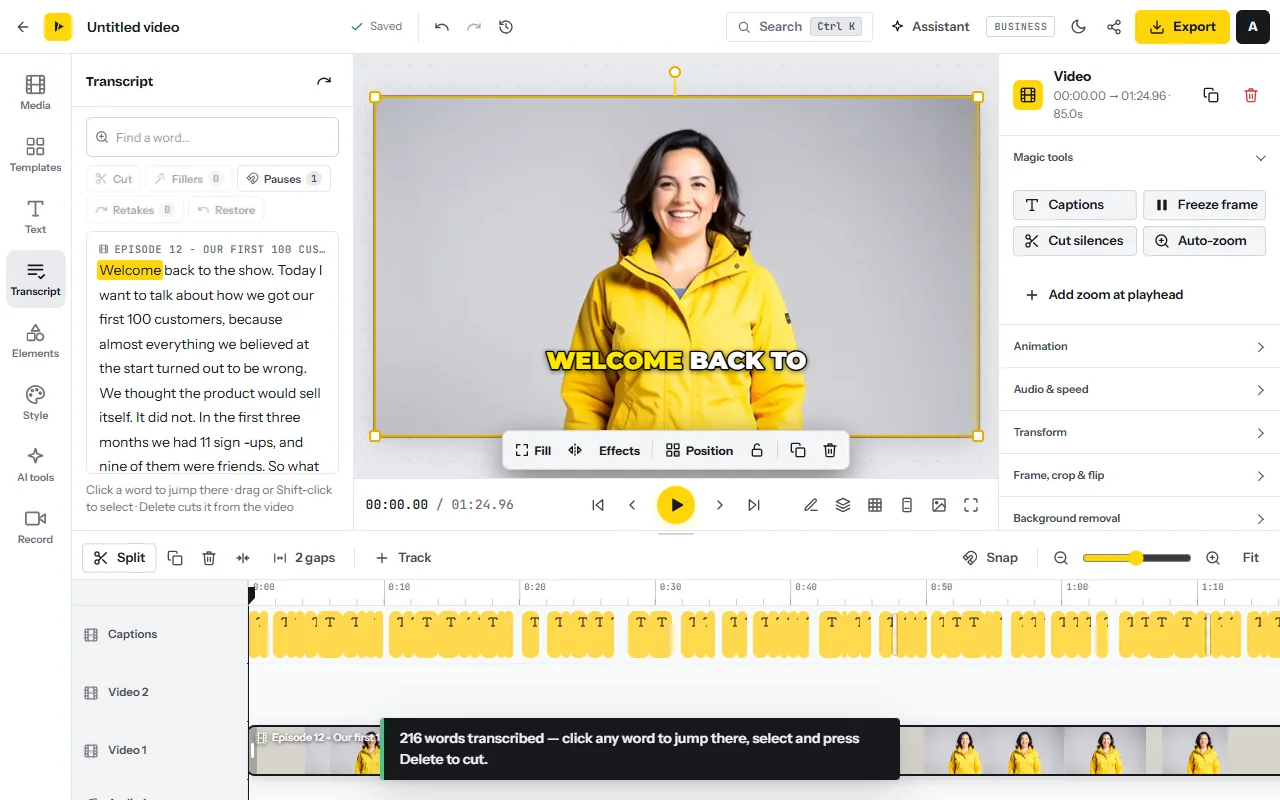
- Transcribe onceOpen the Transcript tab (or press T), choose the language and click Transcribe. Edit video as text uses about one AI minute per minute of speech, in 17 languages.
- Remove fillers, pauses and retakesFillers counts every um and uh and removes them after a preview. Pauses shortens gaps longer than one second to 0.3 seconds. Retakes finds sentences said twice and keeps the last take.
- Cut the content by readingSelect the words you do not want and press Delete, or click Cut. The stretch leaves every unlocked track, so music and titles move along. Restore or Ctrl+Z brings it back.
- Or cut silence without AI timeSelect a clip and press Cut silences: Remove silence analyses the audio on your device and removes pauses of about 0.7 seconds or more.
Polish: sound, music, brand, zooms and captions
- Clean the soundSelect the talking clip and turn on Enhance voice and Reduce background noise.
- Add music that steps backOpen Media, then Stock library, and add a track from the music tab; its files are public-domain or CC0 and need no credit. Select the track and turn on Lower under speech.
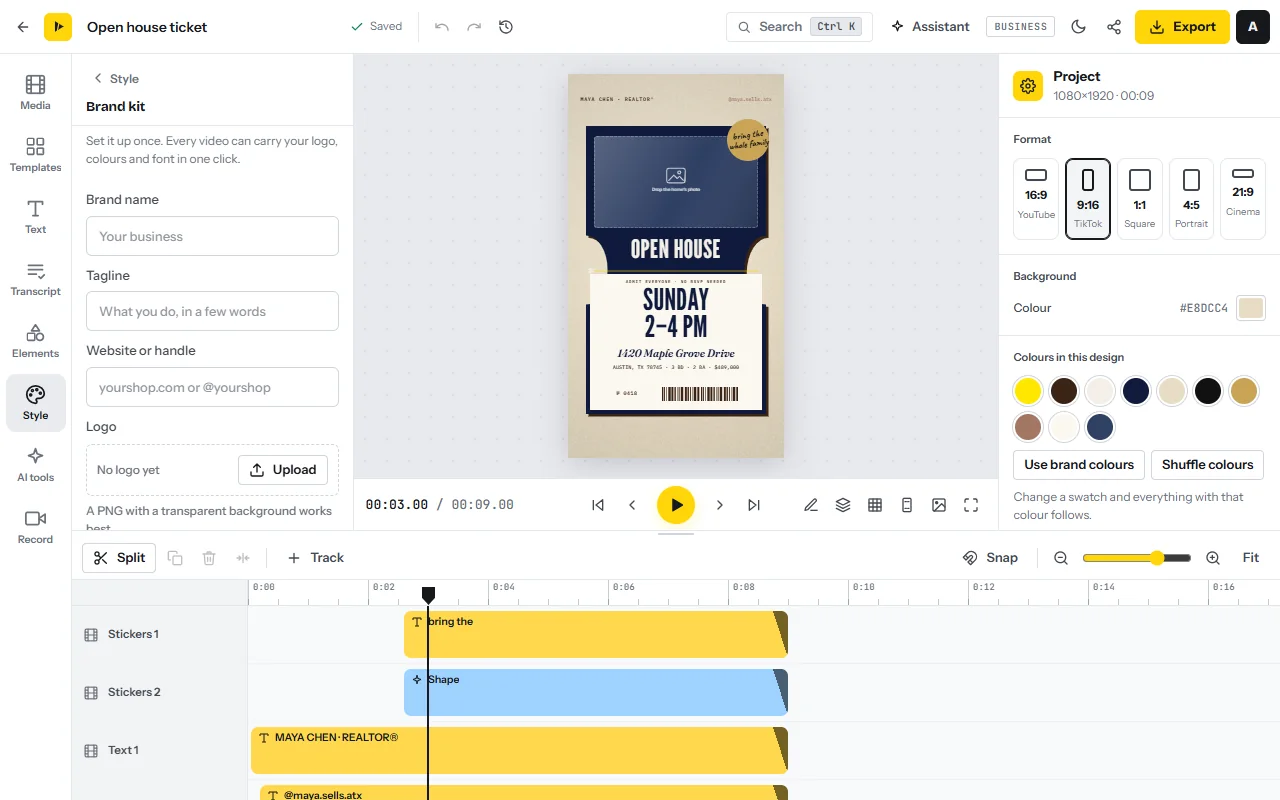
- Apply the client’s brandIn the Brand kit panel, add the logo, colours and font and click Save brand kit. Then use Add my logo, Add a branded intro, Add a closing card and Brand all text. For the speaker’s name, press Ctrl+K and choose Lower third; Save as a template keeps the layout for the client’s next video.
- Add zooms and cover the cutsOn the multi-track timeline, put B-roll on a track above the speaker. For a zoom, select the clip, click Add keyframe, move the playhead and resize the clip: it animates between the two points. On a screen recording, Auto-zoom follows clicks and typing.
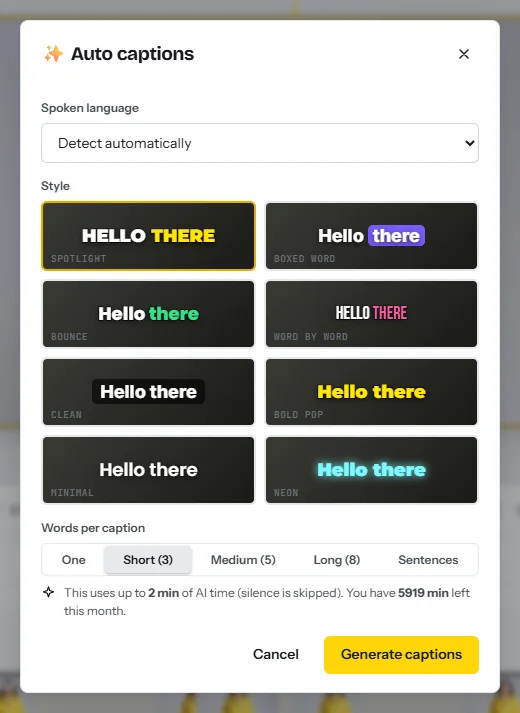
- Caption itPress Ctrl+K and choose Auto captions. Set Spoken language, one of eight styles and Words per caption, then click any caption to correct a name.
Review round and delivery
- Save the version you sendPress Ctrl+K, open Version history and click Save current version…; name it “v1 sent”. Restore this version takes you back.
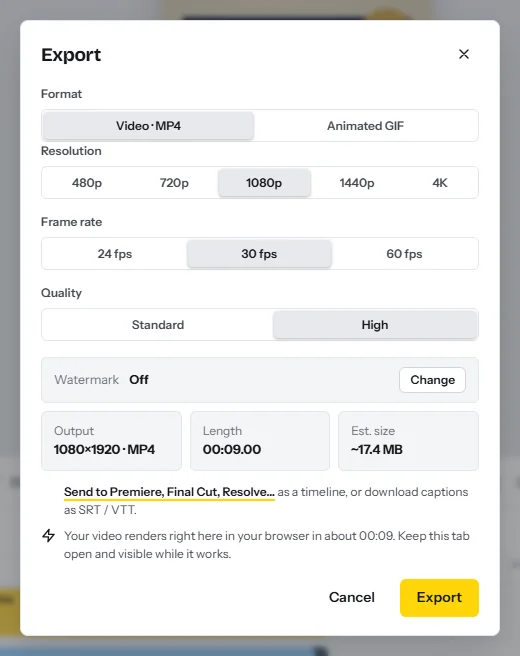
- Export the draftClick Export (Ctrl+E) and set Resolution, Frame rate and Quality. Free exports 1080p with a watermark, Starter 1080p at 60 fps, Pro up to 4K.
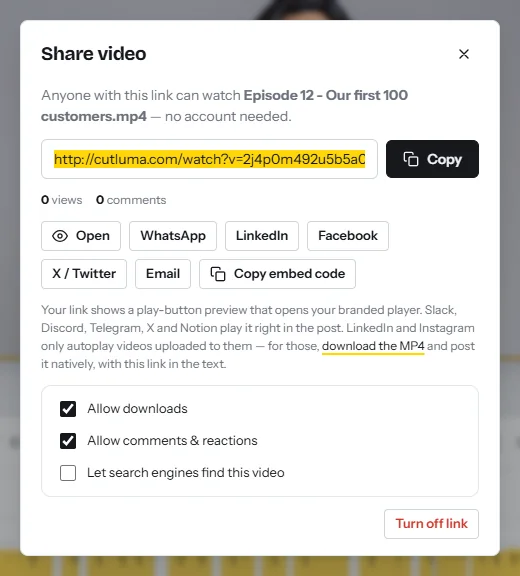
- Send a review linkClick Get share link. In Share video, keep Allow comments & reactions on and switch Allow downloads off until the job is approved and paid. The client needs no account, and each comment is pinned to the moment they are watching.
- Do the revision roundWork through the comments in time order, save “v2”, export again and send the new link. Turn off link retires the old draft.
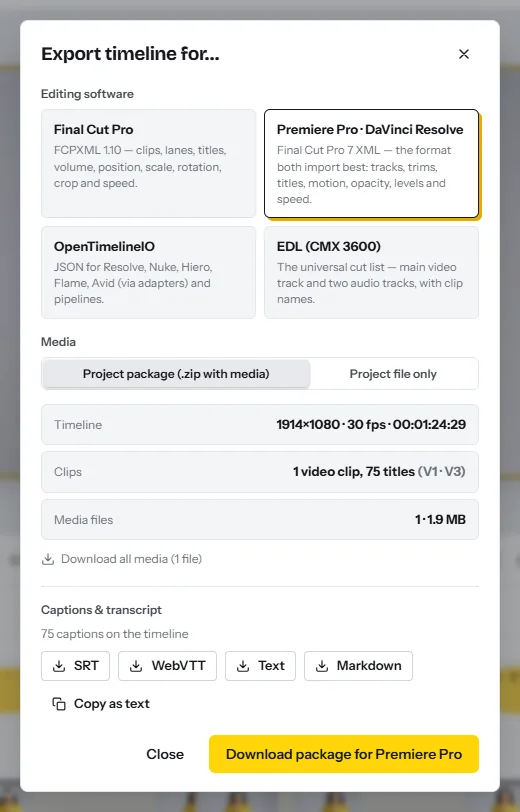
- Deliver the filesExport the final video and name it as agreed. From the Export dialog, Send to Premiere, Final Cut, Resolve… also downloads the captions as SRT or WebVTT. A publish kit writes titles and a description with chapters for about one AI minute.
- Hand over the timeline when the client finishes elsewhereIn Export timeline for…, choose Final Cut Pro (FCPXML), Premiere Pro · DaVinci Resolve (XML), OpenTimelineIO or EDL (CMX 3600), and Project package (.zip with media). This needs a paid plan. Cuts, tracks, titles, volume and speed travel; keyframes, transitions, filters and design layers do not. Test the import on a short timeline before you promise it.
- Export a batchFor a retainer, open Projects, click Select, tick the month’s videos and export them in one go, as files or one ZIP.
Quality checks before you deliver
- Watch it once without stopping, with sound, at normal speed.
- Cuts. No clipped word and no black frame: Ctrl+K, Close all gaps.
- Sound. The voice is level throughout and the music never competes with it.
- Text. Names, job titles and numbers match the client’s spelling.
- Brief. Length, format, resolution and frame rate are what was agreed.
- File names. Client, title, version and size, for example Acme_Onboarding_v2_1080p.mp4. Only one file is called final.
CutLuma does not post or schedule: the client uploads the files. See also the video editor for YouTube and for podcasts.
How to get your first editing clients
Look for people who publish every week and edit their own videos late or roughly: growing channels, coaches, podcast hosts, companies with webinar recordings, agencies that need extra hands. Upwork and Fiverr bring requests without outreach, at the rates above. A direct message should prove you watched the video. Copy this:
- “Hi [name], I watched [video title]. The point at [timestamp] is strong, but the first 40 seconds have two restarts before it. A tighter opening would get viewers there sooner.”
- “I edit talking-head and YouTube videos for [coaches]: cuts, clean sound, captions, your intro and end card, back in three working days with two rounds of changes.”
- “Send me the raw footage of your next video and I will edit its first two minutes as a paid test for $[amount]. If you like it, the full edit is $[price] and the test fee comes off. [Your name], [link to three before-and-after samples]”
A paid test filters out people who collect free samples. Follow up once after a week, and count your own reply rate; none is reliably published. For the wider map, see how to make money with video.
A 30-day plan
| Days | What you do | Output |
|---|---|---|
| 1 to 7 | Start the Starter plan. Edit three samples from footage you own or may use: a talking head, a podcast segment, a captioned 9:16 reformat. Time each one. | 3 before-and-after samples; your minutes per finished minute |
| 8 to 14 | Set three packages from your measured time. Write the checklist, the revision policy and a one-page agreement. List 40 prospects. | A price list, the documents, 40 contacts |
| 15 to 21 | Send 8 hand-written messages a day for five days. Deliver every paid test within 48 hours. | 40 messages sent, tests delivered |
| 22 to 30 | Take the first full job with a deposit: draft in three working days, one review round on the share link, final files. Log every hour. | One delivered video and your real hourly rate |
Risks, rules and mistakes
Scope creep and unpaid work
Put the scope, the fee, the payment date and the revision rounds in writing, take a deposit, and keep downloads off until the final payment. In New York State, the Freelance Isn’t Free Act requires a written contract for freelance work worth $800 or more, counting contracts with the same client over the previous 120 days, and payment within 30 days of finishing when the contract names no date101112. In the UK, a business payment with no agreed date is late after 30 days13. Other places differ, so read the local rules.
Music, stock and footage rights
Losing client files
Never hold the only copy: keep the originals where the client put them and on your own disk. In CutLuma, projects autosave to the cloud, version history restores an earlier state and the trash keeps a deleted project for 30 days. Starter’s 15 GB fills quickly, so agree when you delete a client’s files.
Under-pricing
- Quoting from the marketplace floor. Fiverr puts the average basic job at $653. At six hours that is about $11 an hour before fees and tax.
- Pricing by the finished minute alone. Thirty minutes of footage and three hours can both become ten. Cap the raw minutes in every package.
- Guessing your speed. The same $180 pays $41 or $9 an hour in the chart above. Time three jobs before you fix prices.
Editing income is business income: keep invoices and check the tax rules where you live.
FAQ
How much do freelance video editors charge?
Upwork’s median rates in October 2026 are $10 an hour at entry level, $40 at mid tier and $100 for senior editors2. Editing services publish about $124 to $327 for one long-form video45.
Should I charge per hour, per video or per minute?
A fixed price per video when the scope is written down, per finished minute for captions and reformats, per hour when the scope is still moving.
How long does it take to edit a 10-minute video?
Fiverr’s guide says one finished minute may take one to two hours of editing, so 10 to 20 hours3. The example here assumes 6 hours.
Which CutLuma plan does a freelance editor need?
Starter at $6 a month has no watermark, 1080p at 60 fps and 300 AI minutes, about seven videos at the example’s 41 minutes each. Pro at $12 adds 4K and files up to 5 GB.
Can I start in CutLuma and finish in Premiere Pro or DaVinci Resolve?
Yes, on paid plans. Export timeline for… writes FCPXML, XML, EDL or OpenTimelineIO with the media in a ZIP. Keyframes, transitions and filters are not carried over.
Sources
- U.S. Bureau of Labor Statistics — Occupational Outlook Handbook: Film and Video Editors and Camera Operators (May 2025 data, modified 27 August 2026)
- Upwork — How much does hiring a video editor cost? (viewed October 2026)
- Fiverr Guides — How much does a video editor cost (3 August 2026)
- Vidchops — Pricing plans (viewed October 2026)
- Tasty Edits — Pricing (viewed October 2026)
- Video Husky — Eskimo plan (viewed October 2026)
- Wyzowl — Video Marketing Statistics 2026 (266 respondents, late 2025)
- YouTube Blog — Letter from the YouTube CEO: 4 big bets for 2024 (6 February 2024)
- YouTube Blog — YouTube CEO Neal Mohan’s 2026 letter (21 January 2026)
- New York State Senate — General Business Law § 1410, Freelance Isn’t Free Act: definitions
- New York State Senate — General Business Law § 1411: contracted compensation payments
- New York State Senate — General Business Law § 1412: written contracts
- GOV.UK — Late commercial payments: when a payment becomes late
- YouTube Help — Learn about copyright claims: Content ID (2026)
The figures on this page are published ranges and worked examples, not promises of income. What you earn depends on your niche, your skills and how consistently you work. Platform rules and rates change: check the linked sources before you rely on a number.





