- Platform pay
- None for most members
- Income type
- Your own service or product
- Cost
- $6 a month
- Weekly work
- About 2 hours for 3 posts
- AI time
- About 13 minutes a week
- LinkedIn’s BrandLink page gives members no way to apply and no revenue share, so plan for no income from views15.
- Microsoft reported LinkedIn video uploads up 34% year over year in July 2024 and up over 20% in fiscal year 202524.
- In 1.3 million posts from business pages, video had a 6.00% engagement rate in 2025, but pages with 1K–5K followers averaged 155 views per video10.
- A video post can run 3 seconds to 15 minutes, up to 5 GB11. Use 4:5 at 1080 × 1350 for talking videos.
- Three posts a week use about 13 AI minutes; with one 45-minute webinar a month, that is about 100 of the 300 in the $6 Starter plan.
What LinkedIn video sells, and what LinkedIn’s own numbers say
You sell consulting, freelance work, an agency retainer or software. The video’s job is narrower than a sale: a buyer sees you explain one problem well, remembers your name, and answers when you write.
The growth figures come from Microsoft’s earnings calls. Uploads were up 34% year over year in July 2024, when Microsoft called video LinkedIn’s fastest growing format2. In January 2026 it reported 30% growth in paid video ads5. More members upload video, so yours has to be specific to be noticed.
The buyer research is the 2024 Edelman–LinkedIn B2B Thought Leadership Impact Report: 3,484 business leaders in seven countries, surveyed in late 20237. In it, 52% of decision-makers spend an hour or more a week reading thought leadership, and 9 in 10 are more receptive to outreach from a company that consistently produces it at high quality. Only 15% rated what they read as very good6.
Of 1,015 B2B marketers surveyed by the Content Marketing Institute in mid-2025, 76% named LinkedIn among the most effective places to publish thought leadership9.
What a LinkedIn video reaches: benchmarks from 1.3 million posts
Socialinsider analysed 1.3 million posts from 16,645 LinkedIn business pages active between January 2024 and December 202510. It covers company pages, not personal profiles.
Engagement divided by impressions. Video was 5.60% in 2024. A link post is last.
Source: Socialinsider, LinkedIn Organic Benchmarks 202610
- 2024
- 2025
Views fell for every page size, by 36% on average.
Source: Socialinsider, LinkedIn Organic Benchmarks 202610
People who see a video respond more than to an image or text, but a small account should plan for a few hundred views per video. A link to a video hosted elsewhere is a link post, so upload the file itself.
The funnel as arithmetic: from views to clients at three sizes
No source publishes the rates between a view and a client for your offer. Every rate below is an assumption; replace each with your own count after 30 days. The table assumes 12 posts a month.
| Step | Rate (assumption) | Small | Medium | Large |
|---|---|---|---|---|
| Video views a month | Your number | 2,000 | 10,000 | 40,000 |
| Profile visits | 2% of views | 40 | 200 | 800 |
| Conversations with buyers | 5% of visits | 2 | 10 | 40 |
| Calls booked | 30% of conversations | 0.6 | 3 | 12 |
| New clients | 25% of calls | 0.15 | 0.75 | 3 |
| Example: $3,000 per client | Your price | $450 | $2,250 | $9,000 |
Small is 167 views a post, close to the 155 that pages with 1K–5K followers averaged in 2025. Medium is 833, above the 585 average for 10K–50K followers. Large is 3,333, more than twice the 1,380 average for 100K–1M followers10. Most readers start in the first column: one client about every seven months.
Six LinkedIn video formats that work for B2B
In Wyzowl’s survey, 71% believe videos of 30 seconds to 2 minutes are most effective8, and LinkedIn tells advertisers to show the most impactful content in the first 10 seconds12.
| Format | Length | Shape | How it is made |
|---|---|---|---|
| The 60-second lesson: one mistake and the fix | 45–90 s | 4:5 | Camera with the teleprompter, captions, a headline from the first frame |
| The teardown: you review a page, an ad or a report | 90 s–3 min | 1:1 or 16:9 | Studio recording: screen, camera bubble, automatic zoom |
| The chart and what it means | 20–40 s | 1:1 | A stats template and an animated chart, with the source on screen |
| The client question, answered | 45–90 s | 4:5 | Camera; the question is the headline |
| The webinar clip | 30–60 s | 4:5 or 1:1 | Magic Clips on the recording |
| The short case with numbers | 60–120 s | 4:5 or 16:9 | Present slides: before, what changed, after |
LinkedIn video specs: size, length, shape and captions
LinkedIn’s Help pages give these limits as of October 2026. Ads are stricter, which matters if a company sponsors your public video post as a thought leader ad; that needs your approval16.
| Item | Video post by a member [11] | Video ad [12] |
|---|---|---|
| File size | 75 KB to 5 GB | 75 KB to 500 MB |
| Length | 3 seconds to 15 minutes | 3 seconds to 30 minutes; 15–30 seconds recommended |
| Shape | Any aspect ratio from 1:2.4 to 2.4:1 | 16:9, 1:1, 4:5 (the recommended vertical ratio) or 9:16 |
| Largest size | 4096 × 2304 | 1920 × 1080 (16:9), 1080 × 1350 (4:5), 1080 × 1920 (9:16), 1920 × 1920 (1:1) |
| Frame rate | 10 to 60 fps | Less than 30 fps |
| Captions | An SRT file, attached on desktop13 | An SRT file, text only |
CutLuma’s formats fit both columns: 4:5 is 1080 × 1350, 1:1 is 1080 × 1080, 16:9 is 1920 × 1080 and 9:16 is 1080 × 1920. LinkedIn asks you to keep text and logos away from the edges11. Microsoft said in October 2024 that weekly views of what it calls immersive video had grown six times in a quarter3, so keep a 9:16 copy for phones.
LinkedIn’s ads guide says most members view video on mute as they scroll14, so put captions in the picture. See also the video sizes cheat sheet and how to make a LinkedIn video.
What you need and what it costs
- A computer with Chrome, Edge, Brave or Firefox, a webcam, and a microphone close to your mouth.
- A list of 30 questions buyers ask you. Each one is a video.
- CutLuma Starter, $6 a month. The Free plan has the recorder, templates and brand kit, but allows 3 projects, adds a small watermark and has no AI time. Starter removes the watermark and includes 300 AI minutes (pricing).
| Step that uses AI time | Lesson | Teardown | Chart post |
|---|---|---|---|
| Transcript of the take | 3 minutes | 4 minutes | 0 |
| Captions on the finished video | 2 minutes | 2 minutes | 0 |
| Publish kit (LinkedIn post text) | 1 minute | 1 minute | 0 |
| Total: 13 AI minutes a week | 6 | 7 | 0 |
Transcripts and captions use about one AI minute per minute of speech, and a publish kit about one. Recording, silence removal, zoom, charts, resizing and export use none. Four weeks use about 52 AI minutes, and one 45-minute webinar through Magic Clips adds about 45: about 100 of the 300.
Set up once: brand kit, post template and camera look
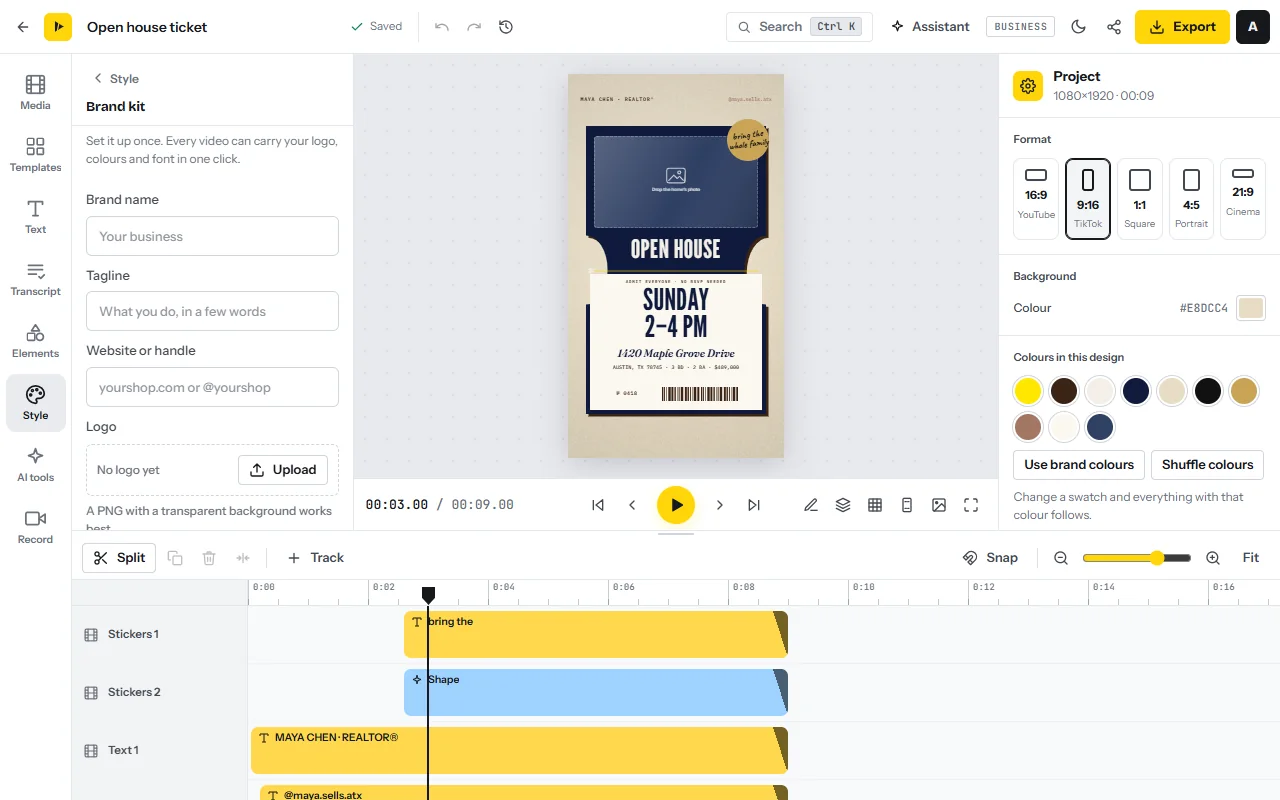
- Save the brand kitIn the Style tab open Brand kit, add your logo, colours and font, and press Save brand kit.
- Build a post shellOpen a 4:5 design from the LinkedIn video templates, keep a headline and a closing card with your name and what you do, and press Brand all text. Then press Ctrl+K and choose Save as a template.
- Set the camera lookIn the Record tab click Camera and choose a look such as Clean office blur, or Newsroom lower third for your name and title. The look is recorded into the video.
- Test the soundRecord ten seconds, select the clip and turn on Enhance voice and Reduce background noise.
The weekly workflow in CutLuma: three posts, step by step
Record all three videos in one sitting, then edit one a day. The LinkedIn video editor page has the short version.
- Write one sentence per videoOne mistake, one teardown, one number. If the sentence needs “and”, it is two videos.
- Record the lessonIn the Record tab click Camera (the webcam recorder) and tick Teleprompter. Paste the script and press Start. The teleprompter scrolls next to the lens and stays out of the video.
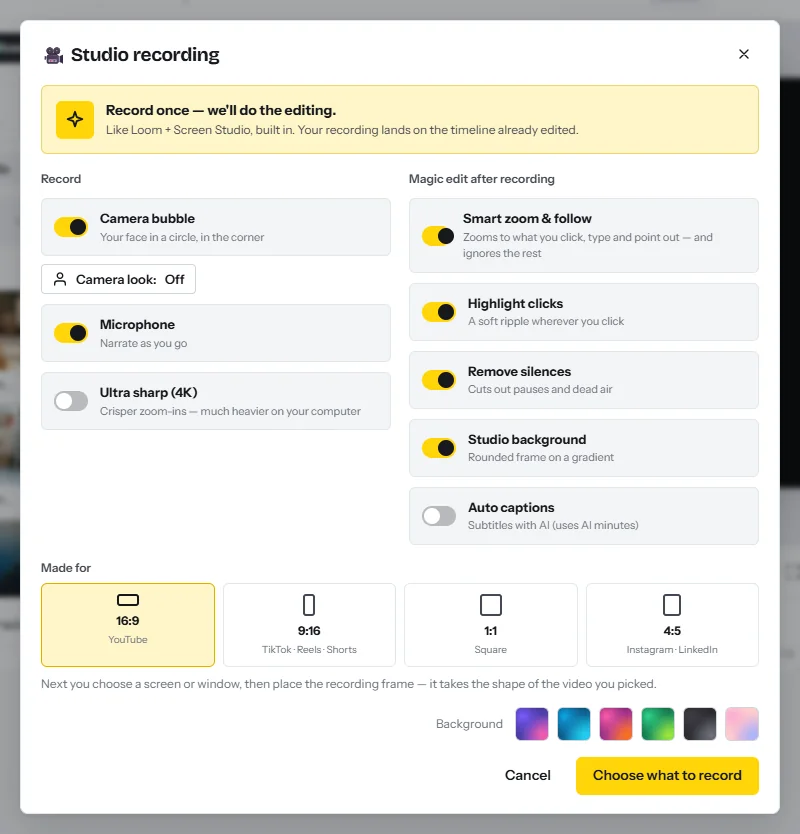
- Record the teardownClick Studio recording. Leave Camera bubble, Microphone, Smart zoom & follow and Remove silences on, pick 1:1 or 16:9 under Made for, then click Choose what to record. The screen recorder zooms on your clicks and cuts the pauses.
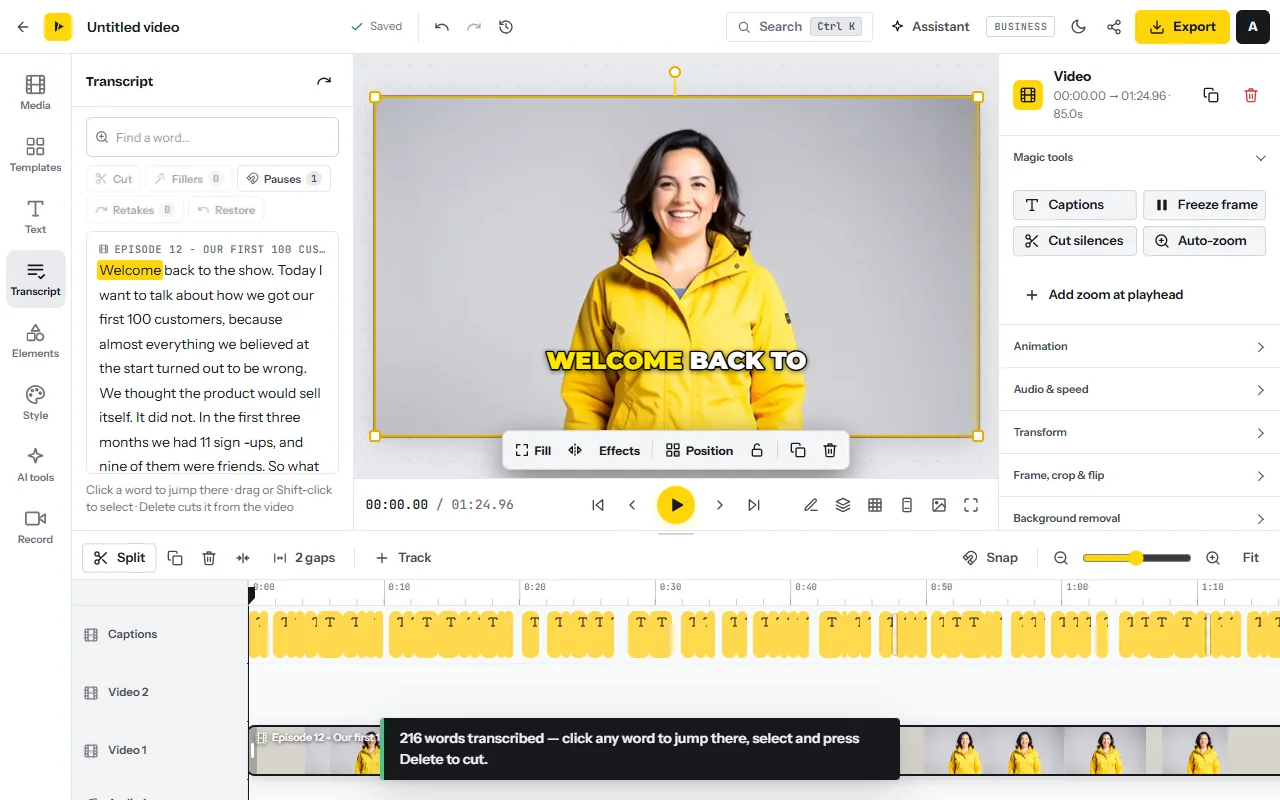
- Cut the wordsOpen the Transcript tab and press Transcribe. Run Fillers, Pauses and Retakes, then select any repeated sentence and press Delete. See edit video as text.
- Frame it for the feedClick an empty part of the timeline and choose 4:5 under Format in the right-hand panel. Select the clip, choose Fill and drag to reframe.
- Put the point on screenIn the Text tab add a short headline, visible from the first frame. Start with the claim, not a logo.
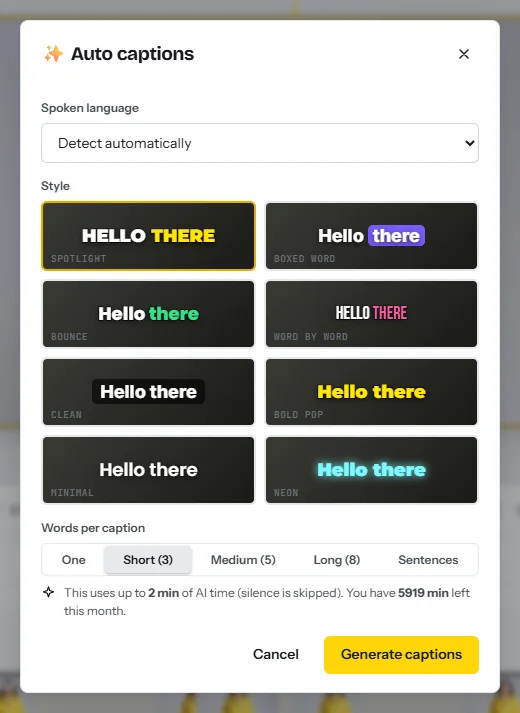
- Add captionsIn the Text tab open Auto captions, choose the language and the Clean style, then correct names and numbers. See auto captions.
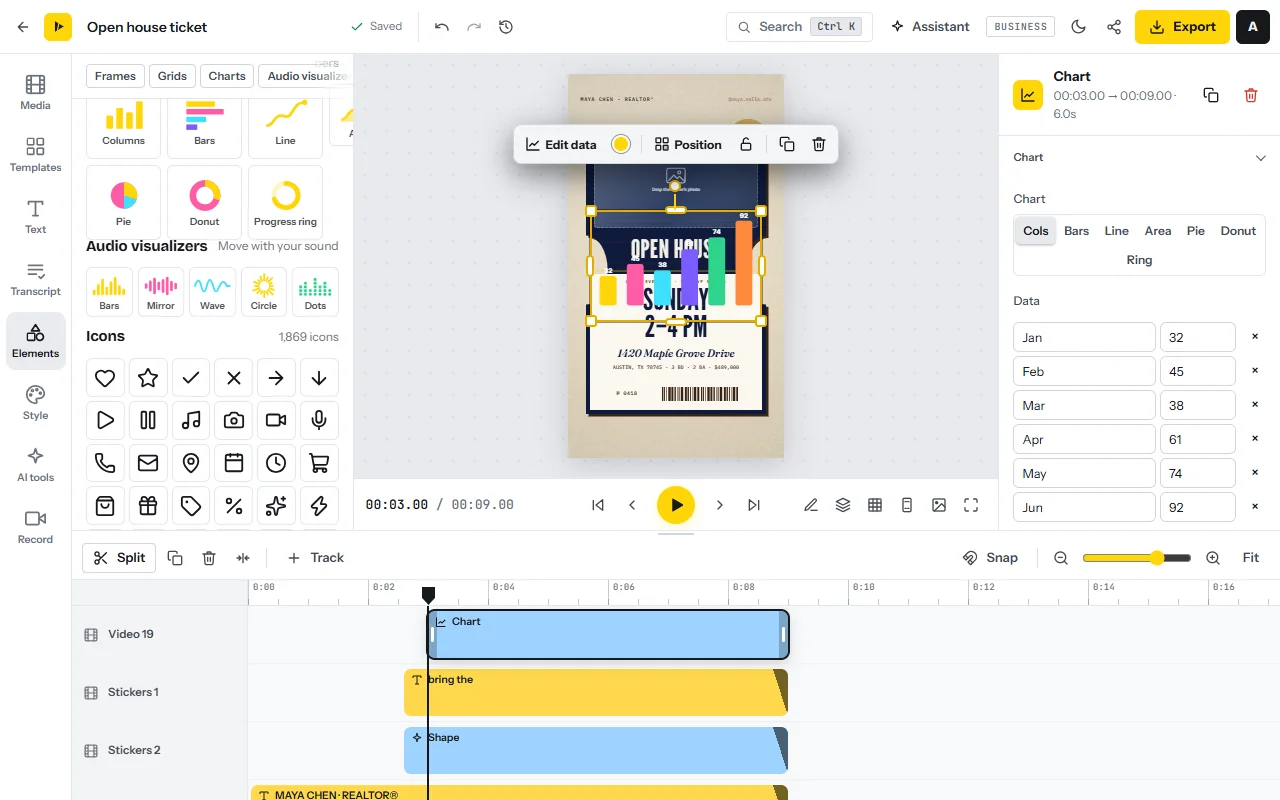
- Build the chart postOpen a 1:1 design from the stats templates. In the Elements tab open Charts, pick a chart and press Paste from a spreadsheet (up to 24 rows). Add the source as a line of text. See animated charts.
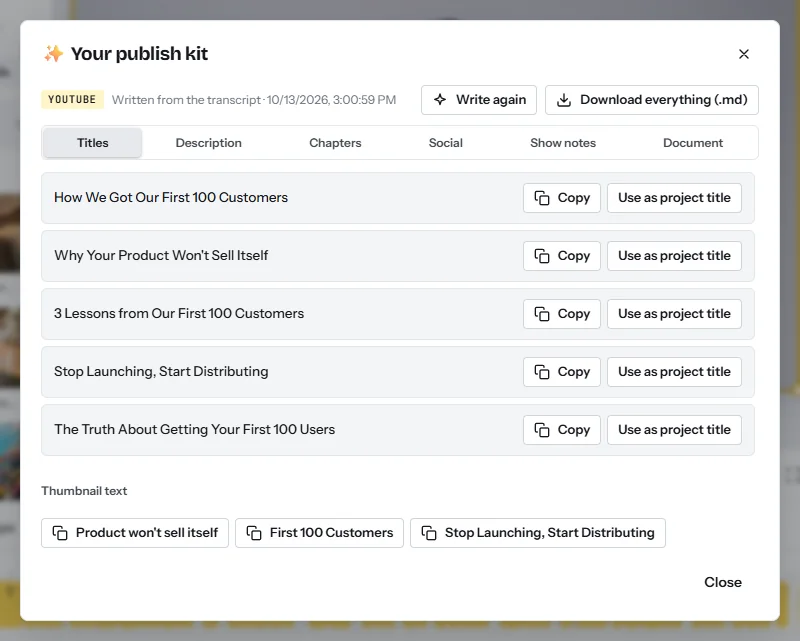
- Write the post textClick the share icon next to Export, choose LinkedIn under Where will it go? and open the Social tab. The publish kit writes a LinkedIn post from what you said; rewrite it into the skeleton below.
- Check, export and uploadWatch once at phone size with the sound off. Press Export, choose Resolution 1080p, Frame rate 30 fps and Quality High, and download the MP4. Attach the file to a LinkedIn post yourself: CutLuma does not post or schedule.
- Make the other shapesPress Ctrl+K, choose Copy into other sizes, tick 1:1, 9:16 or 16:9 and press Create copies. Each copy is a new project, re-arranged to fit (resize video).
For the case format, click Present slides in the Record tab, import a three-slide PDF, choose a Layout with you beside the slide and press Start recording; arrow keys change the slide. See present your slides.
After export, Get share link gives a watch page for messages and email. Do not paste it as the post: the Share video dialog notes that LinkedIn only autoplays videos uploaded to it.
Once a month: a webinar into clips, and other languages
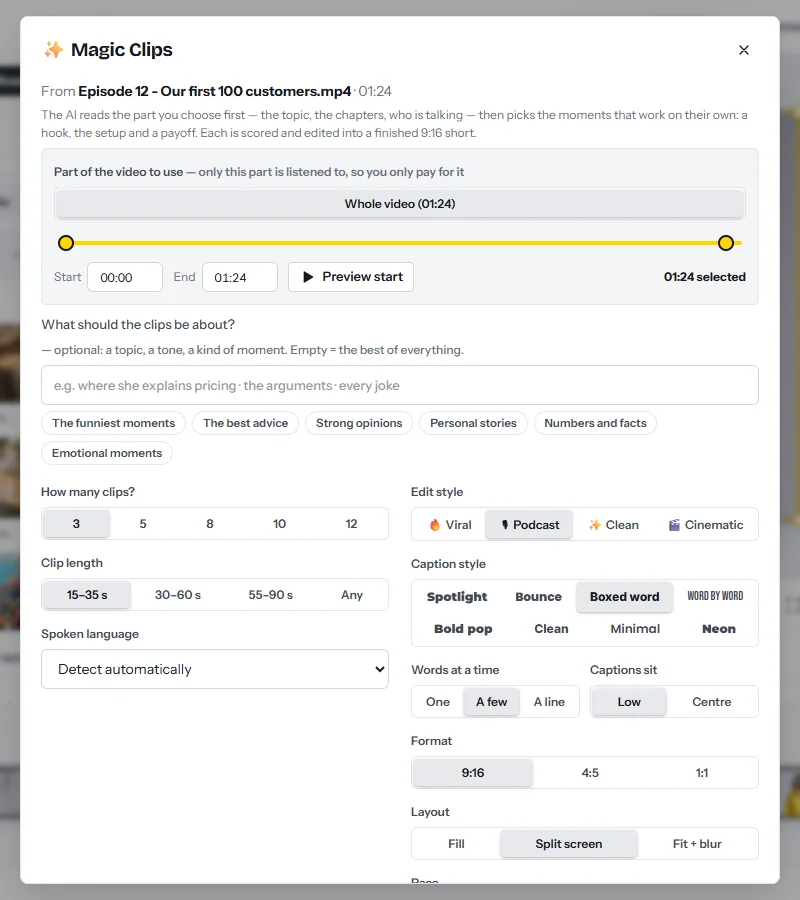
- Bring in the recordingOpen Magic Clips and drop the file, or paste a link to your own video and tick the permission box. Videos can be up to three hours long.
- Choose what it listens toUnder Part of the video to use press Whole video. The line at the bottom shows the AI minutes the run needs: about one per minute of speech.
- Set the clips for LinkedInUnder How many clips? choose 5 and under Clip length choose 30–60 s. Pick the Clean edit style and set Format to 4:5. Choose the Fit + blur layout when slides are on screen and Fill for a speaker. Tick My brand kit.
- Pick by earClick Find the best clips, play each result and open the ones that stand alone with New project.
- Translate for another marketIn the AI tools tab click Translate the whole video and choose A copy per language. Translate video covers on-screen text and captions in 17 languages, about one or two AI minutes each.
See also the video content repurposing system and the multilingual video business.
The post text: a skeleton and two filled samples
- Line 1: the claim or the question. Keep it near 150 characters, the length LinkedIn gives advertisers to avoid truncated intro text12.
- Line 2: who it is for. A job title and a situation.
- Three short lines: what the video shows.
- One line of proof: the source of the number, or how many cases you have seen.
- A question a buyer can answer from experience. Put any link last or in a comment.
The follow-up: comments, messages and LinkedIn’s limits
A view becomes a lead in the replies. Answer every comment the same day, in public, with a specific answer and one question.
- A buyer comments. “Good question, [name]. In most cases [short answer]. Do you price per seat or per usage?”
- They answer. Message them: “Thanks for the comment on the pricing video. You mentioned [their words]. I have a 4-minute walkthrough of that case: [share link]. Is it useful to you?”
- Someone messages first. “Happy to look. Two questions first: [question], [question]. If talking is easier, I am free [two times].”
- Someone reacts but says nothing. No pitch. After a second reaction, invite them with a note that names the post.
A company with an ad budget can also gate a document behind a Lead Gen Form, pre-filled from the member’s profile1417. LinkedIn’s form page gives one figure, that 90% of pilot customers beat their cost-per-lead goals, and no average conversion rate17.
A 30-day plan
| Days | Work | Output |
|---|---|---|
| 1 to 3 | Say who you help in your profile headline. Set up the brand kit, post shell and camera look. List 30 buyer questions | Setup and 30 ideas |
| 4 to 7 | Record and post a lesson, a teardown and a chart post | 3 posts |
| 8 to 14 | Three more posts. Reply to every comment the same day. Log profile visits and conversations | 6 posts and a baseline |
| 15 to 21 | Three posts, including a client question and a case with permission. Record one webinar or long talk | 9 posts, 1 long recording |
| 22 to 26 | Run Magic Clips on the recording and plan five clips over two weeks | 5 clips ready |
| 27 to 30 | Put your counts into the funnel table. Keep the two formats that started the most conversations | Your own rates |
If the videos show that people want the method itself, continue with how to create and sell an online course.
Risks, rules and mistakes
- Client confidentiality. A screen recording shows names, emails and revenue. Record on a demo account, and check your contract before you show client work.
- Claims about results. Say what happened for one client, with permission and the period. Do not promise the viewer the same.
- Your employer’s social media policy. If you are employed, read it before you post about your field, clients or pricing.
- Bought engagement. Paid likes, comments or followers are the fake engagement LinkedIn prohibits19. Judge a format by conversations, not by counts.
FAQ
Does LinkedIn pay for video views?
Not for most members. LinkedIn’s BrandLink page describes pre-roll ads before videos from selected publishers and creators, bought through its sales team, with no application route or revenue share for members.
What is the best video size for LinkedIn?
For a talking video, 4:5 at 1080 × 1350. Use 1:1 at 1080 × 1080 for charts and 16:9 at 1920 × 1080 for long screen demonstrations.
How long can a LinkedIn video be?
LinkedIn Help gives 3 seconds to 15 minutes and up to 5 GB for a post. Most B2B formats here run 45 seconds to 2 minutes.
How many leads will LinkedIn video bring?
No source publishes a reliable rate. With this guide’s assumptions, 2,000 views a month lead to about 2 conversations. Count your own for 30 days.
Do LinkedIn videos need captions?
Yes. LinkedIn’s ads guide says most members view video on mute as they scroll, so put captions in the picture.
How many connection requests can I send on LinkedIn?
LinkedIn limits invitations but publishes no number. It recommends inviting only people you know and trust.
Sources
- LinkedIn Pressroom — About Us: statistics (viewed October 2026)
- Microsoft — Fiscal Year 2024 Fourth Quarter Earnings Conference Call, transcript (30 July 2024)
- Microsoft — Fiscal Year 2025 First Quarter Earnings Conference Call, transcript (30 October 2024)
- Microsoft — Fiscal Year 2025 Fourth Quarter Earnings Conference Call, transcript (30 July 2025)
- Microsoft — Fiscal Year 2026 Second Quarter Earnings Conference Call, transcript (28 January 2026)
- LinkedIn Marketing Blog — Reach Beyond the Ready: B2B Thought Leadership Research From LinkedIn and Edelman (29 February 2024)
- CustomerThink — New Study Shows the Continuing Value of B2B Thought Leadership: sample and dates of the 2024 Edelman–LinkedIn report (25 April 2024)
- Wyzowl — Video Marketing Statistics 2026 (266 respondents, late 2025)
- Content Marketing Institute and MarketingProfs — B2B Content and Marketing Trends: Insights for 2026 (1,015 B2B marketers)
- Socialinsider — LinkedIn Organic Benchmarks 2026 (1.3 million posts, 16,645 business pages)
- LinkedIn Help — Video sharing troubleshooting: video file requirements
- LinkedIn Marketing Solutions Help — Video ads advertising specifications
- LinkedIn Help — Add Closed Captions to Videos on LinkedIn
- LinkedIn Marketing Blog — A B2B Marketer’s Guide to Every LinkedIn Ad Type (5 September 2025)
- LinkedIn Marketing Solutions — BrandLink (viewed October 2026)
- LinkedIn Marketing Solutions Help — Thought Leader Ads
- LinkedIn Marketing Solutions — Lead Gen Forms
- LinkedIn — Professional Community Policies
- LinkedIn Help — Prohibited software and extensions
- LinkedIn Help — Types of restrictions for sending invitations
- US Federal Trade Commission — CAN-SPAM Act: A Compliance Guide for Business
- UK Information Commissioner’s Office — Business-to-business marketing
The figures on this page are published ranges and worked examples, not promises of income. What you earn depends on your niche, your skills and how consistently you work. Platform rules and rates change: check the linked sources before you rely on a number.





