- Input
- One 45-minute recording a week
- Output
- 19 videos plus the text to publish them
- Working time
- About 5.5 hours a week (planning figure)
- AI time
- 51 to 145 minutes a week
- Plan that fits
- Starter at $6 or Pro at $12 a month
- In HubSpot’s 2026 survey, 49.4% of teams reused the same content across platforms and 39.5% tailored it to each one1.
- A Short is square or vertical and up to three minutes5, a reel over three minutes is not recommended to new audiences7, and X accepts 140 seconds without a subscription10.
- The full route uses about 105 AI minutes a week and fits the $12 Pro plan; the lean route uses about 51 and fits the $6 Starter plan.
- Recording, silence removal, reframing, resizing, templates, charts, covers and exporting use no AI time.
Why one recording should become many files: the survey data
Repurposing means planning every version of a recording before you make the first one. In HubSpot’s 2026 State of Marketing, repurposing content across channels was the fifth most common trend, at 35.08%, and more teams reuse one file everywhere than adapt it1.
The two formats at the top are both cut from the same long recording.
Source: HubSpot, 2026 State of Marketing1
The limit is capacity: 28% of those B2B marketers also named creating enough quality content2. Wyzowl’s survey of 266 people in late 2025 shows how many places a video must go: 82% of businesses upload to YouTube, and 70% of video marketers use LinkedIn, 69% Instagram, 66% Facebook and 40% TikTok3.
What each platform accepts: the shapes and limits behind reformatting
These limits are from the platforms’ own pages as of October 2026; pixel sizes are in the video sizes cheat sheet.
| Platform | Shape | Length rule | What it means for your files |
|---|---|---|---|
| YouTube Shorts | Square or vertical | Up to three minutes5 | A vertical clip becomes a Short; a 16:9 file does not. |
| TikTok | 9:16 | Uploads up to 60 minutes6 | Length is not the limit. |
| Instagram Reels | Between 1.91:1 and 9:168 | Up to 20 minutes; over 3 minutes not recommended to new audiences7 | Keep clips under three minutes. |
| Any | No length or format restrictions (Meta, June 2025)11 | The 9:16 clips work unchanged. | |
| From 1:2.4 to 2.4:19 | 3 seconds to 15 minutes17 | Post a 4:5 or 1:1 clip, not the full video. | |
| X | 16:9, 1:1 or 4:5 | 140 seconds without a paid subscription10 | Clips fit. The full video does not. |
Instagram also lists the reels it shows less often: muted, blurry or low-resolution ones, those with borders, logos or watermarks, those mostly covered by text, and those that are not original13.
The output map: 19 files from one 45-minute recording
The recording can be a talk, a podcast episode, a webinar, a screen-recorded lesson, or a client call you have written permission to publish. The list changes how you record: say the key number aloud, and finish each point in a sentence that can stand alone.
| Output | Shape and length | Where it goes | How it is made | AI minutes |
|---|---|---|---|---|
| 1 full video | 16:9, about 40 minutes | YouTube, your site | Transcript editing, title card | 45 |
| 1 highlight reel | 9:16, under a minute | Shorts, Reels, TikTok on day one | Magic Clips, Highlight reel | 0 extra |
| 8 clips | 9:16, 30 to 60 seconds | Shorts, Reels, TikTok, Facebook | Magic Clips with a request | 45 |
| 2 feed versions | 4:5 or 1:1, under 140 seconds | LinkedIn, X, Instagram feed | Copy into other sizes | 0 |
| 2 quote cards | 4:5 or 1:1, 6 to 10 seconds | Instagram feed, LinkedIn, X | Template, brand kit, a quoted line | 0 |
| 1 chart card | 1:1, 8 to 12 seconds | LinkedIn, X | Animated chart of a number you said | 0 |
| 1 audiogram | 1:1, 30 to 60 seconds | Feed posts | Audio visualizer, captions | About 1 |
| 3 translated clips | 9:16, same length | A second-language account | Translate video, a copy per language | 3 to 6 |
| Publish text | Text files | Titles, descriptions, chapters, posts | One full publish kit and a lighter kit per short | 1 + about 7 |
The lengths are planning targets. Where a step belongs to another part, follow it there: client clipping is part 2, reward programmes are part 5, sponsors are part 11 and dubbing a whole video is part 12.
The AI-time budget for a week and a month
Listening (auto captions, the transcript, Magic Clips) uses about one AI minute per minute of speech. Translate video uses a minute or two per language, a full publish kit about one minute, and the lighter kit a short receives at export about half a minute. Fourteen files count as shorts: the eight clips, the reel, and the resized and translated copies.
- Transcript of the master45 min43%
- Magic Clips listening45 min43%
- Kits for 14 shorts7 min7%
- Three translated clips6 min6%
- Full publish kit1 min1%
- Audiogram captions1 min1%
Listening is 86% of the budget.
Arithmetic from CutLuma’s published AI-time rates
| Route | AI minutes a week | Four recordings | Plan |
|---|---|---|---|
| Lean: silence removal, Magic Clips, kits for 11 shorts | 51 | 204 | Starter, $6: 300 minutes |
| Full: plus transcript, full kit, translations, audiogram captions | 105 | 420 | Pro, $12: 1,200 minutes |
| Full, plus one dubbed 45-second clip | About 145 | About 580 | Pro |
| Agency: the full route for many clients | 105 a recording | 57 recordings | Business, $29: 6,000 minutes |
On Pro, four recordings cost $3 each, about 16 cents a file. These use no AI time: recording, Cut silences, trimming, Auto reframe videos, Copy into other sizes, templates, charts, the audio visualizer, covers and every export. The Free plan holds three projects and has no AI time, so it cannot run this system. See pricing.
The weekly schedule: five sessions, about five and a half hours
These minutes are planning figures for one person; replace them with your own after two weeks.
| Day | Pass | What you do | Minutes |
|---|---|---|---|
| Monday | Record | Set up, test for ten seconds, record 45 minutes | 60 |
| Tuesday | Master | Clean the sound, transcribe, cut as text, add the title card, export | 75 |
| Wednesday | Derivatives | Magic Clips, review, highlight reel, covers, two feed versions | 90 |
| Thursday | Derivatives | Two quote cards, a chart card, the audiogram, three translated clips | 60 |
| Friday | Packaging | Publish kit, names and folder, Export all, review link | 45 |
| The week after | Publish | One upload a day by hand, then fill in the sheet | 10 a day |
The 330 minutes produce 19 files, about 17 minutes a file.
Planning figures, not measurements
CutLuma does not post or schedule. Publish the full video and the reel on day one, then one clip a day.
Set up once: brand kit, card templates, folders and file names
- Brand kit. In the Brand kit panel, add your logo, colours and font and click Save brand kit.
- Three saved designs. Build a title card, a quote card and a chart card from the quote templates and the stats templates. Press Brand all text, then Ctrl+K and Save as a template.
- One folder per recording. On the Projects page, click New folder and name it by week and topic: “2026-W42 pricing-talk”.
- One name pattern. Week, topic, number, type, shape, language: “2026-W42 pricing-talk 03 clip 9x16 EN”. Use 00 for the full video, 01 for the reel and 02 to 09 for clips.
Pass 1, the master: record, cut as text, export
- Record or bring in the long videoIn the Record tab, choose Studio recording for a screen recording, or Present slides to record yourself with a PDF deck. For a published video, upload the file, or paste its link in Magic Clips and tick I own this video or have permission to use it.
- Clean the soundSelect the recording and, in the clip settings, turn on Enhance voice and Reduce background noise.
- Transcribe (about 45 AI minutes)Open the Transcript tab or press T, choose the language and press Transcribe. This is editing video as text; the publish kit reuses the transcript.
- Run the clean-upsFillers removes um and uh, Pauses shortens long pauses, and Retakes keeps the last take of a sentence said twice.
- Read, cut and take notesSelect a tangent in the text and press Cut. Write down words that describe your three best moments, and one number you said, for pass 2.
- Add the title card and exportPlace your saved title card at the start, then click Export at 1080p. A long video renders in about its own running time.
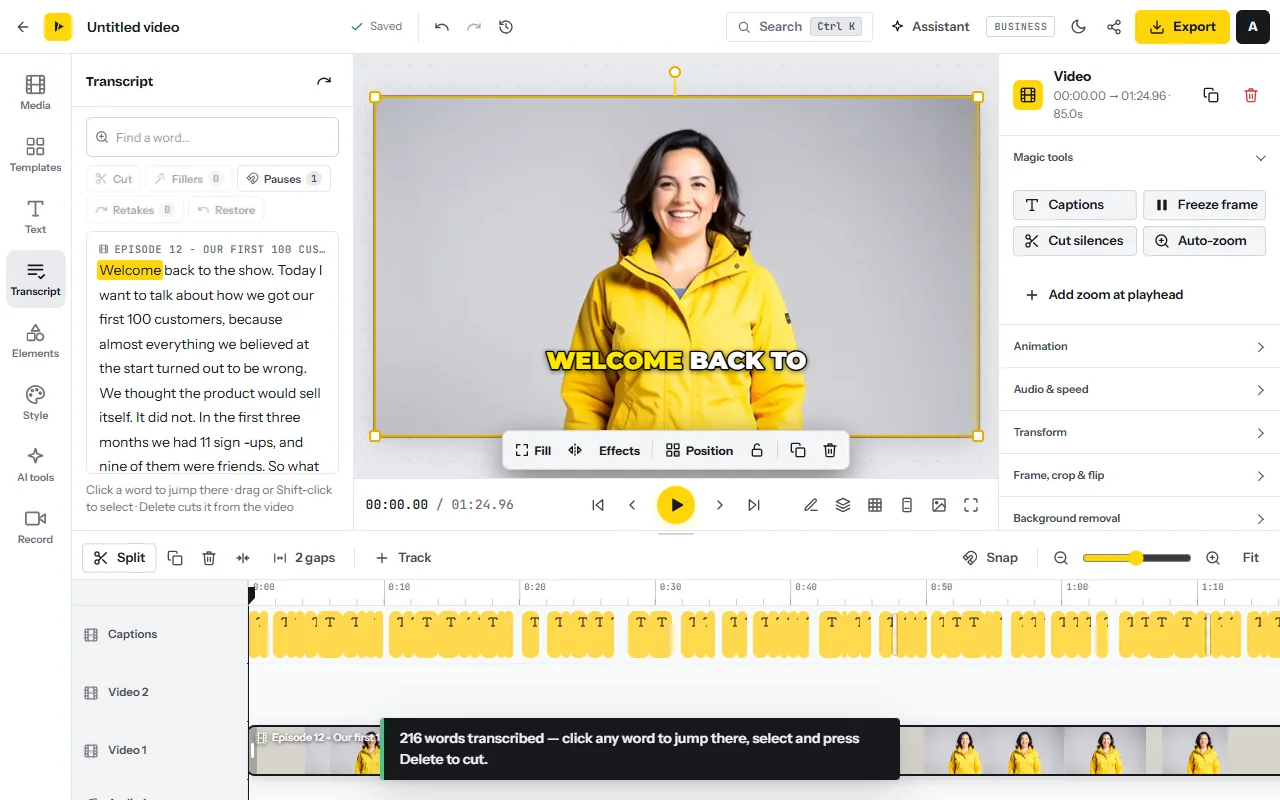
On the lean route, skip the transcript: select the clip and press Cut silences under Magic tools. Remove silence uses no AI time. You give up text editing and the chapters.
Pass 2, the derivatives: clips, reel, feed versions, cards and a second language
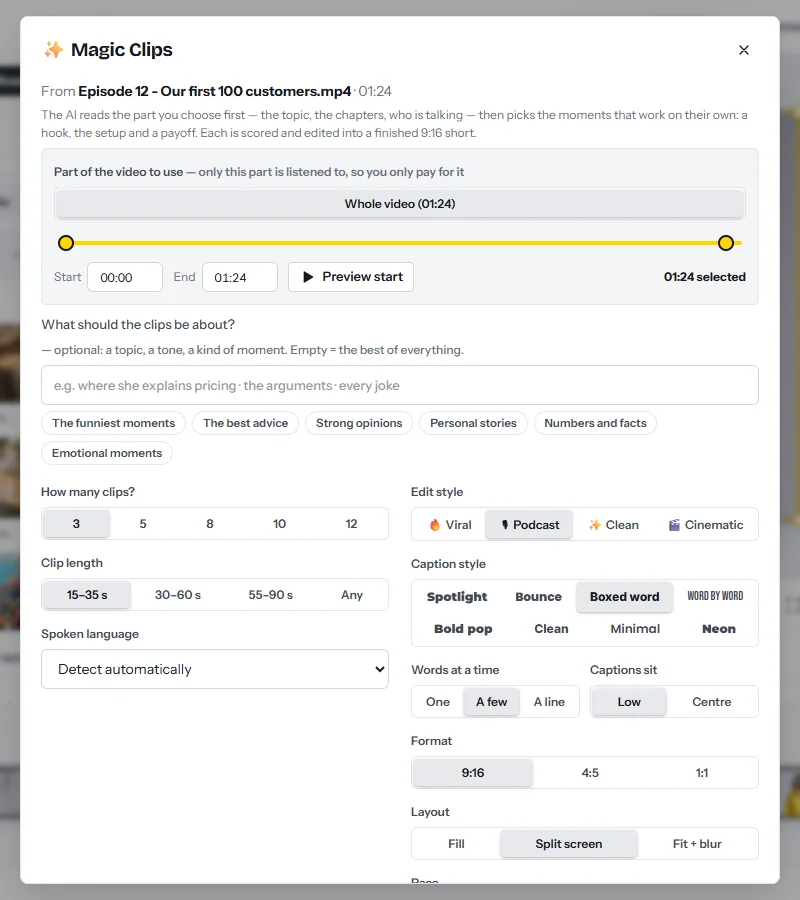
- Open Magic Clips with the exported masterAdd the master MP4 to Magic Clips. A long recording starts on its first 30 minutes, so press Whole video.
- Say what the clips should be aboutIn the box What should the clips be about?, type the words from your notes, for example “where she explains pricing”, or tap a ready request such as The best advice.
- Set count, length, style and shapeChoose 8 under How many clips?, 30–60 s under Clip length, and an Edit style: Viral, Podcast, Clean or Cinematic. Keep Format on 9:16; for slides or a shared screen, set Layout to Fit + blur.
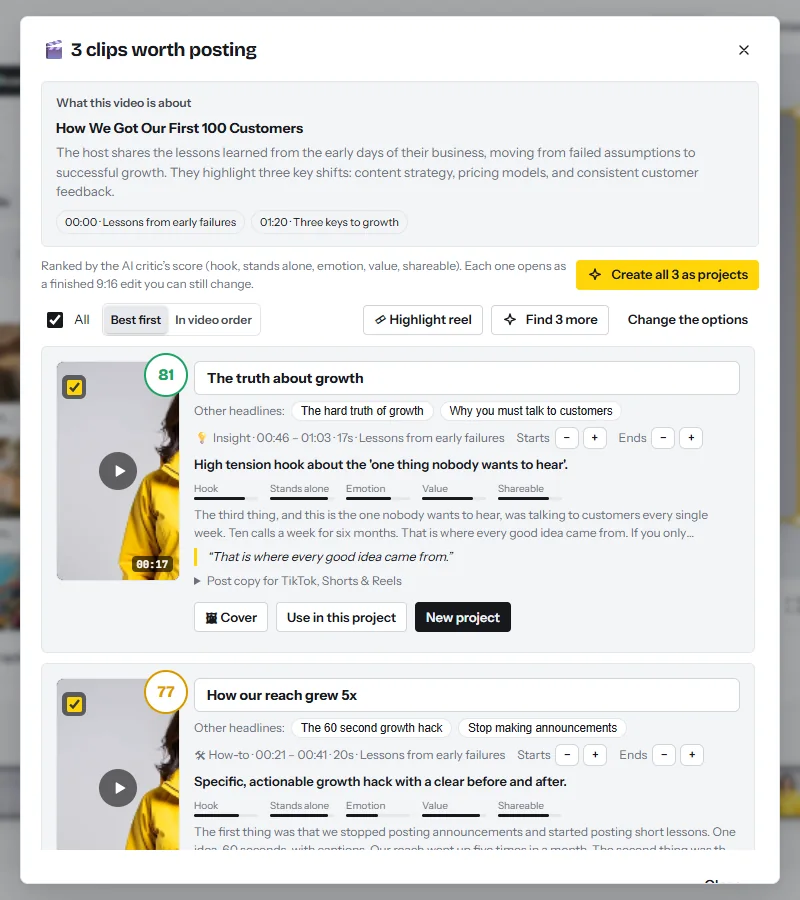
- Find and reviewClick Find the best clips. Each result plays on its card and shows a score. Move a start or an end one sentence at a time with the − and + buttons, and correct the headline.
- Find 3 moreIf fewer than eight are worth posting, click Find 3 more. It uses a little AI time.
- Make the highlight reelLeave the best clips ticked and click Highlight reel: the strongest line of up to six clips is joined into one short and saved as a project.
- Create the projects and coversClick Create all 8 as projects. On the two best cards, click Cover for a 9:16 cover and a 16:9 thumbnail.
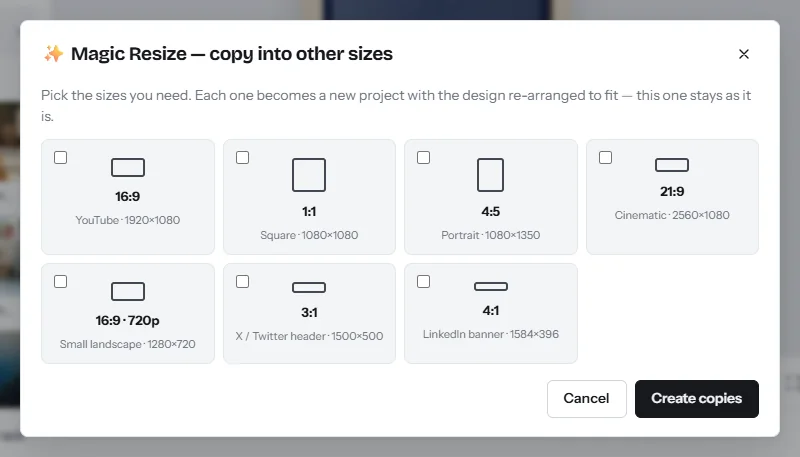
- Make two feed versionsOpen each of the two best clips, press Ctrl+K and choose Copy into other sizes. In Magic Resize, tick 4:5 or 1:1 and click Create copies. If a face is off centre, run Auto reframe videos from Ctrl+K.
- Build the cardsOpen your quote card and paste the line shown in quotation marks on a clip’s card. For the chart card, open Elements, go to Charts and type the numbers or use Paste from a spreadsheet (animated charts). Put the source of the number on the card.
- Make an audiogram of an audio-only momentUse the audio visualizer over your cover art and add auto captions.
- Add a second languageOpen a finished clip, go to the AI tools tab and click Translate the whole video. Tick the language and choose A copy per language: captions and on-screen text are translated and the original stays as it is (Translate video).
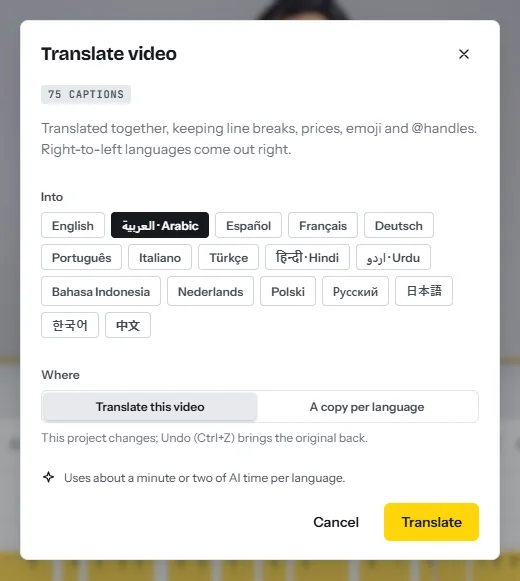
Magic Clips results stay in the browser you used: reopen the dialog on the same video and it offers them again without using AI time. Dubbing voices exist for English, Spanish, French, Chinese, Japanese and Korean only.
Pass 3, packaging: publish kits, bulk export and review
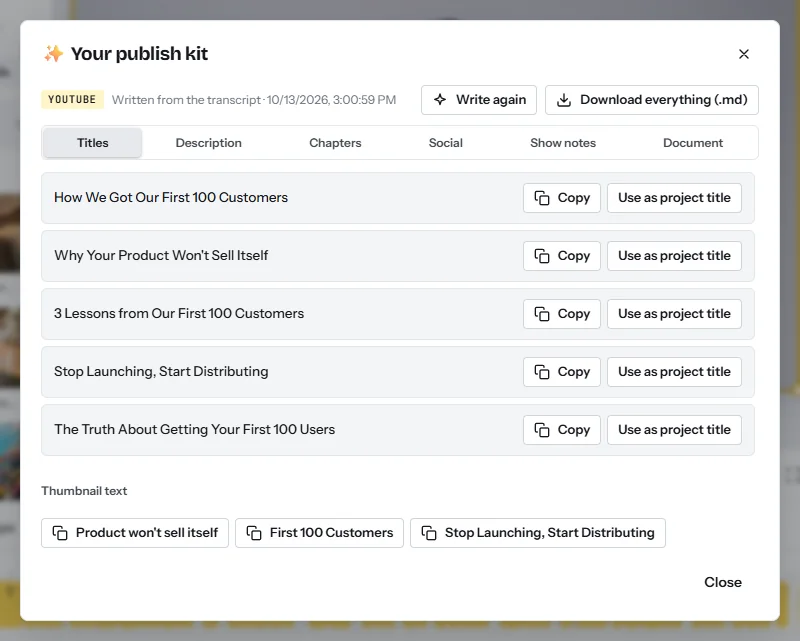
- Write the full publish kit (about 1 AI minute)In the master project, click the share icon next to Export, pick YouTube and click Write the publish kit. The publish kit writes 5 titles, a description with chapters, hashtags, show notes, social posts and thumbnail text.
- Rename and file every projectOn the Projects page, open a card’s menu and click Rename. Then click Select, tick the week’s projects and use Move to put them in the folder.
- Export the whole folderOpen the folder and click Export all. In Export videos, leave Write a publish kit for each Magic Clips short ticked and tick Save each video to my media too if you want share links. Click Export and keep the tab open while the projects render one after another.
- Download one ZIPClick Download all (.zip). Each MP4 arrives with a text file beside it, ending in “publish kit.txt”: titles, the caption with hashtags and a post for each platform. A ZIP holds up to 4 GB.
- Send a review linkOn a finished row, click Share link and send it to the guest or client.
- Upload by handPost each file with the text from its kit, and paste the chapter list into the YouTube description.
Checks before anything leaves the folder
- Names and numbers. Read every caption once; transcription gets these wrong most often.
- Frame. The face is in frame in every shape, and no text sits in the bottom fifth of a vertical clip.
- Translation. A native speaker has read each translated clip.
What not to do: the originality rules that limit reposting
Your own recording, posted as a clean file, is original everywhere. The rules are about other people’s material and files that carry another app’s marks.
- Do not save a clip out of one app to post it in another. TikTok lists content with someone else’s visible watermark or superimposed logo as unoriginal16, and Instagram shows reels with logos or watermarks less often13.
- Do not put the 16:9 master inside a vertical frame. Bars are borders on Instagram’s list13, and only square or vertical uploads are categorized as Shorts5.
- Do not repost someone else’s recording with small changes. Meta said in March 2026 that adding borders, inserting captions or changing the speed of another creator’s post is unoriginal, and that accounts posting mainly such content may be demonetized15. Instagram says stitching clips together or adding a watermark is not a material edit14.
- Do not rely on permission alone. YouTube’s reused-content policy covers content already online that is repurposed without significant commentary or substantive modification, and it applies even with the original creator’s permission12.
- Do not post a quote card as a reel that is mostly text. Text covering most of the picture is on Instagram’s list13. Post cards to the feed.
The measurement sheet: what to record and what each number decides
CutLuma has no social analytics. Keep a spreadsheet with a row per file and fill it from each platform’s analytics seven days after posting.
| Output | What to record | Decision it feeds |
|---|---|---|
| Full video | Views, average view duration, the chapter where most viewers leave | Length and order of the next recording |
| Clips | Views, average watch time, followers gained, the Magic Clips score | The words you type in the request box, and the edit style |
| Feed versions | Impressions and comments | Which topics go to LinkedIn and X |
| Cards and audiogram | Saves and shares | Which card type you keep |
| Translated clips | Views against the same clip in the first language | Add a language, or drop it |
| Every file | Minutes of your work and AI minutes used | Cost per file, and which output to cut first |
After four weeks, compare outputs by followers gained per minute of your work.
A 30-day plan on the Starter plan
| Week | Do | Finished | AI minutes |
|---|---|---|---|
| 1 | Save the brand kit and three designs. Set up the folder, the names and the sheet. Run recording 1 on the lean route. | 16 files, published the week after | 51 |
| 2 | Recording 2, lean route. Type a request based on week 1’s best clip. Fill in the sheet. | 16 files; the first week of numbers | 51 |
| 3 | Recording 3 with transcript editing and the full publish kit, so the full video has chapters. | 16 files; a tighter master | 97 |
| 4 | Recording 4, same route. Read the sheet: cut one output type and double another. | 64 files in the month; a revised output map | 97 |
The month uses about 296 of Starter’s 300 AI minutes, so there is no margin: if a recording runs long, give Magic Clips a shorter part. Translated clips start in month two on Pro. For the business models these files serve, see how to make money with video.
Risks, rules and mistakes
- Private details on screen. A screen recording can show names, emails and prices. Cut those stretches or cover them with the privacy blur.
- Machine errors. Captions, translations and publish text are written by AI. A wrong number in the master is copied into every derivative, so correct it there first.
- Music. YouTube blocks a Short over one minute that carries an active copyright claim5. Use your own audio or the free music in the stock library.
FAQ
What is a video content repurposing system?
A weekly routine that turns one long recording into a planned set of files: the full video, a highlight reel, clips, feed versions, cards, translated copies and their publish text.
How many clips can you get from a 45-minute video?
Magic Clips returns 3, 5, 8, 10 or 12 clips in one run, and Find 3 more adds others.
Can I post the same video on every platform?
Your own clean file is original everywhere, but the limits differ: a Short runs up to three minutes5, reels over three minutes are not recommended to new audiences7, and X accepts 140 seconds without a subscription10.
How much AI time does one week use?
About 51 AI minutes on the lean route and about 105 on the full route. Four full weeks need about 420, inside the $12 Pro plan.
Does CutLuma post or schedule the videos?
No. A bulk export gives you a ZIP with every MP4 and its publish-kit text file, and you upload them yourself.
Can I repurpose someone else’s webinar or podcast?
Only with written permission, and permission does not settle monetization: YouTube’s reused-content policy applies even when the original creator agreed12.
Sources
- HubSpot — 2026 State of Marketing: data from 1,500+ global marketers (updated 10 April 2026)
- Content Marketing Institute — B2B Content and Marketing Trends: Insights for 2026 (1,015 B2B marketers, June to August 2025)
- Wyzowl — Video Marketing Statistics 2026 (266 respondents, late 2025)
- Edison Research at SSRS — The Infinite Dial 2026 (survey of January 2026)
- YouTube Help — Understand three-minute YouTube Shorts (2026)
- TikTok Support — Camera tools: video length (2026)
- Instagram Help Center — Record a reel on Instagram (2026)
- Instagram Help Center — Reel size & aspect ratios on Instagram (2026)
- LinkedIn Help — Video specifications for your LinkedIn Pages and Career Pages
- X Help Center — How to share and watch videos on X (2026)
- Meta Newsroom — Making it Easier to Create Videos on Facebook (17 June 2025)
- YouTube Help — YouTube channel monetization policies: reused content (2026)
- Instagram Help Center — What kind of reels you may see on Instagram (2026)
- Instagram Help Center — About original content on Instagram (2026)
- Meta Newsroom — Rewarding Original Creators on Facebook (13 March 2026)
- TikTok Creator Academy — Understanding TikTok’s Originality Policy (updated 26 September 2026)
- LinkedIn Help — Video sharing troubleshooting: video file requirements
The figures on this page are published ranges and worked examples, not promises of income. What you earn depends on your niche, your skills and how consistently you work. Platform rules and rates change: check the linked sources before you rely on a number.





