- Startup cost
- $6 a month, plus the ad budget
- One batch
- 18 files in about four hours
- AI time used
- About 70 of 300 minutes
- Shortest test
- 7 days (Meta’s guidance)
- Meta reports a 34.5% lower cost per result for 9:16 Reels video ads with audio than for image ads, in 15 split tests run with advertisers1.
- At the 2024–25 median cost per click of $0.70, $140 a week buys about 200 clicks: 11 an ad when 18 ads share it, too few to compare15.
- Meta recommends tests of at least 7 days that change one variable, and says an ad set settles after about 50 results in a week1214.
- Three concepts, three hooks and two shapes make 18 files and use about 70 of the 300 AI minutes in the $6 Starter plan.
What a product video ad has to do, and what the platforms have measured
This is the advertiser’s side: a shop, or a freelancer making its ad files, pays Meta, TikTok or YouTube to show a video. Filming for brands is in how to become a UGC creator; earning commission is in video affiliate marketing.
Each platform measured its own product: read the direction, not the size. Google says “over 20%”.
These are sellers describing their own goods. Meta’s 34.5% comes from 15 split tests by e-commerce, retail and packaged-goods advertisers1. TikTok’s Spark Ads figures (completion +30%, engagement +142%, conversions +43%) sit on a help page updated in March 2026 with no test period10. Meta’s December 2025 press release, as reported by Marketing Dive, credits partnership ads with 19% lower cost per acquisition and 13% higher click-through11.
For an outside yardstick, WordStream’s 2025 benchmark covers 554 US Facebook traffic campaigns from April 2024 to June 2025: a median click-through rate of 1.71% and cost per click of $0.70, and 4.13% and $0.34 for shopping, collectibles and gifts15. A category needed only three campaigns, so treat these as rough.
Video ad specs by placement: shape, size and length
| Placement | Shape | Size the platform lists | Length guidance |
|---|---|---|---|
| Instagram Reels ad | 9:16 | 1440 × 2560 pixels | Up to 15 minutes accepted; no ideal length given2 |
| Facebook Feed video ad | 4:5; 1:1 also supported | 1440 × 1800 pixels | Up to 241 minutes accepted34 |
| TikTok in-feed ad | 9:16; 1:1 and 16:9 accepted | At least 540 × 960; shoot 720p or more | Up to 10 minutes; hook in the first 6 seconds56 |
| YouTube Shorts ad | 9:16 | 1080 × 1920 pixels | 10 to 30 seconds for action ads; under 60 seconds78 |
| YouTube in-stream | 16:9 | 1920 × 1080 pixels | Varies by campaign type8 |
Figures are the platforms’ own, as of October 2026. A 9:16 master covers Reels, Stories, TikTok and Shorts, and a 4:5 copy covers the Facebook feed; add 1:1 or 16:9 only for carousels and in-stream video4. CutLuma exports 9:16 at 1080 × 1920, the size Google recommends8; Meta accepts Reels ads from 250 pixels wide2.
Safe zones, sound and the first seconds
- Top, keep clear14%
- Safe middle51%
- Bottom, keep clear35%
Keep 6% clear on each side too. Hook, price and captions go in the middle band.
Source: Meta Ads Guide, Instagram Reels2
- Meta. Captions are “optional, but recommended” and sound “strongly recommended” for Reels ads, which play with sound on by default12.
- TikTok. Hook in the first 6 seconds, the offer in the first 3, captions or text overlays, and 3 to 5 creatives per ad group6.
- YouTube. Google’s ABCDs (attention, branding, connection, direction): show the product from the start and repeat the on-screen call to action in the voice-over9.
- All three. Every claim readable with the sound off, and spoken for viewers with it on.
What ad creative costs to buy, and what a batch costs to make
| Source | What you get | Price |
|---|---|---|
| Billo, October 2026 | One creator video, two revisions, ad rights; hooks and formats extra | From $9920 |
| Insense, 2026 | One creator video, plus a platform plan from $400 a month | From $10021 |
| Collabstr, 2025 | Average UGC package in 21,000 collaborations | $180 listed, $154 paid22 |
| CutLuma Starter | Unlimited projects, no watermark, 300 AI minutes | $6 a month |
You need five or six product photos, ten phone clips and desktop Chrome, Edge, Brave or Firefox. Starter fits: the batch exceeds the Free plan’s three projects, the AI tools are paid, and an ad should carry no watermark (pricing).
An ad script for 15 and 30 seconds
The sample is for an invented product with no real brand: a bamboo drawer organizer at $29. The 15-second cut is about 40 words, or 220 characters.
| Part | 15-second cut | 30-second cut | Sample line |
|---|---|---|---|
| Hook | 0 to 3 | 0 to 3 | Your kitchen drawer does not have to look like this. |
| Problem | Left out | 3 to 8 | Every morning I dug through this for one teaspoon. |
| Product and demo | 3 to 10 | 8 to 20 | This is the [Brand] organizer. It slides out to fit the drawer, and everything gets a slot. |
| Proof | Left out | 20 to 26 | One line from a real review, used with permission. |
| Offer and call to action | 10 to 15 | 26 to 30 | $29 with free shipping this week. Tap Shop now. |
Write three hooks per concept, because the opening is what you will test: a problem hook (as above), a result hook (“One drawer, two minutes, done”) and an offer hook (“$29 fixes your worst drawer”).
The CutLuma workflow: three ad concepts from one product page
The batch is 3 concepts × 3 hooks × 2 shapes = 18 MP4 files: a photo ad from the product page (A), an offer ad from a template (B) and a demo from phone clips (C). Finish each master in 9:16 first.
- Save the brand kitIn the Style tab open Brand kit, add logo, colours, font and shop address, and click Save brand kit.
- Concept A: paste the product linkIn the AI tools tab choose Make an ad from a product link (Product link to video ad, paid plans), paste the address and click Fetch product. It reads the name, price and photos and drafts a script. Edit Opening line, Benefit 1 to 3, Price and Button text, tick up to six photos and click Build my video. You get a 1080 × 1920 ad of about 13 seconds in your brand colours: hook, three benefits over moving photos, and a price card. If a shop blocks the tool, upload the photos and start from a template.
- Cut out the product photosSelect a photo, choose Remove a photo’s background in AI tools and click what to keep. The background remover is free with an account and saves a transparent PNG.
- Concept B: an offer ad from a templateIn the Templates tab search “sale” and open a design from the sales and business or product launch sets. Swap in the cut-out, then in the Text tab click Price tag or Sale burst under Combos (add text to video).
- Concept C: a demo from phone clipsDrop the clips on the timeline; S splits and Shift+Delete removes a piece and closes the gap. To replace what is behind a product, film it against green and turn on Green screen under Background removal (guide).
- Add voice and musicIn AI tools choose Read a script aloud (AI voiceover) and pick an English or Spanish voice: about 60 AI minutes per 1,000 characters, so 13 for this script. Add a track from Media, Stock library, Music & sounds, select it and turn on Lower under speech.
- Add captions, check the safe zoneIn the Text tab choose Auto captions and a style (auto captions): about one AI minute per minute of speech. Then press Ctrl+K, choose Toggle safe zones and move anything in the top or bottom band.
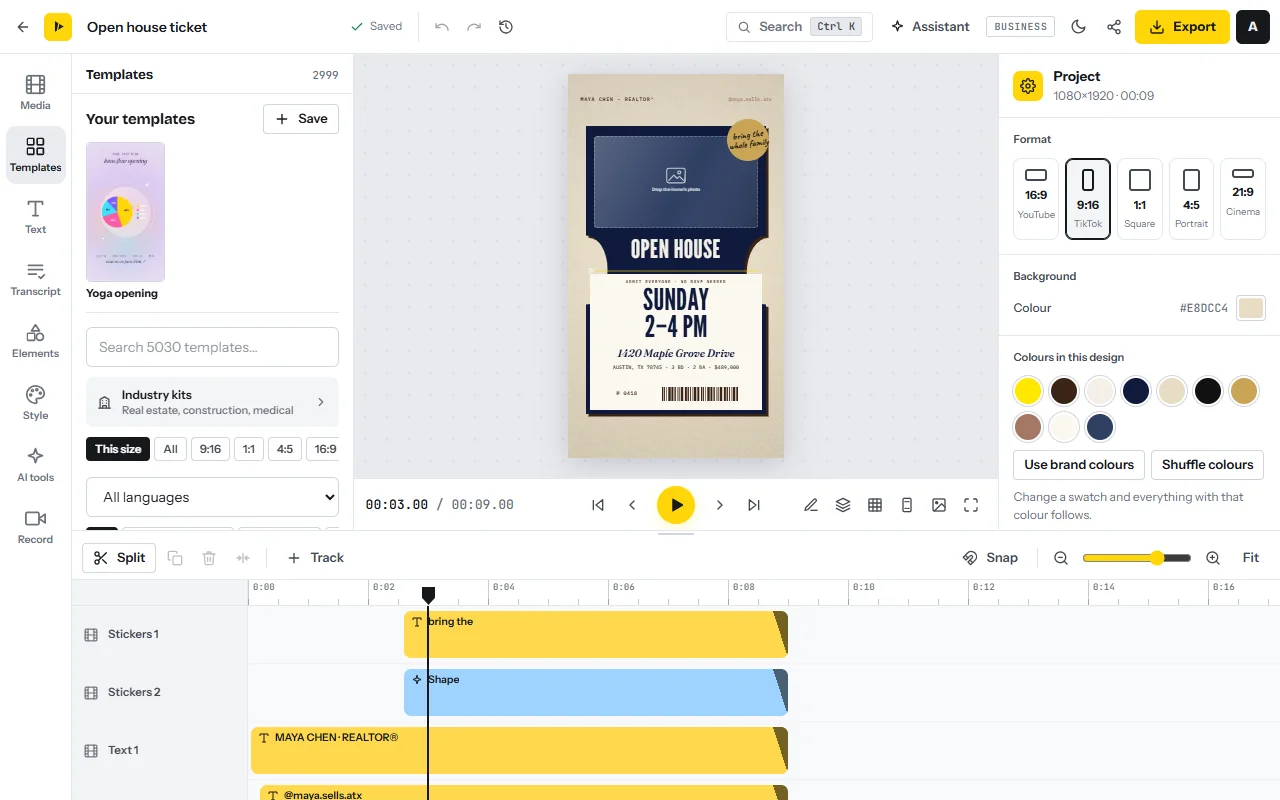
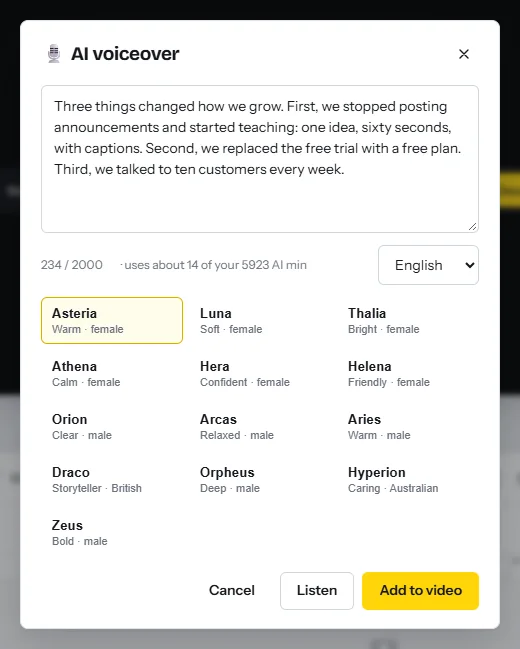
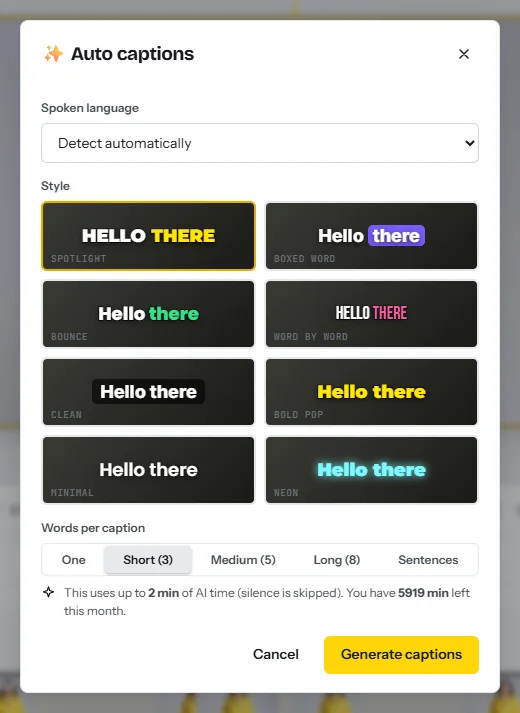
Hook variants, two shapes and one bulk export
- Duplicate each master twiceOn the Projects page click Select, tick the three masters and click Duplicate, twice. Name the copies clearly: organizer_A_hook2.
- Change only the first three secondsReplace the hook text and opening shot, generate the new hook line in the same voice and retype its caption. Everything after second three stays identical.
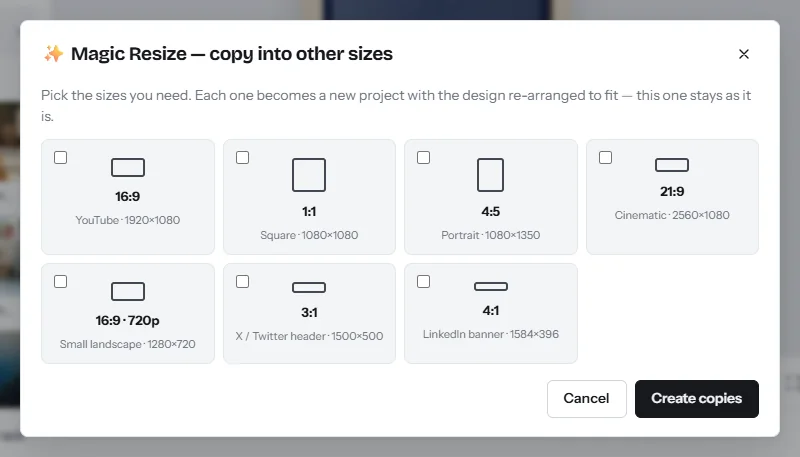
- Copy into 4:5In each of the nine projects press Ctrl+K, choose Copy into other sizes, tick 4:5 and click Create copies (resize video). Check that product and price are in frame in each copy. 1:1 and 16:9 are in the same list.
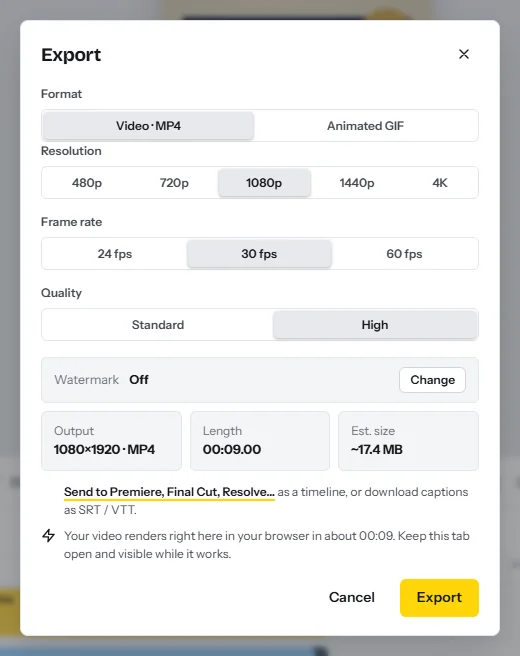
- Export all 18 at onceOn the Projects page click Select, tick the 18 projects and click Export. They render one after another; Download all (.zip) collects them. Paid plans export with no watermark unless you switch one on.
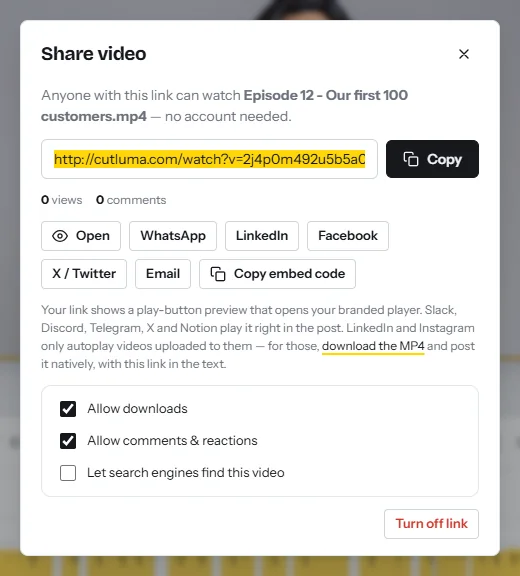
- Send drafts for approvalPress Ctrl+K, choose Watermark: style, position and ending card and pick Proof pattern. Click Export in that project, then Get share link, and turn on Allow comments & reactions.
- Copy for other marketsIn AI tools choose Translate the whole video, then A copy per language (translate video): text and captions in 17 languages, a minute or two of AI time each. See the multilingual video business playbook.
| Task | Time (planning estimate) | AI minutes |
|---|---|---|
| Three masters with voice, music and captions | 2 hours | About 43: three voiceovers of 220 characters, three caption runs |
| Six hook copies | 48 minutes | About 18: six lines of 50 characters |
| Nine 4:5 copies, bulk export, checks | 62 minutes | 0 |
| Total | 3 hours 50 minutes | About 70 of 300: the 61 above plus an allowance for the product-link script |
Before you upload, play each file on a phone with the sound off: the first frame shows the product, and name, price and offer match the landing page.
How to test video ads on a small budget
The mistake is to upload all 18 at once. Example: $20 a day is $140 a week, which at the WordStream medians buys about 200 clicks from about 11,700 impressions15. Shared by 18 ads that is 11 clicks each. A count of n events moves by about twice the square root of n by chance, so 11 clicks can swing by 60%: an ad with 8 clicks and one with 14 cannot be told apart.
With three ads, a difference of a third is probably real; with 18, almost nothing is.
Arithmetic from the WordStream medians15: two divided by the square root of the count
Purchases are rarer still. Meta says an ad set usually settles after about 50 results in a week12; TikTok says volatility starts to decline after about 25 results or 7 days13. Example: at an invented $25 a purchase, 50 purchases cost $1,250 a week. So compare ads on frequent events and confirm the winner on purchases later.
| Round | What varies | What stays the same | Ads and length | Decided by |
|---|---|---|---|---|
| 1 | Concepts A, B and C, each with hook 1 | Audience, budget, landing page, offer | 3 ads, 7 days | Link click-through rate, then cost per result |
| 2 | Hooks 1, 2 and 3 on the winning concept | Everything after second three | 3 ads, 7 days | Hook rate, then link click-through rate |
| 3 | The winner against one new concept | As in round 1 | 2 ads, 7 days or more | Cost per purchase |
- One variable, 7 days, no edits. Meta says results are more conclusive when versions differ in one variable only, and recommends at least 7 days14. Editing an ad during the learning phase resets it12.
- Shape is not a test. Upload the 9:16 and 4:5 files as versions of one ad4.
- Write the rule first. For example: “a winner needs a third more link clicks, with at least 60 each.” If nothing clears it, keep both. The other 12 files are round 2 and your reserve.
The results sheet: what to record and how to read it
| Metric | How it is defined | How to read it |
|---|---|---|
| Hook rate (thumb-stop) | Industry convention, not a platform metric: 3-second video plays ÷ impressions on Meta, 2-second video views ÷ impressions on TikTok1618 | Compares openings, between hooks of one concept |
| Hold rate | Also a convention: ThruPlays ÷ 3-second plays. Meta counts a ThruPlay at completion or 15 seconds16; TikTok reports 6-second views18 | High hook, low hold: the opening promises what the body does not show |
| Link click-through rate | Meta: link clicks divided by impressions17 | Yardstick: the 1.71% median15 |
| Cost per result | Amount spent ÷ results, a result being the event the campaign optimizes for; Meta frames test hypotheses in it14 | Decides, once the count is large enough |
Selling ad creative packs to shops as a freelancer
Marketplaces sell one creator video from $99 or $100, and the average UGC job on Collabstr paid $154 in 2025202122. Those include a person filming, so an edit-only pack should cost less per file.
| Pack | What is in it | Example price | Basis |
|---|---|---|---|
| Test pack | 1 concept, 3 hooks, 2 shapes (6 files), one revision round | $150 | One marketplace video at $154 paid22 |
| Full batch | 3 concepts × 3 hooks × 2 shapes (18 files) | $390 | Under four videos at $9920 |
| Monthly refresh | 6 new hooks on the winner, both shapes (12 files) | $240 a month | Example |
| Extra language | A translated copy of each file | $8 a file | Example |
Example: $390 for five hours of work is $78 an hour before tax. Agree in writing who supplies claims and proof, and that you sell files, not results. For retainers see how to start a social media video agency.
A 30-day plan
| Week | Work | Output |
|---|---|---|
| 1 | Collect photos, ten clips and three reviews with permission. Write three concepts with three hooks each. | Scripts and material |
| 2 | Build the 18 files. Run round 1: three concepts, 7 days. | 18 MP4s, test 1 running |
| 3 | Fill in the sheet. Run round 2: three hooks on the winning concept, 7 days. | A winning concept, test 2 running |
| 4 | Read round 2, keep the winner running and build six new hooks from what won. | A winner, six reserve files |
Risks, rules and mistakes
This is general information, not legal advice. In the United States the FTC says an advertiser needs a “reasonable basis”, meaning objective evidence, before an ad runs; health or safety claims need competent and reliable scientific evidence; and a customer’s endorsement must reflect the typical experience25. A rule announced in August 2024 prohibits creating or selling fake reviews and testimonials26.
- Before and after, and superlatives. TikTok does not allow product-effect comparisons such as before-and-after results, or absolute terms such as “number 1”24. Meta requires ads for dietary, health and weight-loss products to target adults, and bars promises of specific outcomes within a set time frame without qualifiers23. Keep the editor’s Before / After combo for drawers and rooms.
- Music. A business cannot use TikTok’s general music library; its Commercial Music Library holds 1 million pre-cleared songs28, and Meta offers free audio in its Sound Collection1. For one file that runs everywhere, use the public-domain and CC0 tracks in CutLuma’s stock library.
- Customer content. A customer’s review, photo or clip is theirs: ask in writing first, or collect clips with a video testimonials link.
- Creative fatigue. Meta shows “Creative fatigue” when an ad’s cost per result reaches twice that of your past ads, and suggests a new, materially different ad19: your reserve files.
FAQ
What size should a product video ad be?
9:16 at 1080 × 1920 covers Reels, Stories, TikTok and Shorts, and a 4:5 copy covers the Facebook feed. Meta lists 1440 × 2560 and 1440 × 1800; Google recommends 1080 × 1920238.
How long should a product video ad be?
Google recommends 10 to 30 seconds for action ads on Shorts7. Meta and TikTok name no ideal length; TikTok wants the hook in the first 6 seconds256.
How many ads should I test at once, and for how long?
TikTok suggests 3 to 5 creatives per ad group, and Meta recommends tests of at least 7 days614. On $140 a week, test three, and do not edit them meanwhile12.
What is a good hook rate?
No platform publishes one. Hook rate is an industry convention, usually 3-second video plays divided by impressions; Meta Ads Manager lists the counts under Columns, Video engagement16. Compare with your own earlier ads.
Can I use before-and-after shots in an ad?
Not on TikTok for product effects24. Meta bars promises of outcomes within a set time frame without qualifiers in health and weight-loss ads23.
Can I make a product video ad without filming?
Yes. On a paid plan, from $6 a month, CutLuma’s product-link tool reads the name, price and photos from a product page and builds an editable vertical ad of about 13 seconds.
Sources
- Meta for Business — Reels ads: results and FAQ sources (meta-analysis of 15 split tests)
- Meta Ads Guide — Instagram Reels video ad: specs and safe zones
- Meta Ads Guide — Facebook Feed video ad: specs
- Meta Business Help Center — Best practices for aspect ratios
- TikTok Business Help Center — Video ads specifications (updated June 2026)
- TikTok Business Help Center — Creative best practices for performance ads (updated June 2025)
- Google Ads Help — YouTube Shorts ads: Asset specs and best practices
- Google Ads Help — About video ad specs
- Google Ads Help — About the ABCDs of effective video ads
- TikTok Business Help Center — Spark Ads in Video Shopping Ads: increase in ad performance (updated March 2026)
- Marketing Dive — Meta streamlines brands’ creator partnerships: partnership ads data from Meta’s press release (December 2025)
- Meta Business Help Center — About the learning phase
- TikTok Business Help Center — About Learning Phase (updated June 2026)
- Meta Business Help Center — Best practices for A/B testing
- WordStream — Facebook Ads Benchmarks 2025 (554 US traffic campaigns, April 2024 to June 2025, medians)
- Meta Business Help Center — About video ad metrics
- Meta Business Help Center — CTR (link click-through rate)
- TikTok Business Help Center — Video play metrics (updated November 2025)
- Meta Business Help Center — About creative fatigue recommendations in Meta Ads Manager
- Billo — How Billo pricing works: what you pay for UGC videos (prices as of October 2026)
- Insense — Pricing and pricing FAQ (2026)
- Collabstr — Annual Influencer Marketing Report 2026 (2025 marketplace data, 21,000 collaborations)
- Meta Transparency Centre — Advertising standards: Health and wellness
- TikTok Advertising Policies — Misleading and false content (updated April 2026)
- US Federal Trade Commission — Advertising FAQ’s: A Guide for Small Business
- US Federal Trade Commission — Final Rule Banning Fake Reviews and Testimonials (August 2024)
- US Code of Federal Regulations — 16 CFR 233.1, Former price comparisons (FTC Guides Against Deceptive Pricing)
- TikTok Business Help Center — About the Commercial Music Library (updated July 2025)
The figures on this page are published ranges and worked examples, not promises of income. What you earn depends on your niche, your skills and how consistently you work. Platform rules and rates change: check the linked sources before you rely on a number.





